Google could be developing an easier way to activate Gemini Live, eliminating the need to open the app.
According to a rumour, Google is creating a new gesture-based technique for activating the Gemini Live AI voice assistant for Android. This upgrade is expected to improve the AI feature’s accessibility. Currently, users can only access Gemini Live through the Gemini application. However, this new gesture-based trigger may give a more convenient approach to start voice chats with the AI chatbot. This discovery comes as Google continues to look for methods to improve the uptake and usefulness of its AI technologies. Currently, Android users can activate Google Assistant using voice commands, long-pressing the power button, or on-screen shortcuts.
Google developing a new way to enable Gemini Live on Android makes the Gemini app presently supports two-way voice conversations. According to a source, the Mountain View-based tech giant is working on a new gesture-based trigger for the artificial intelligence (AI) capability. This move could be intended to increase tool use while also providing a direct means to commence voice interactions with the chatbot.
According to an Android Authority article, the new Gemini Live activation adjustment was introduced in Google app version 16.2.39. It is not yet available in the current version, but the publication discovered it during an Android application package (APK) breakdown procedure. This implies that users will not be able to test out the shortcut until it is released.
Also Android Authority advises that, Google app version 16.2.39 contains an unexpected feature relating to Gemini Live activation. The feature, discovered during an Android application package (APK) breakdown, is not yet operational in the public version of the app, so users will have to wait until it is officially released to test the new capabilities.
The update apparently substitutes the diagonal swipe gesture, which previously triggered the Google Assistant, with Gemini Live provided Gemini is selected as the device’s default assistant.
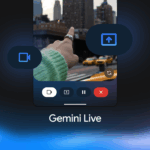
The article also includes a demonstration of the diagonal swipe gesture, which launches the real-time AI voice interaction interface in full-screen mode. This will allow users to begin communicating with Gemini instantly.
Currently, Android users have numerous options for activating the on-device virtual assistant. It can be activated with the phrases Hey Google or OK Google. It may also be activated by long-pressing the power button, touching the microphone symbol in the Google Search widget, selecting a home screen shortcut icon, or swiping diagonally from either bottom corner.
Google is apparently modifying the diagonal swipe approach to activate Gemini Live instead of the virtual assistant. Notably, this is supposed to work only when Gemini is set as the device’s default assistant. According to a video published by the newspaper, the gesture opens the real-time AI voice interaction interface in full screen mode. Following that, users are apparently able to communicate directly with Gemini.
The Gemini Live interface also features a disconnect option at the bottom. Tapping the disconnect button at the bottom of the Gemini Live interface apparently redirects by taking the user to the full-screen Gemini app, which also opens in full-screen mode. Tapping the back button or performing the back motion again or gesture sends is said to return the user to the home screen.
Google has not formally disclosed this update and modification, so it is unknown when it will become available to all users. Furthermore, it is possible that the developers were simply testing the feature and did not intend to disclose it to the public.
Google’s continued attempts to improve accessibility and increase use of its cutting-edge AI products. Stay tuned for official updates, as this invention has the potential to alter how we interact with AI on Android devices.
We use cookies to ensure that we give you the best experience on our website. If you continue to use this site we will assume that you are happy with it.