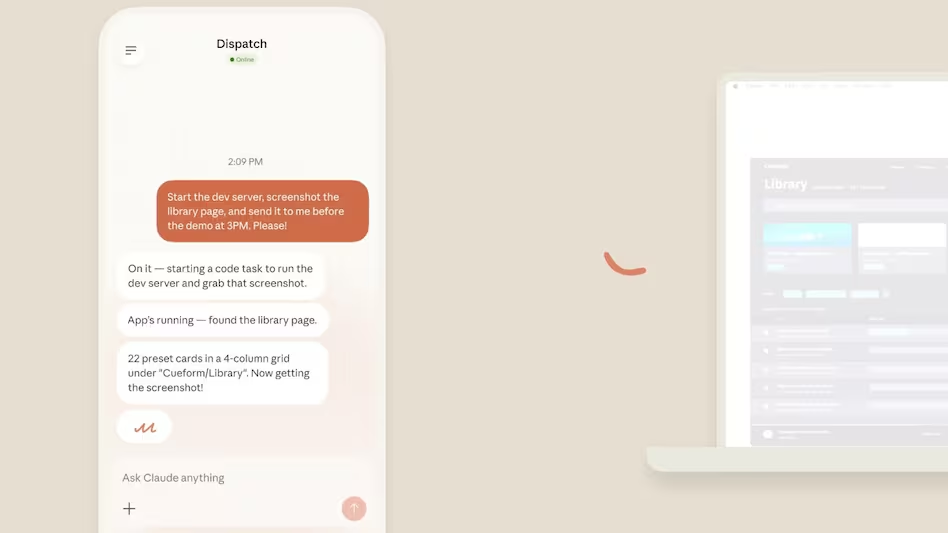
Claude received a new artificial intelligence (AI) function from Anthropic on Monday. The feature, which is a component of the AI platform’s Computer Use capability, enables the chatbot to operate the user’s computer and carry out tasks on its own. This means that it is to enable the AI to carry out activities on your computer on its own.
Currently, and through the updates that are accessible through its Claude Code or Claude Cowork tools and functions, the capacity is offered as a research preview. Using a dedicated virtual keyboard and mouse, as well as the capacity to read screen content through screenshots, the functionality employs agentic AI to work with both connected and traditional apps.
This capability, which is currently available in a research preview for macOS Pro and Max subscribers, allows Claude to interact with your desktop environment by clicking, typing, and browsing apps much like a human would.
The fresh new feature was revealed via Claude’s official account on X, formerly known as Twitter. According to the business, Claude may now work independently on PCs. The functionality might be seen as an extension of the newly launched Claude Dispatch feature, which allows users to remotely operate Claude on their computers, even though the specifics were not disclosed.
The Computer Use feature, which is currently accessible as a research preview with Claude Code and Claude Cowork, allows desktop automation through linked and legacy apps, screen reading through screenshots, and virtual mouse and keyboard interaction with desktop environments.
Opening programs, browsing browsers, and using productivity tools like spreadsheets, papers, and more are some of the use cases for the capability that have been mentioned. According to the business, Claude will first attempt to finish the task utilizing linked platforms like Slack and calendar. It will request the user’s consent to launch a legacy app directly on the screen if there are no associated apps for the job.
The feature will be helpful when used with Dispatch, according to Felix Rieseberg, Member of Technical Staff at Anthropic, since it will enable Claude to perform complex activities on its own in addition to allowing a user to operate it from a mobile device or a PC. But he also cautions that Claude’s computer use will be slower than that of a modern person due to the early adoption of this new technology. The capability should be able to expand in scope and speed in subsequent iterations.
Claude now executes actions directly on your system, including desktop navigation (clicking, typing, scrolling), file and browser access, automated workflows like organizing folders or populating spreadsheets, and remote control via Dispatch to trigger tasks from your smartphone.
Claude completes tasks using a three-tier hierarchy: it first taps direct integrations like Google Workspace or Slack, then uses a browser to navigate tools if needed, and finally resorts to direct screen control, visually interpreting screenshots to manipulate the mouse and keyboard.
Since Claude operates directly on the desktop, Anthropic added guardrails: a permission-first approach requiring approval for each new app, blocklists to prevent interaction with specific apps, restrictions on high-risk actions like fund transfers, and input monitoring to detect prompt injection attacks.
As an early research preview, the feature is currently also limited to macOS-only (Windows support planned), operates slower than API-based interactions, and struggles with complex multi-step tasks that may need multiple attempts. The computer must remain awake with the Claude desktop app open.
We use cookies to ensure that we give you the best experience on our website. If you continue to use this site we will assume that you are happy with it.