Google is finally giving Chrome one of its most requested features—and it says a lot about where the browser is headed.
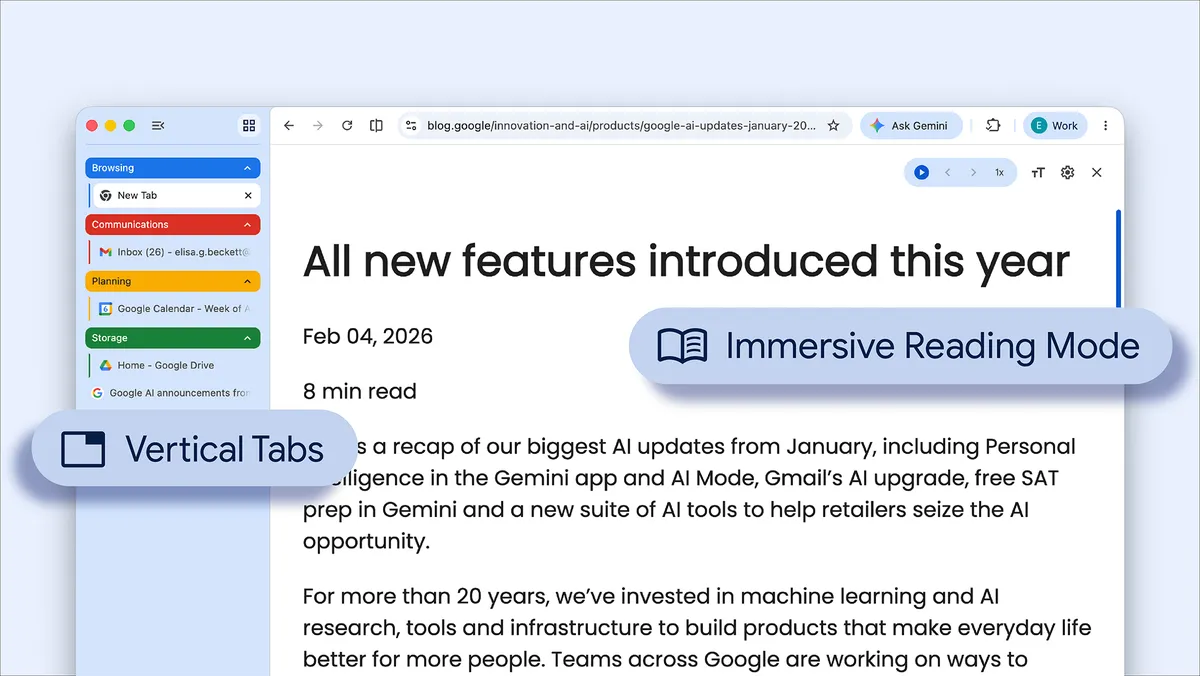
With its latest update, Chrome now supports vertical tabs, letting users move their tabs from the traditional horizontal strip at the top of the browser into a sidebar. It’s a small visual change, but for anyone juggling dozens of tabs, it fundamentally changes how the browser feels.
Instead of shrinking tabs into unreadable favicons, vertical tabs make them easier to scan, organize, and manage especially on larger screens. It’s the kind of feature that power users have relied on in browsers like Edge and Firefox for years. Now, Google is bringing it to the mainstream.
And it doesn’t stop there.
Chrome is also getting Split View, allowing users to place two tabs side-by-side in a single window. Combined with vertical tabs, it starts to feel less like browsing and more like working comparing documents, referencing sources, or multitasking without constantly switching contexts.
Google is also adding built-in PDF editing tools, letting users highlight, annotate, and interact with documents directly in the browser. No extra apps, no downloads just open and work.
Then there’s tighter integration with Google Drive, including the ability to save files directly into the cloud without the usual download-and-upload loop.
Taken individually, these are useful features.
Taken together, they point to something bigger.
Chrome is no longer just a browser, it’s becoming a workspace.
That shift has been happening quietly for years. As more software moved to the web, Chrome became the place where people write, communicate, analyse data, and run entire businesses. Now, Google is leaning into that reality by building productivity features directly into the browser itself.
And the timing isn’t accidental.
New AI-first browsers are trying to redefine how we interact with the web, adding assistants, automation, and agents into the browsing experience. Google’s response, at least for now, isn’t to reinvent the browser—but to make Chrome more capable, more integrated, and harder to replace.
Because if Chrome becomes the place where work happens, not just where websites load, then it doesn’t just compete with other browsers.
Paul Balo is the founder of TechBooky and a highly skilled wireless communications professional with a strong background in cloud computing, offering extensive experience in designing, implementing, and managing wireless communication systems.
We use cookies to ensure that we give you the best experience on our website. If you continue to use this site we will assume that you are happy with it.