Google is rolling out a new update to Chrome’s AI Mode that’s designed to make juggling tabs less painful and more contextual. The features, launching first for users in the US, help the built-in chatbot understand and work with whatever you already have open in your browser.
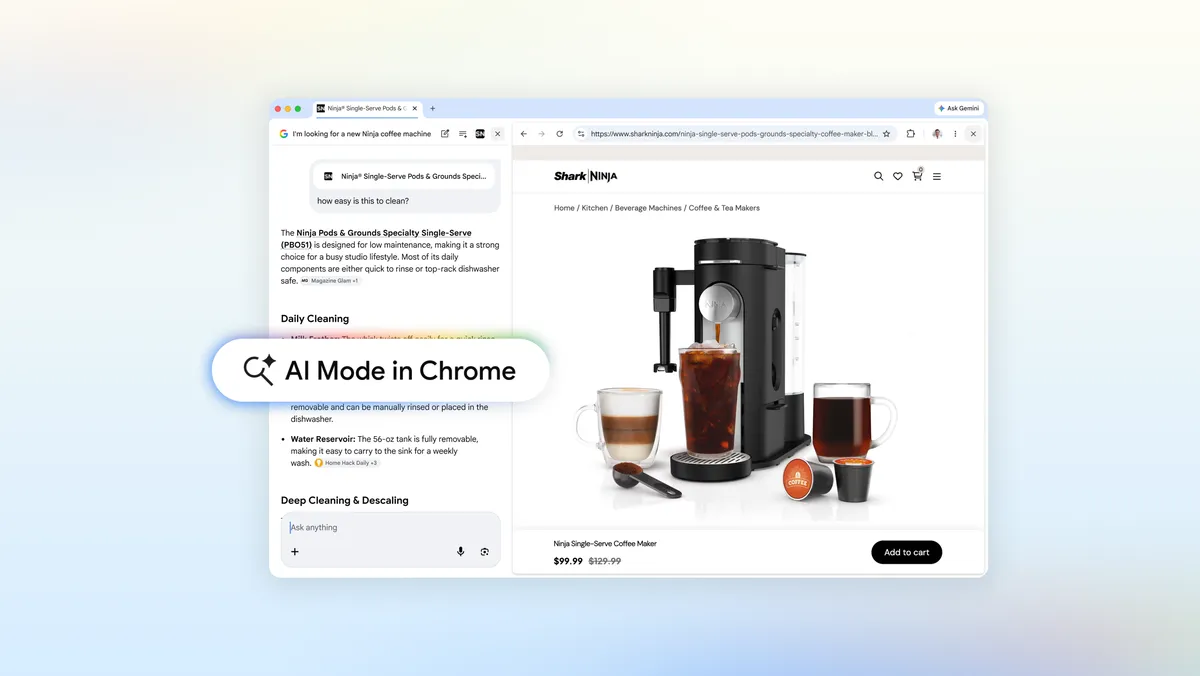
AI Mode in Chrome for desktop will now open a side-by-side view when you click a link from the chatbot. Instead of shuttling between a chat window and a full-page website, you’ll see the webpage and the AI panel together. Google says that connection lets AI Mode keep track of the search that led you there, and use that context while you keep browsing.
In practice, this means you can ask follow-up questions without carefully repeating product names or page details. One example Google gives is shopping for a coffee maker. After AI Mode finds a few models, you can click through to a manufacturer’s page and then ask things like “How easy is this to clean?” without naming the specific machine again. The expanded context window allows the chatbot to understand what you’re referring to based on the page and prior results.
The update goes beyond links surfaced directly by AI Mode. If you already have one tab or a whole set of tabs open and want the chatbot to factor those into a new query, you can now do that from Chrome’s updated Plus menu. Google has added a new option there that tells AI Mode to look at your existing tab or tab group as part of its response.
From the same Plus menu, you can also ask AI Mode to consider other types of content alongside your tabs, including images and PDFs. That effectively turns the chatbot into a single place where you can reference what you’re reading, what you’ve saved and files you’re reviewing, instead of copying text or constantly switching views.
Google says that in its own testing, this tighter integration with tabs led to less tab switching and made it easier for people to stay focused. With the AI panel anchored next to the webpage and aware of surrounding context, users didn’t have to bounce around as much to get answers or run comparisons.
Mike Torres, vice president of product for Chrome, frames the change as part of a broader effort to bring practical AI features directly into the browser. Rather than treating AI Mode as a detached chatbot, these updates aim to blend it into everyday browsing tasks like research, shopping and document review.
The new tab-aware capabilities are available now to Chrome users in the US, with Google planning to bring the update to more regions. The company has not shared specific international timelines, but says the features will be coming to “more places around the world” soon.
We use cookies to ensure that we give you the best experience on our website. If you continue to use this site we will assume that you are happy with it.