• AI Search
  • Cryptocurrency
  • Earnings
  • Enterprise
  • About TechBooky
  • Submit Article
  • Advertise Here
  • Contact Us
TechBooky
  • African
  • AI
  • Metaverse
  • Gadgets
Generic selectors
Exact matches only
Search in title
Search in content
Post Type Selectors
Search in posts
Search in pages
  • African
  • AI
  • Metaverse
  • Gadgets
Generic selectors
Exact matches only
Search in title
Search in content
Post Type Selectors
Search in posts
Search in pages
TechBooky
Generic selectors
Exact matches only
Search in title
Search in content
Post Type Selectors
Search in posts
Search in pages
Home Service news

First Homescreen Update in Testing for Google TV

Akinola Ajibola by Akinola Ajibola
September 20, 2025
in Service news
Share on FacebookShare on Twitter

Since its launch in 2020, Google TV’s homescreen has remained virtually unaltered. Even in the competitive smart TV market as Google TV has not been doing well, although the company is currently testing a minor update that modifies the navigation.

Google also appears to be reconsidering several aspects of the TV platform, beginning with a possible redesign of the home screen look, given the platform’s comparatively low uptake in the US and advertisers’ preference for YouTube.

The homescreen takes up the majority of your interactions with Google TV, which has caused changes over time to feel a little stale. Early in 2024 saw the most recent significant update, which essentially consisted of switching to circular iconography. However, we are now receiving an update on the experience at last.

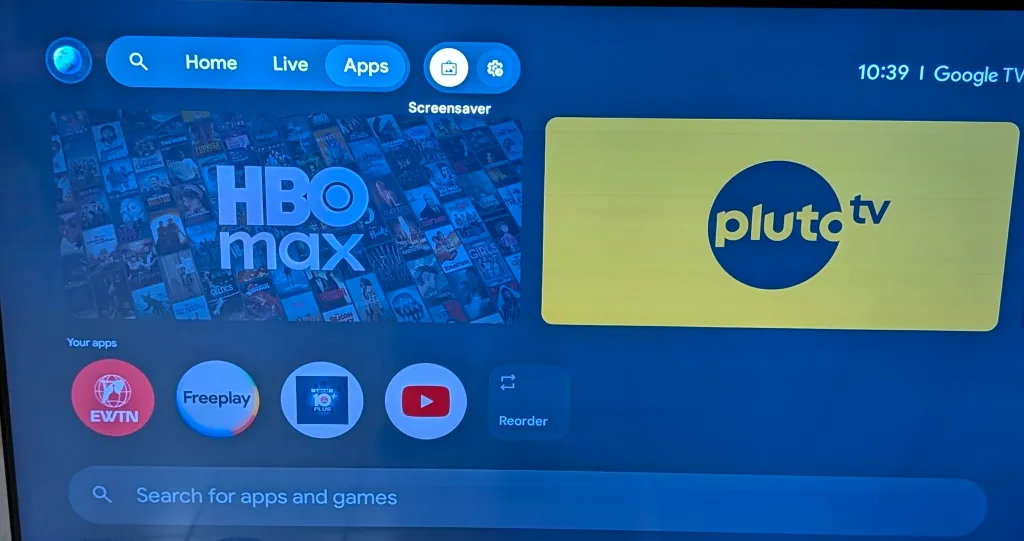
This minor makeover mainly impacts Google TV’s top navigation bar and occurs as a server-side upgrade on top of Google TV Home v1.0.806977084.

The “For You” tab is changed to only “Home” and the “Library” tab is eliminated. Next, a search button and the “Live” and “Apps” tabs show up in a pill-shaped box. The screensaver and settings buttons show up in a second box.

Another significant change is the addition of a dropdown menu with a profile switcher and four buttons (Watchlist, Library, Your services, and Content preferences) to the profile image on the far left side of the screen. In the past, “Your services” and “Content preferences” were limited to the Accounts & Profiles section of the Settings menu. The move should make it easier to reach the final two, which were previously hidden in Settings.

While by no means a revolutionary revamp, this is the first significant update to Google TV in the previous five years.

Since there haven’t been many reports of this redesign being made available to Google TV customers thus far, it’s probable that Google is testing the update in a small-scale setting before launching it widely.

It is advisable to try it out if you’re lucky enough to observe it. Naturally, we suggest looking into third-party launchers if you’re sick of waiting for Google and want something new. These launchers not only alter the appearance and feel of Google TV, but they also remove annoying features like advertisements and the likes which discourage users generally.

After trying Projectivity Launcher out recently, it was discovered that it provides an experience that significantly improves the smart TV experience. It is simple to use, quick, and clean. In order to provide an experience that concentrates on your content, it also eliminates advertisements from your homescreen.

Related Posts:

  • Google_new_logo_1747116336209_1747116347992
    Google Changes Its "G" Logo Colours In First Major Change
  • Google-Search-AI-Mode-cover-1
    Google Search’s AI Mode Coming to Android Tablets
  • chromecast_edited_1765839714
    Apple TV App Update Enables Google Cast on Android
  • hero-image.fill.size_1248x702.v1731585358
    Google's Gemini AI App May Soon Get An Update
  • 1934304-google-rolls-out-advanced-smart-home-features-in-gemini-app-update
    Gemini Extensions for Google Home Are Available to All Users
  • 47695-93183-chrome-100-macos-icon-xl
    Google Will Enable Its Cookie-Replacing Tools For Developers
  • Gemini_Live
    Android Tests Gemini Live Gesture Shortcut
  • material-you-google-account-switcher-before-after
    Android's Google Account Switcher Gets a Fullscreen…

Discover more from TechBooky

Subscribe to get the latest posts sent to your email.

Tags: googlegoogle tvGoogle TV homescreen
Akinola Ajibola

Akinola Ajibola

BROWSE BY CATEGORIES

Receive top tech news directly in your inbox

subscription from
Loading

Freshly Squeezed

  • Apple Adds Claude and OpenAI Codex to Xcode for Agentic Coding February 4, 2026
  • Vercel Rebuilds v0 to Take AI Apps From Prototype to Production February 4, 2026
  • Microsoft Reveals First Xbox Game Pass Additions for Feb 2026 February 3, 2026
  • GoCab Raises $45m Seed Round After Hitting $17m ARR February 3, 2026
  • SpaceX Acquires xAI in $1.25T AI and Space Consolidation February 3, 2026
  • OpenAI Moves Beyond Nvidia Chips in AI Arms Race February 3, 2026
  • SpaceX Acquires xAI in Major Strategic Move February 2, 2026
  • UK Launches Fuel Finder API for Petrol Station Prices February 2, 2026
  • France Signals Possible VPN Restrictions Amid Under-15 Social Media Ban February 2, 2026
  • Samsung Galaxy Unpacked 2026: What to Expect From the Galaxy S26 February 2, 2026
  • OpenAI Launches Standalone Codex App for macOS February 2, 2026
  • Uber exits Tanzania after Years of Regulatory Tension February 2, 2026

Browse Archives

February 2026
MTWTFSS
 1
2345678
9101112131415
16171819202122
232425262728 
« Jan    

Quick Links

  • About TechBooky
  • Advertise Here
  • Contact us
  • Submit Article
  • Privacy Policy
Generic selectors
Exact matches only
Search in title
Search in content
Post Type Selectors
Search in posts
Search in pages
  • African
  • Artificial Intelligence
  • Gadgets
  • Metaverse
  • Tips
  • AI Search
  • About TechBooky
  • Advertise Here
  • Submit Article
  • Contact us

© 2025 Designed By TechBooky Elite

Discover more from TechBooky

Subscribe now to keep reading and get access to the full archive.

Continue reading

We use cookies to ensure that we give you the best experience on our website. If you continue to use this site we will assume that you are happy with it.