Google is rolling out new tools that make it easier for people using ChatGPT and other chatbots to move their conversations and personal context into Gemini.
The company has introduced what it calls “switching tools,” designed to transfer entire chat histories and structured personal details what Google refers to as “memories” directly into a Gemini account. The aim is to avoid the cold start problem of a brand-new AI assistant and let users pick up with Gemini where they left off elsewhere.
Chat logs: Users are encouraged to upload full conversation histories from other chatbots, typically via a ZIP file export.
Memories: Individual profile details such as personal preferences, relationships, and background context.
Once imported, Google says Gemini will be able to understand key facts users have previously shared with other apps, including interests, details about family members like a sibling’s name, and information such as where someone grew up. The idea is that users don’t need to re-teach Gemini their basic life context.
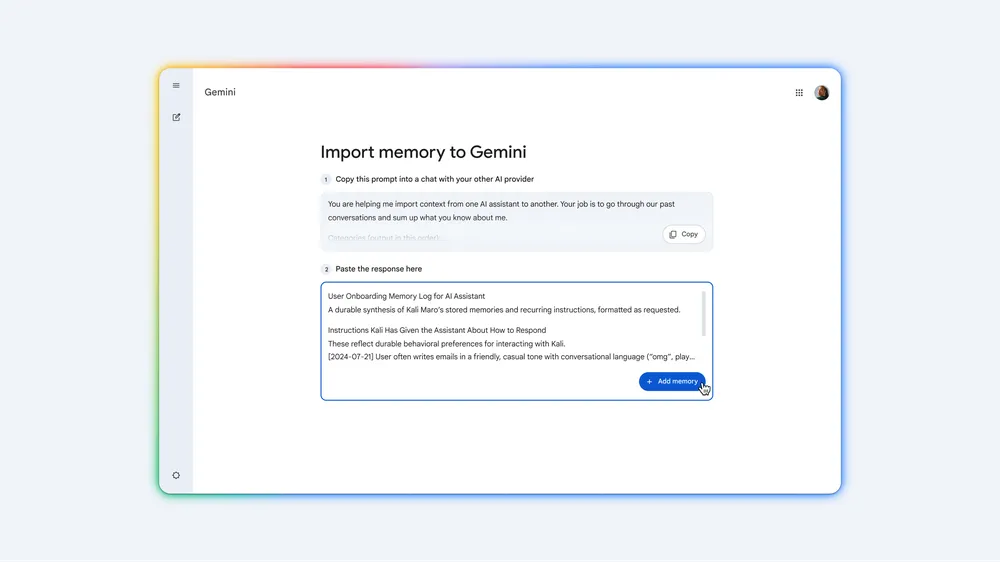
Gemini does more than accept a raw data dump. It can use knowledge from an existing chatbot to help structure what it calls “memory.” Rather than leaving users to comb through years of conversation manually, Gemini offers tailored prompts that people can paste into their current chatbot. That chatbot then generates a concise summary of important personal details, which users can move back into Gemini as a memory entry.
The process, as described, involves steps such as:
Copying a Gemini-generated prompt.
Pasting it into the existing chatbot of choice (for example, a competing AI assistant) to produce a personal summary.
Copying that summary back into Gemini’s settings and selecting “+Add Memory” to store it.
In addition to imported memories, Gemini can also draw from linked Google services. Using what Google calls Personal Intelligence, Gemini can access and learn from a user’s other Google accounts, including Gmail and Google Photos. That gives the assistant another stream of personal data to adapt its responses, beyond what is imported from rival chatbots.
Lowering the barrier to switching assistants
These tools are squarely aimed at people already heavily invested in another AI assistant who may be considering Gemini but don’t want to start over. By supporting both bulk chat log uploads and structured memory summaries, Google is trying to make the move feel less like a reset and more like a handover.
The company’s framing is that users can “quickly get Gemini up to speed on what matters most” based on what they have already told other apps. That includes long-term preferences and recurring personal details that typically take many sessions to build up with a new assistant.
For now, the factual details available focus on how the import flow works and the kinds of information Gemini can digest. Questions around privacy controls, data retention, and how imported content is used beyond personalization are not addressed in the provided material.
Paul Balo is the founder of TechBooky and a highly skilled wireless communications professional with a strong background in cloud computing, offering extensive experience in designing, implementing, and managing wireless communication systems.
We use cookies to ensure that we give you the best experience on our website. If you continue to use this site we will assume that you are happy with it.