• Archives
  • Cryptocurrency
  • Earnings
  • Enterprise
  • About TechBooky
  • Submit Article
  • Advertise Here
  • Contact Us
TechBooky
  • African
  • AI
  • Metaverse
  • Gadgets
Generic selectors
Exact matches only
Search in title
Search in content
Post Type Selectors
Search in posts
Search in pages
  • African
  • AI
  • Metaverse
  • Gadgets
Generic selectors
Exact matches only
Search in title
Search in content
Post Type Selectors
Search in posts
Search in pages
TechBooky
Generic selectors
Exact matches only
Search in title
Search in content
Post Type Selectors
Search in posts
Search in pages
Home Cloud

Google Drive Android Gets New Video Player & Upload Features

Akinola Ajibola by Akinola Ajibola
June 21, 2025
in Cloud, Service news
Share on FacebookShare on Twitter

Google Drive has released two updates to the Android app that update the video player and file uploading functionality. This means that the video player in Google Drive for Android now has more user-friendly playback controls. Additionally, file renaming, folder selection, and more transparent progress tracking have been added to the mobile upload process.

Google’s primary storage app with the update now making it simpler to watch videos and submit files is the main goal of the most recent Google Drive for Android improvements.

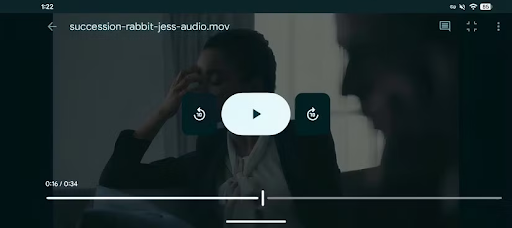
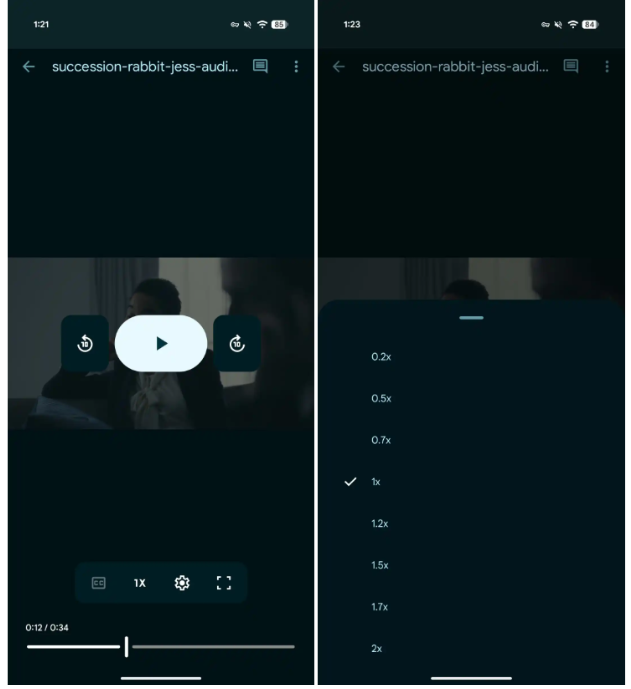
The Playback controls are even now easier to view and use, thanks to the updated design, which places them beneath the video instead of overlaid. It also offers full-screen mode, playback speed, and fast access to captions.


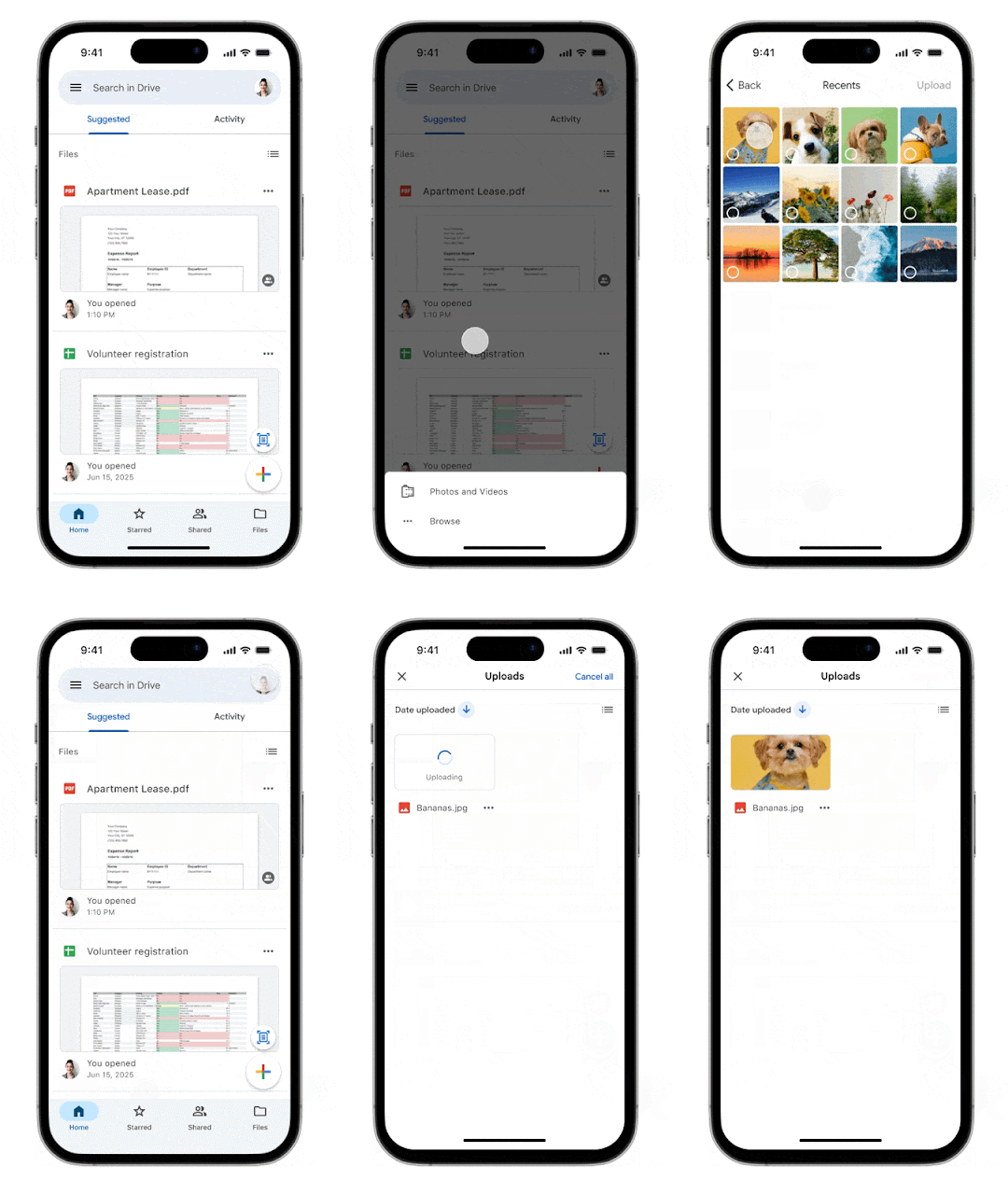
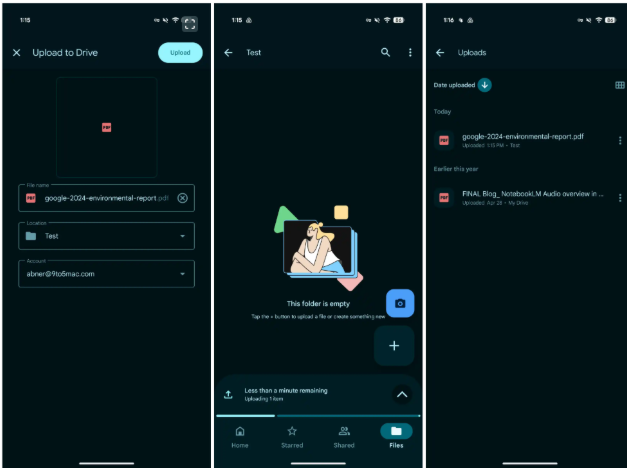
When uploading files, the Google Drive app on iOS and Android now provides “more fine grained controls and proactive status updates.” You can rename the file, modify the folder location, and change the account if you’re signed in to several accounts after choosing what you want to upload on the “initial upload screen.”

This player’s Android version was first seen to us in March, when code from a Drive app deconstruction suggested a redesign. The revised layout wasn’t yet available to users, but it could be manually enabled at the time.

The bottom sheet/progress shows that “tells you how many items are uploading and how long it will take” is then docked above the bottom bar and pushes up the floating action buttons, or FABs. In addition to the standard system notification, that exists. 

The Uploads page, accessible through the navigation drawer as well, can be accessed by tapping the up chevron. “All pending or recently completed uploads” are displayed to you.

Additionally, Google Drive’s mobile upload experience is being updated. A new progress indicator makes it easier to see how much is left, and you can now choose the destination folder and rename files as soon as you hit upload. You can also monitor recently finished and pending uploads using the Upload tab.

Additionally, the “smoother, more modern video player” that was first made available online last year is now available in Google Drive for Android. The timeline scrubber is located at the bottom, along with sizable Material 3 buttons for play/pause and rewind/skip. Controls for captions, looping, fullscreen, and playback speed (0.2-2x) are located above that.

“All Google Workspace customers, Workspace Individual Subscribers, and users with personal Google accounts can access these updates.”

Also both modifications are now completely available to all Google personal accounts and Workspace users.

Related Posts:

  • hq720
    Google Drive Updates Video Player Controls
  • How-to-Share-Files-from-Google-Drive
    Google Drive Adds Privacy Screen for Android
  • Enhancing video navigation and accessibility with Google Drive video transcripts
    Google Drive Adds Video Caption Viewing and Search
  • l87620240315095304
    Google Moves Android News Online Ahead of I/O
  • VS–2-
    Proton Drive vs Google Drive; Here's what to Know
  • Screen_Shot_2020_08_11_at_8.40.27_AM
    Google Phone Introduces Personalised Profile Cards
  • Android_16_blog_header.width-1600.format-webp
    Android 16 Update: Release Date, Device Support, and…
  • 20_year_aspect_ratio_adjusted.max-700×3000.format-webp
    YouTube To Be Updated This Summer

Discover more from TechBooky

Subscribe to get the latest posts sent to your email.

Tags: androidDrivegoogle drive
Akinola Ajibola

Akinola Ajibola

BROWSE BY CATEGORIES

Receive top tech news directly in your inbox

subscription from
Loading

Freshly Squeezed

  • Cursor Introduces An AI Coding Tool For Designers December 12, 2025
  • OpenAI Unveils More Advanced Model as Google Rivalry Grows December 12, 2025
  • WhatsApp Is Redefining The Voicemail Features For Users December 12, 2025
  • Microsoft’s Nadella Is Building a Cricket App in His Spare Time December 12, 2025
  • Google Photos Expands ‘Remix’ Feature to More Countries December 12, 2025
  • Google Play Store Reinstates Fortnite December 12, 2025
  • Vodacom Announces Price Hike December 12, 2025
  • ChatGPT Set to Launch ‘Adult Mode’ By Q1 2026 December 12, 2025
  • Amazon to Invest $35B in India by 2030 for Jobs & AI Growth December 11, 2025
  • SpaceX May Launch Its Big IPO Next Year With a $1tr Valuation December 11, 2025
  • GPT-5.2 Debuts as OpenAI Answers “Code Red” Challenge December 11, 2025
  • Netflix Plans Heavy Borrowing to Fund Warner Bros Deal December 11, 2025

Browse Archives

December 2025
MTWTFSS
1234567
891011121314
15161718192021
22232425262728
293031 
« Nov    

Quick Links

  • About TechBooky
  • Advertise Here
  • Contact us
  • Submit Article
  • Privacy Policy
Generic selectors
Exact matches only
Search in title
Search in content
Post Type Selectors
Search in posts
Search in pages
  • African
  • Artificial Intelligence
  • Gadgets
  • Metaverse
  • Tips
  • About TechBooky
  • Advertise Here
  • Submit Article
  • Contact us

© 2025 Designed By TechBooky Elite

Discover more from TechBooky

Subscribe now to keep reading and get access to the full archive.

Continue reading

We use cookies to ensure that we give you the best experience on our website. If you continue to use this site we will assume that you are happy with it.