The recent news from Google says that the business is planning to upgrade its Google Drive document scanner. Google’s cloud-based file storage service is now undergoing a recent update that includes improved on-device AI capabilities and a redesigned interface. Users may now scan many pages at once thanks to the update’s new Smart Batch Scanning functionality. The Auto-Best Frame feature, which replaces fuzzy images with crisp ones, is another feature of the update. Android smartphones with a minimum of 8 GB of RAM can use the new scanner.
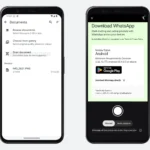
The launch of a new document scanner integrated into Google Drive for Android was confirmed by Sameer Samat, President of Google’s Android Ecosystem. A screen capture of the enhanced scanning experience has also been shared by the executive. A cleaner user interface with Material 3 Expressive design is shown in the video. With the most recent update, Google Drive’s beaker icon that was previously located in the upper-right corner has been deleted.
The release by Google is one that also includes a cleaner Material 3 expressive design and potent on-device AI capabilities. The update, which was unveiled by Sameer Samat, President of the Android Ecosystem, changes how users digitize paper files directly within Google Drive and Files by Google.
Scanning documents from a phone is a pain!
Glad to see the new document scanning experience in Google Drive on Android is rolling out now.
📄 Smart Batch Scanning: Scan multiple pages at once, automatically splits them into separate docs. 🚫 Duplicate Detection: Hovering… pic.twitter.com/Uqh2Zf2NMY
The new Smart Batch Scanning feature, which enables users to scan several pages simultaneously, is one of the improved scanner’s main features. This function allows users to create distinct documents by automatically dividing pages. It functions similarly to making a video rather than taking individual pictures.
In order to avoid scanning the same site repeatedly, the update also contains a duplication detection tool. Pages that have already been scanned are immediately detected and skipped by the algorithm. Another noteworthy new feature is the Auto-Best Frame, which automatically replaces fuzzy scans with the best photos available.
The official affirmed that only more expensive Android cellphones with at least 8GB of RAM are now compatible with the enhanced Google Drive scanner. Google Play services are the primary source of power.
The improved Google Drive scanner can be accessed offline and is processed on the device. The new scanner ensures complete data privacy, according to the CEO. The Files by Google app on Android smartphones has the new document scanner.
The upgrade comes with several key features. First, smart batch scanning allows users to continuously scan multiple pages at once. They simply need to hover their camera over a stack of documents. The scanner then automatically processes the pages and splits or combines them into individual files as needed.
Another feature is duplicate detection. The built-in AI automatically skips any pages that have been accidentally scanned more than once. This prevents redundant frames and helps maintain cleaner document libraries.
The update also includes an auto-best frame feature. When captures are shaky or poor quality, the app automatically replaces blurry frames with the sharpest and highest-quality frame from the scanning window.
Total offline privacy is another major benefit. All processing runs entirely on the device itself. This allows the scanning tools to operate at lightning speed without an active internet connection while also keeping user data private.
Finally, the interface has been redesigned. The update introduced comes with a modernized viewfinder with larger buttons, an option to pause auto-scanning, and a quick-access system file picker. In addition, the old experimental lab flask icon has been removed from the top-right corner to reduce visual clutter.
We use cookies to ensure that we give you the best experience on our website. If you continue to use this site we will assume that you are happy with it.