• Archives
  • Cryptocurrency
  • Earnings
  • Enterprise
  • About TechBooky
  • Submit Article
  • Advertise Here
  • Contact Us
TechBooky
  • African
  • AI
  • Metaverse
  • Gadgets
Generic selectors
Exact matches only
Search in title
Search in content
Post Type Selectors
Search in posts
Search in pages
  • African
  • AI
  • Metaverse
  • Gadgets
Generic selectors
Exact matches only
Search in title
Search in content
Post Type Selectors
Search in posts
Search in pages
TechBooky
Generic selectors
Exact matches only
Search in title
Search in content
Post Type Selectors
Search in posts
Search in pages
Home Security

Google Fixes Quick Share Crashes, WiFi Issues on Windows

Akinola Ajibola by Akinola Ajibola
October 29, 2024
in Security
Share on FacebookShare on Twitter

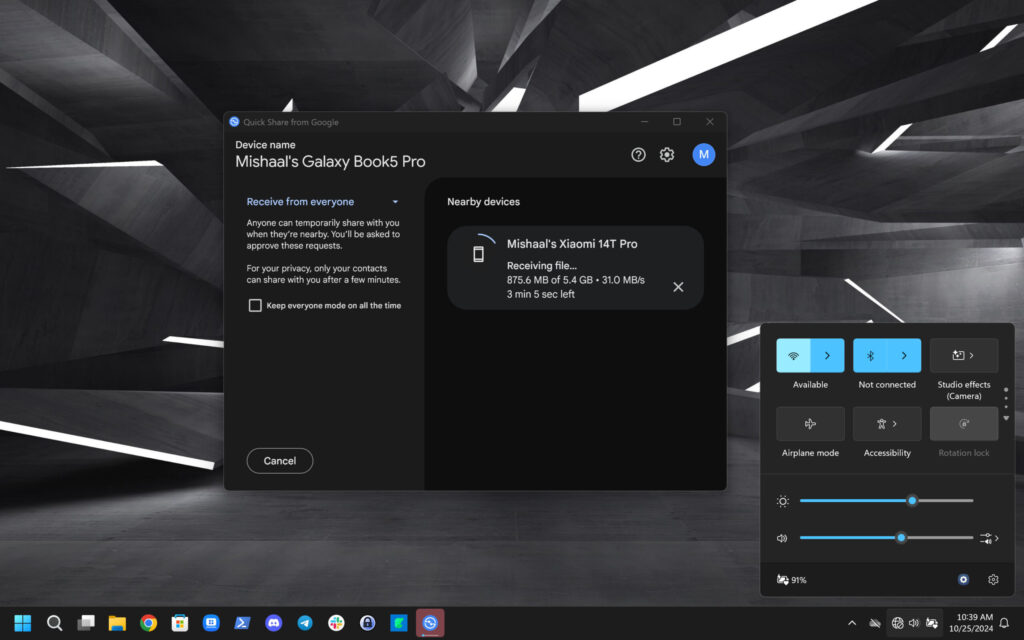
A new version for Quick Share has been released by Google for the Windows platform. It addresses a number of bugs that users have been experiencing in recent weeks, but it does not include any new capabilities according to 9to5 Google. A bug that caused Quick Share to crash if the file name contained non-ASCII characters has been fixed in the latest version. It also addresses problems with Quick Share shortcut icon, Wi-Fi Hotspot, Wi-Fi LAN advertising, system configuration settings, and program crashes.

The 1.0.2002.2 update, which is presently being distributed, is mainly concerned with fixing bugs that affected the dependability and performance of the application. The update notably fixes issues with non-ASCII characters in file names, which previously resulted in crashes or improper file opening. It also fixes problems with user choice storage and guarantees that the program icon consistently shows up in the Start menu. Additional enhancements focus on connection, including fixes for Wi-Fi and Bluetooth stability issues during file transfers.

According to Google, Windows users may now download Quick Share version 1.0.2002.2. Twelve bugs have been fixed, including one that prevented Wi-Fi hotspot recovery if the program was stopped while transferring files. Additionally, it was claimed that the program occasionally crashed while reading an input file or establishing a Bluetooth connection. Both of these issues are reportedly fixed in Quick Share’s most recent Windows upgrade. The following update’s complete changelog is available below:

Source: Android Authority
  1. Fixed to delete files received from an unknown sender with the same payload ID.
  2. Fixed an issue that caused the app to crash when a file name has non-ASCII characters.
  3. Fixed an issue where non-ASCII characters prevented received files from opening successfully.
  4. Fixed an issue when reading preferences.
  5. Fixed an issue where preferences failed to save on certain system configurations.
  6. Fixed an issue that kept the Quick Share shortcut icon from showing up in the Start menu after installation.
  7. Fixed an issue that caused the app to crash when reading an input file.
  8. Fixed an issue that caused multiple GATT reads during discovery.
  9. Fixed a bug to stop Wi-Fi LAN advertising.
  10. Fixed an issue that caused the app to crash when connecting to Bluetooth.
  11. Fixed an issue that prevented the Wi-Fi hotspot profile from being deleted correctly.
  12. Fixed an issue where the Wi-Fi hotspot couldn’t be recovered when the app was closed during file transfer.

Even though Quick Share might not get any new features with this update, stability enhancements are always appreciated. This upgrade should provide customers with a more dependable file-sharing experience for the time being, bringing them one step closer to Android’s smooth AirDrop experience.

The Mountain View-based tech giant released the app’s 1.0.1939.4 version earlier this month, which is the foundation for the Quick Share upgrade.

Related Posts:

  • Quick-Share-QR-code-cover
    Google Quick Share Broadly Rolling Out QR Code Sharing
  • CT25G4KUGNPL3PD2GVCENAU3QU
    Spotify Acknowledges App Crashes on Samsung and Pixel Phones
  • 8566bb3a-a332-47bd-9234-ab9fe44fc82a
    Microsoft's Quick Test to Fix Non-Booting PCs
  • ST_LaunchScreen
    Windows 11 Gets Built-in Screen Recorder Finally
  • microsoft-copilot-2
    Windows 11 Preview Adds Shared Audio and Taskbar Copilot
  • File-Explorer-dark-mode-dialogs-for-Delete-Folder-1
    KB5070311 Update Resolves File Explorer and Search Bugs
  • Windows_11
    Microsoft Fixes Windows Certificate Enrolment Bug
  • windows11bsod
    Microsoft's Revamp, The Windows BSOD May Become Black

Discover more from TechBooky

Subscribe to get the latest posts sent to your email.

Tags: googlequick sharewindows
Akinola Ajibola

Akinola Ajibola

BROWSE BY CATEGORIES

Receive top tech news directly in your inbox

subscription from
Loading

Freshly Squeezed

  • Microsoft Denies Reports of Lowered AI Software Sales Targets December 3, 2025
  • Why Anthropic Is Emerging Ahead of Google’s Gemini December 3, 2025
  • TikTok to Invest $37B in Brazil Data Centre Infrastructure December 3, 2025
  • Standard Bank Becomes First African Bank on China’s CIPS Network December 3, 2025
  • Android 16 Adds AI Summaries and Expanded Customisation Features December 3, 2025
  • Google Experiments Combining AI Overviews & AI Mode December 3, 2025
  • OpenAI Issues ‘Code Red’ as Google Gains in AI Race December 3, 2025
  • Outage Confirmed As Users Were Unable To Access ChatGPT December 3, 2025
  • KB5070311 Update Resolves File Explorer and Search Bugs December 2, 2025
  • KB5070311 Update Causes Dark Mode Flash Issue, Microsoft Confirms December 2, 2025
  • Data Centers to Consume 300% More Energy by 2035 December 2, 2025
  • Google-Backed Fusion Startup Moves to Commercialize Neutral-Beam Tech December 2, 2025

Browse Archives

December 2025
MTWTFSS
1234567
891011121314
15161718192021
22232425262728
293031 
« Nov    

Quick Links

  • About TechBooky
  • Advertise Here
  • Contact us
  • Submit Article
  • Privacy Policy
Generic selectors
Exact matches only
Search in title
Search in content
Post Type Selectors
Search in posts
Search in pages
  • African
  • Artificial Intelligence
  • Gadgets
  • Metaverse
  • Tips
  • About TechBooky
  • Advertise Here
  • Submit Article
  • Contact us

© 2025 Designed By TechBooky Elite

Discover more from TechBooky

Subscribe now to keep reading and get access to the full archive.

Continue reading

We use cookies to ensure that we give you the best experience on our website. If you continue to use this site we will assume that you are happy with it.