In an effort to stay up with Microsoft’s quick integration of comparable technologies, Google unveiled a number of AI features for its Workspace suite of apps in March. Duet AI is the company’s new branding for this initiative, which was unveiled at Google I/O, but the functions are still not readily available to the general public. A new tool named “Sidekick” that can read, summarize, and respond to inquiries about documents from other Google apps was also hinted at by the business.
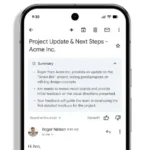
Duet AI offers a variety of generative AI tools for Google’s productivity products. This includes automatic meeting summaries for Meet, image production for Slides, writing assistance in Docs and Gmail, and more, as we explained earlier this year. However, the only significant announcement made at Google I/O was the addition of writing assistance to Gmail for mobile, which would be known as “Help me Write” as an upgrade to Smart Compose. However, users will need to register with Workspace Labs and add their names to a waitlist if they want to actually access these new features.
The good news is that, unlike before, anyone can now join this waitlist, which was previously private. The bad: It’s unclear when users will be able to gain access. Only “to even more users and countries in the weeks ahead” is all Google says it is doing with the services.
Listed below is a rollout of when features will be available to users:
Write in Gmail — available now on your mobile, web and in Workspace Labs.
Gmail contextual responses – available in Workspace Labs by month-end.
Generate images from text, right within Google Slides – available to Workspace Labs next month.
Organize complex projects in Google Sheets – available to Workspace Labs next month.
Intelligent classification in Google Sheets -available to Workspace Labs in the coming months.
Custom backgrounds in Google Meet – available to Workspace Labs in the coming months.
AI building blocks in Docs – available in Workspace Labs by month-end.
Proofreading in Docs – Available in preview to Workspace commercial users in the coming months.
The “Help me write” AI assistant on the Gmail mobile app is major news. Microsoft introduced a similar tool in April by incorporating Bing into its SwiftKey iOS and Android keyboard app. Workspace VP Aparna Pappu mentioned that it may be a much more effective tool on a platform where you don’t have access to a full keyboard, but that it also requires a more responsive AI partner during a roundtable briefing with journalists before I/O.
According to Pappu, “As you can imagine, mobile creates a whole bunch of constraints. Sometimes you’re online, sometimes you’re offline. You really don’t want to fat finger things,” Pappu added “And so we expect people to use far shorter prompts when asking AI to help them write mobile, and we’ve had to tune our experience there to create the best possible output with the least possible input.”
When employing AI to generate responses, Gmail has a pleasant surprise in the form of an “I’m feeling lucky” button. It will occasionally write you a haiku, Pappu says, and other times it will write your reply in a pirate voice. Whimsical? Sure. Useful? Me, myself, I would be saying “Nay.”
Google, however, had more to offer. In particular, Pappu spoke at I/O about a Workspace/Duet feature called Sidekick, calling it “the future of collaboration with AI” (although specifying when it may be made accessible to users was not stated).
It appears to be a side panel with the ability to analyse the document you are viewing. In addition to being able to provide answers to content-related searches, Google claims it can also provide recommendations. So, for instance, it might advise you to create some photos to illustrate a story you’re writing. Another instance shows the user composing an email announcing an upcoming potluck. Sidekick is able to recommend a good accompaniment by not only analyzing the email chain’s contents but also any connected documents, in this case, a list of the dishes being served.
In summary, it’s simply a means to connect existing capabilities rather than the major advancement Google is suggesting. It seems that the future of this will require us to wait a little longer.
Olagoke Ajibola is a creative writer and content producer with an eye for details and excellence. He has a demonstrated history of telling stories for TV, Film and Online. Aside from being fascinated by the power of imagination, his other interest are travel, sport, reading and meeting people.
We use cookies to ensure that we give you the best experience on our website. If you continue to use this site we will assume that you are happy with it.


:format(webp)/cdn.vox-cdn.com/uploads/chorus_asset/file/24647783/Screenshot_2023_05_10_at_18.35.28.png)
:no_upscale():format(webp)/cdn.vox-cdn.com/uploads/chorus_asset/file/24647326/Docs.gif)
:format(webp)/cdn.vox-cdn.com/uploads/chorus_asset/file/24647872/Screenshot_2023_05_10_at_18.54.01.png)