Google has quietly rolled out its Find Hub app for Wear OS smartwatches, bringing device tracking right to your wrist. The app is now available on the Play Store for Pixel Watch models, though early reports suggest it works just fine when installed on other Wear OS devices too.
The new app lets you track down missing phones, tablets, headphones, and other gadgets connected to your Google Account without pulling out your phone. This is particularly helpful when your phone is the very thing you’ve lost. Instead of the usual panicky pocket pat-down, you can simply glance at your wrist and start the search.
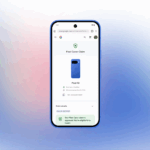
When you open Find Hub on your watch, you’ll see a list of all devices logged into your Google Account. Tap any device and you’ll get details about when it was last seen and how much battery life it has left. The app shows your device on a map, which you can tap to open Google Maps and get directions straight from your wrist.
The features available include playing a sound to help you locate nearby devices, securing a lost device remotely, getting directions to where it was last seen, and even factory resetting it if necessary. It’s basically the same experience you’d get from the phone app, just shrunk down for your wrist.
For families sharing devices on the same Google account, the watch becomes a shared locator. No more asking “who has the phone?” when everyone’s trying to head out the door. For commuters and runners, it cuts out the hassle of pulling out a phone just to make a device ring when you know it’s somewhere close by.
The app first appeared in a promo video for the Pixel Watch 3 earlier this year, and Google mentioned it in their July system update notes. But it’s taken until now, about four and a half months later, for the app to actually show up in the Play Store.
Right now, Find Hub is officially available for Pixel Watch devices, likely the Pixel Watch 2, Pixel Watch 3, and the recently launched Pixel Watch 4. These models all run Wear OS 6, which might be a requirement for native support. However, users have successfully installed the app on other watches like the OnePlus Watch 2R through sideloading, and it works without issues.
The Find Hub network uses over a billion Android devices to help locate lost items, all while keeping your privacy intact. All location data is encrypted, and Google itself can’t see where your devices are. The app also includes protections against unwanted tracking, with alerts that work across platforms to warn you if there’s an unrecognized tracker nearby.
While the Wear OS version doesn’t include the location sharing feature that lets you share your whereabouts with friends and family, it handles all the important device-finding tasks. You can search for the app directly in your watch’s Play Store or start the download from your phone using the “Install on more devices” option.
For anyone who’s ever lost their phone at home, dropped earbuds between couch cushions, or left a tablet behind at a coffee shop, having Find Hub on your wrist is a practical quality-of-life improvement. It’s not a flashy feature, but it’s one of those things you’ll use more often than you’d think once you have it. The quiet rollout might not make headlines, but for Pixel Watch owners and potentially other Wear OS users soon, it’s a welcome addition to Google’s device ecosystem.
To search for “Find Hub” feature, newly introduced, please find the on-watch Play Store or use the “Install on more devices” option from the Find Hub page on your Android phone
We use cookies to ensure that we give you the best experience on our website. If you continue to use this site we will assume that you are happy with it.


/cdn.vox-cdn.com/uploads/chorus_asset/file/24796730/whatsapp.png "WhatsApp Rolls Out On Wear OS Smartwatches Starting Today.")