• AI Search
  • Cryptocurrency
  • Earnings
  • Enterprise
  • About TechBooky
  • Submit Article
  • Advertise Here
  • Contact Us
TechBooky
  • African
  • AI
  • Metaverse
  • Gadgets
Generic selectors
Exact matches only
Search in title
Search in content
Post Type Selectors
Search in posts
Search in pages
  • African
  • AI
  • Metaverse
  • Gadgets
Generic selectors
Exact matches only
Search in title
Search in content
Post Type Selectors
Search in posts
Search in pages
TechBooky
Generic selectors
Exact matches only
Search in title
Search in content
Post Type Selectors
Search in posts
Search in pages
Home Service news

Google Messages Adds Snooze and Delete Features

Akinola Ajibola by Akinola Ajibola
June 19, 2025
in Service news
Share on FacebookShare on Twitter

These two features Google Messages’ “Delete for everyone” feature are only available in RCS chats.

Rich Communication Services, or RCS chat, is an advanced messaging protocol that offers a more loaded with functions and comprehensive chatting experience than SMS and MMS.

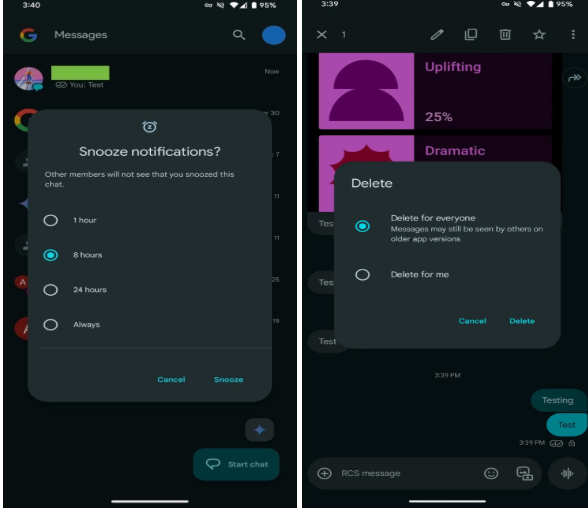
Last week, Google had revealed a number of new features for its Messages app, such as the ability to snooze notifications and remove text messages from RCS chats for all participants. Stable users will now have widespread access to these features. The former allows you to snooze incoming message notifications, as the names imply. In the meanwhile, the latter, like WhatsApp’s current feature, removes texts for all conversation participants. The erased texts might still be visible to users of older versions of the Google Messages app, though.

Google Messages’ “Delete for everyone” feature has been in the works for a few months. The tech giant made the app available to beta customers the following month after it was discovered in the code back in February. The Google Messages app now makes it largely available.

Delete for everyone and Delete for me are now the two options that appear when you long press on a message and then tap the trash button. The former takes it off of the device of both the sender and the recipient, the receiver.

Google has also added the ability to snooze notifications to the Messages app. From the app’s home screen, long pressing on a chat opens a new window with the various time periods displayed. Users have the option to snooze conversational notifications for one hour, eight hours, twenty-four hours, or always.

The chosen time or date will then show underneath the chat, which will be grayed out. According to Google, other participants won’t know that you’ve turned off chat notifications. To undo snooze, users can redo the instructions.

The tech giant has also revealed personalization for RCS group conversations, allowing users to designate a personalized icon and unique moniker for the chats as part of the June 2025 Google Messages upgrade.

RCS group conversations can be renamed, and the 2×2 circular grid of profile avatars can be changed to a custom icon. You have the option of using Google Illustrations or uploading your own image.

Last but not least, the new chat page (version 20250528_00_RC00) now displays RCS status with a label to the right with a distinct and dynamic colour theming for stable users.

All things considered, we all want to believe that these changes will make Google Messages even more competitive, gradually catching up to other well-known platforms like iMessage. These new features are a step toward making Google Messages more adaptable and user-friendly, whether you’re attempting to recover from an unaware message, temporarily mute a conversation, or add a more personal touch to your group chats.

Related Posts:

  • google-messages-1
    Google to Launch 'Delete for Everyone' Feature on Messages
  • google-messages-hero
    Google Messages Lets Users Edit RCS Messages to iPhone
  • 489004786_460534553749625_8815815832330094324_n
    WhatsApp Releases Video Notes, Tappable Reactions,…
  • WhatsApp-Apple-Watch_Header
    WhatsApp Now Available on Apple Watch
  • WA_NOTIFICATION_REMINDERS_FOR_CHAT_MESSAGES_FEATURE_IOS
    WhatsApp for iOS Gets Message Reminder Feature
  • 5f08a4e0-a383-11ef-b9ff-05c3bc6765e0
    New Feature: WhatsApp Now Lets you Store Draft Messages
  • WA_NEW_ADVANCED_CHAT_PRIVACY_FEATURE_MEDIA_AUTO_SAVING_CHAT_INFO_SCREEN_ANDROID
    WhatsApp Tests Privacy Feature on Android to…
  • skynews-whatsapp-phone-messaging_6156083
    WhatsApp Introduces Chat Lock To Lock & Hide Chat Threads

Discover more from TechBooky

Subscribe to get the latest posts sent to your email.

Tags: google messagesmessagingnew features
Akinola Ajibola

Akinola Ajibola

BROWSE BY CATEGORIES

Receive top tech news directly in your inbox

subscription from
Loading

Freshly Squeezed

  • YouTubers Sue Snap Over Copyright Infringement in AI Models January 28, 2026
  • Sony Plans A State of Play Broadcast in February January 28, 2026
  • TikTok Avoids Trial, Settles Lawsuit Over Addiction Claims January 27, 2026
  • Ezra Olubi Sues David Hundeyin for ₦140M Over X Defamation January 27, 2026
  • Lagos & MTN Team Up on Eco-Friendly Obalende Bus Park January 27, 2026
  • France Ditches Microsoft Teams, Zoom for Homegrown ‘Sovereign’ Platform January 27, 2026
  • Meta Tests Premium Subscriptions on Facebook, Instagram & WhatsApp January 27, 2026
  • Microsoft Introduces New IT Admin Tool to Analyse Security Breaches January 27, 2026
  • Google May Bring Apple-Like “Liquid Glass” Design to Android 17 January 27, 2026
  • TikTok Blames Power Outage for US Service Problems January 27, 2026
  • Nvidia Backs CoreWeave With $2B to Support Data Centre Growth January 27, 2026
  • Google Agrees $68M Settlement in Google Assistant Privacy Lawsuit January 27, 2026

Browse Archives

January 2026
MTWTFSS
 1234
567891011
12131415161718
19202122232425
262728293031 
« Dec    

Quick Links

  • About TechBooky
  • Advertise Here
  • Contact us
  • Submit Article
  • Privacy Policy
Generic selectors
Exact matches only
Search in title
Search in content
Post Type Selectors
Search in posts
Search in pages
  • African
  • Artificial Intelligence
  • Gadgets
  • Metaverse
  • Tips
  • AI Search
  • About TechBooky
  • Advertise Here
  • Submit Article
  • Contact us

© 2025 Designed By TechBooky Elite

Discover more from TechBooky

Subscribe now to keep reading and get access to the full archive.

Continue reading

We use cookies to ensure that we give you the best experience on our website. If you continue to use this site we will assume that you are happy with it.