Google Photos is most likely everyone’s preferred method for organizing their photos and videos, backing them up to the cloud, and editing them while they are on the road if they use Android. Google’s most recent update aims to give its users the ability to edit their selfies, but it does it in a way that the company consistently refers to as “subtle.”
It is a new Touch Up suite of AI-powered face-editing tools for selfies and group portraits that has been formally released by Google Photos. These tools are intended to make subtle, “blink-and-you-miss-it” improvements. These fine-grained features, which were previously limited to Google’s Camera app at the time of capture, are now built right into the primary Google Photos editor for post-capture adjustment.
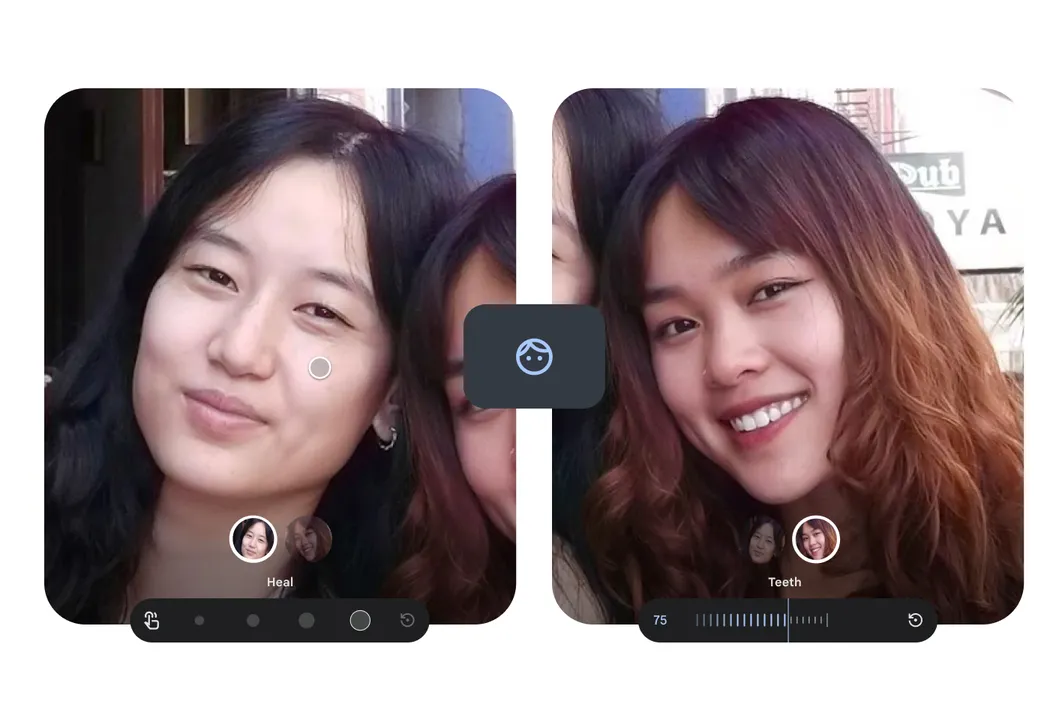
Google Photos’ image editor now offers touch-up features that should add “subtle enhancements” to selfies or pictures of their friends, according to an announcement made on the company blog yesterday. Everyone can whiten their teeth, brighten their eyes for a more striking appearance (pun intended), smooth out the texture of their skin, and get rid of imperfections. To use it, pick a face in an image that has been taken, then from the list of tools, choose “heal,” “smooth,” “beneath eyes,” “irises,” “teeth,” “eyebrows,” or “lips.” Users can switch between extremes with each effect’s intensity slider. The editing suite uses machine learning models with intensity sliders per effect: “Smooth” refines skin texture, “Heal” removes specific blemishes, “Under eyes” reduces dark circles, “Irises” (or “Brighten eyes”) enhances eye luminance, “Teeth” provides quick whitening, and dedicated sliders for “Eyebrows” and “Lips” allow fine-tuning of tones and definition.
Unsurprisingly, Google’s post today uses wording that tries to minimize the possible negative effects of retouching, especially when it comes to its use in industries like fashion and modelling. Additionally, given that Google lost a lawsuit last month regarding YouTube’s involvement in these problems, it is releasing at a time when many parents are angry with how social media affects their teenage children.
To access the tools, open a photo in Google Photos, tap Edit, go to the Actions tab, select a specific face (the app can detect and edit up to six faces in one group shot, allowing different settings per person), and complete a one-time 16MB download of machine learning models when using the tool for the first time. And adjust the effect level using the slider; dial it down for a natural look or increase it for more visible edits.
Users need Android 9.0 or higher and at least 4GB of RAM to access the new tools.
We use cookies to ensure that we give you the best experience on our website. If you continue to use this site we will assume that you are happy with it.