TechBooky AI Assistant
👋 Welcome to TechBooky AI Assistant

I can help with:
🔎 Tech News
🤖 AI Topics
💻 Gadgets
☁️ Cloud
✍️ Guest Posts
📢 Advertising
🔗 Backlinks
📩 Newsletter
  • AI Search
  • Cryptocurrency
  • Earnings
  • Enterprise
  • About TechBooky
  • Submit Article
  • Advertise With TechBooky
  • Contact Us
TechBooky
  • African
  • AI
  • Metaverse
  • Gadgets
Generic selectors
Exact matches only
Search in title
Search in content
Post Type Selectors
Search in posts
Search in pages
  • African
  • AI
  • Metaverse
  • Gadgets
Generic selectors
Exact matches only
Search in title
Search in content
Post Type Selectors
Search in posts
Search in pages
TechBooky
Generic selectors
Exact matches only
Search in title
Search in content
Post Type Selectors
Search in posts
Search in pages
Home Product news

Google Photos Updates Layout To Make Photos Easier To Find

Olagoke Ajibola by Olagoke Ajibola
March 22, 2022
in Product news
Share on FacebookShare on Twitter
Share this story

Send it to someone who should read it.

f Facebook X X in LinkedIn wa WhatsApp tg Telegram @ Email

Google Photos updates its library and sharing tabs to make photos easier to  find - The Verge

In Brief
  • Google announces it’s bringing a pretty significant layout change to one of its products, Google Photos.
  • Google Photos is that AI-powered assistant that lets users store, share, view, and edit photos and videos, basically helping you manage your media files.
  • That said, the company is redesigning the layout to make it easier to find the photos and albums you’re looking for in the library and share...

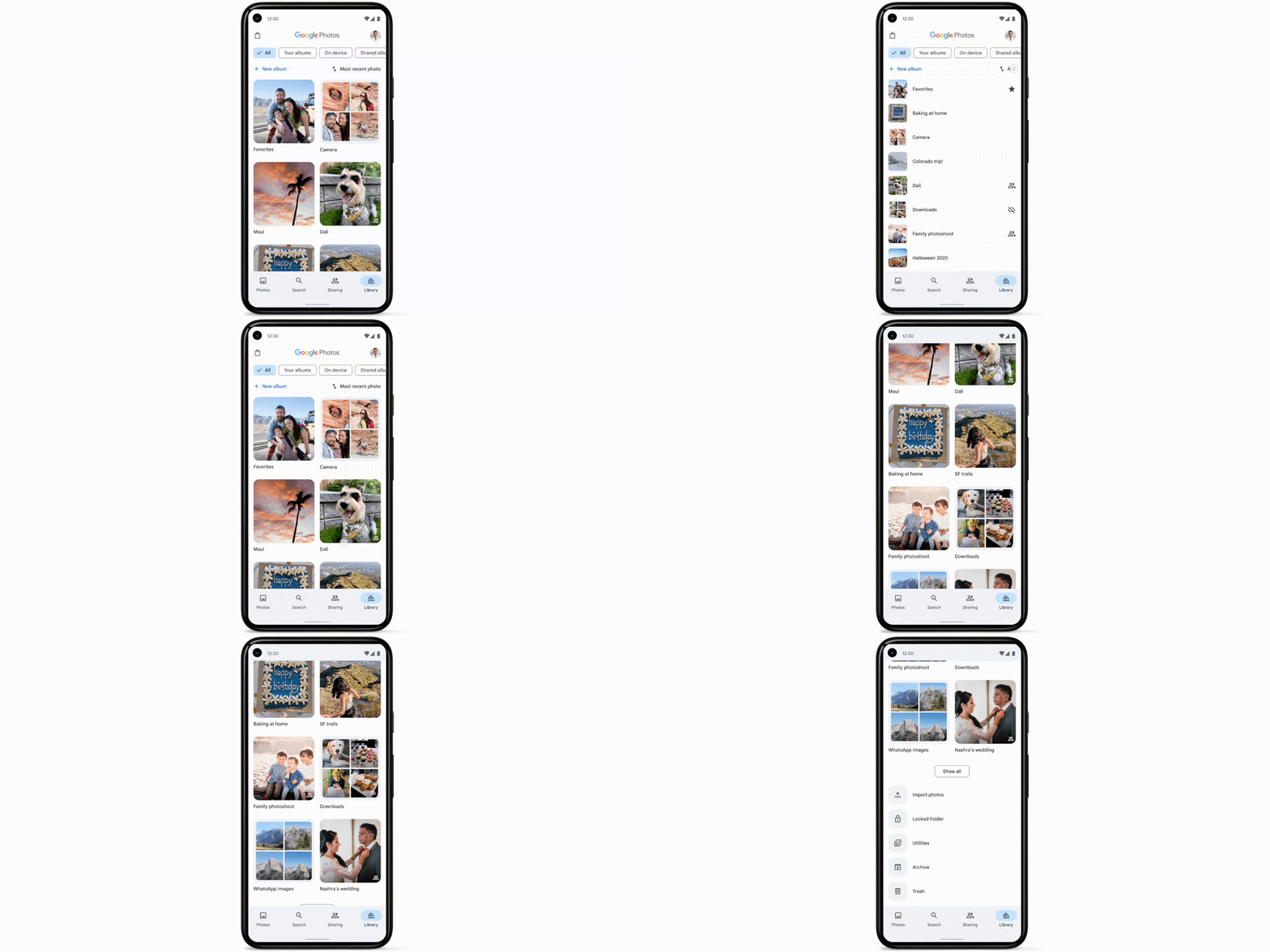
Google announces it’s bringing a pretty significant layout change to one of its products, Google Photos. Google Photos is that AI-powered assistant that lets users store, share, view, and edit photos and videos, basically helping you manage your media files. That said, the company is redesigning the layout to make it easier to find the photos and albums you’re looking for in the library and share tabs.

Google Photos organizational updates

This update will bring about the transformation of the current tab layout that comprises of a mishmash of photos, albums, folders to a grid or list view users can sort through by categories. Meanwhile, the Photos sharing tab will now have slight changes, the company has created sections for partner sharing, shared albums, and conversations. Google says that with more defined sections, it will be easier to find, view, and manage shared photos and videos. Changes to the sharing tab will arrive on Android within the week but at a later date for iOS.

A cool new feature is also slated to come to Photos. This cool feature is said to be dedicated to importing your photos from locations outside the platform like photo storage services, uploads straight from a camera, as well as digitising physical photos and film. But of course, to access these cool features, one must have ample storage on Google Photos (or are close to it), as the company officially put an end to free unlimited storage last year.

Also worth reading
Google And Meta Gain As AI Slowdown Could Help Them Catch Up Google’s $15B Finland AI Bet Shows Compute Is Now An Energy Race Google’s AI Power Plan Gets A Nuclear Boost Judge Orders Google To Make Rival Android App Stores Easier To Install Sergey Brin’s Return Puts Gemini In War-Room Mode Google Brings Gemini Voice Into Gmail And Docs

Google Photos organizational updates

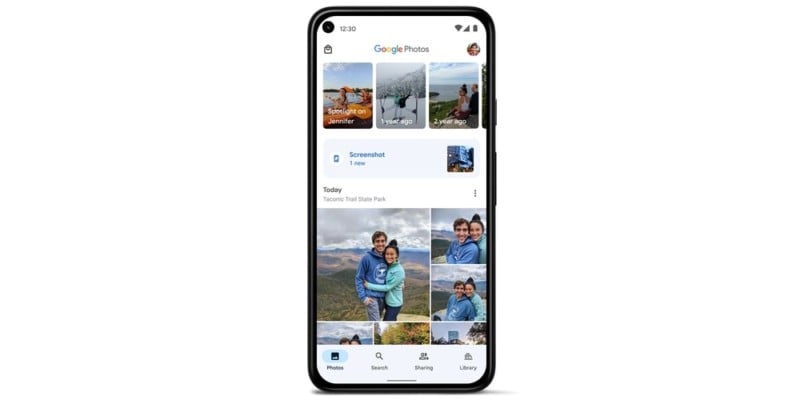
In addition to the cool feature, Google is bringing to Photos is a shortcut that would be located at the top of your main photo grid that takes you straight to your screenshots — while excluding them from the backup process. In other words, Google Photos is also adjusting how it manages screenshots. Since screenshots will not be backed up or included with memories, finding them might be challenging. Indeed it feels so good that the search giant is introducing a feature that ultimately acknowledges the fact that screenshots don’t really need to be backed up and helps you reach them faster and easier. Also added is “a carousel of contextual suggestions” coming soon to Android that will make typing text, crop, search, or copy text from a screenshot possible and make a search using Google Lens when viewing a screenshot, more usable.

Recently Google confirmed it’s now bringing the ability for users to delete the last 15 minutes of search history on its Android app, a feature that has long existed for the iOS app. This is a confirmation that the search giant is constantly looking for ways to better the experience of its plenty of users.

Related Reading

More contextual TechBooky stories selected from tags, categories and article context.

  • WA_ASK_META_AI_CHAT_HOME_SCREEN_FEATURE_ANDROID
    A New Meta AI Widget Developed on WhatsApp Android
  • WA_NEW_COVER_PHOTO_FOR_PROFILE_PERSONALIZATION_FEATURE_ANDROID
    WhatsApp Cover Photos: What Profile Banners Could…
  • google-search--1-
    Google Introduces Brand New AI Tool For English Learners
  • WA_PROFILE_PHOTO_FROM_INSTAGRAM_FACEBOOK_FEATURE_ANDROID
    WhatsApp Tests Profile Photo Import from Instagram, Facebook
  • aura google
    Aura Restores Google Photos Integration
  • assets_task_01jryr2pwyfwsagc1sv1n2e5px_img_0
    Introducing Google Photos Integration for Gemini's…
  • Ask-Photos
    Google Photos Debut New Feature 'Ask Photos' Using AI
  • Quicklyfindandshare_inline.width-1000.format-webp
    Google Maps Adds Gemini-Powered Photo Captions and…
Keep Reading Smarter

Search TechBooky with AI

Use TechBooky's AI Search to explore the context behind this story and related coverage across the site.

Try AI Search
More On This Topic
Product news
Follow TechBooky

Follow TechBooky for more technology stories and newsroom updates.

f Facebook X X in LinkedIn ig Instagram wa WhatsApp

Tags: AIandroidartificial intelligencebusinessfeaturegoogleiosnew featurephotoScreenshotsearchShare
Olagoke Ajibola

Olagoke Ajibola

Olagoke Ajibola is a creative writer and content producer with an eye for details and excellence. He has a demonstrated history of telling stories for TV, Film and Online. Aside from being fascinated by the power of imagination, his other interest are travel, sport, reading and meeting people.

Search TechBooky
Open TechBooky AI Search Try the AI Assistant

BROWSE BY CATEGORIES

Receive top tech news directly in your inbox

subscription from
Loading

Freshly Squeezed

  • Anthropic Takes Claude Into Wealth Management September 16, 2026
  • OpenAI Backs Outside Evaluators For Frontier AI Models September 16, 2026
  • Zuckerberg Says AI Labs Can Slow Down Without A Pact September 16, 2026
  • Google Launches Gemini 3.8 Live For Real-Time AI Talk September 16, 2026
  • Elon Musk Wants AI Rivals To Test Each Other’s Models September 16, 2026
  • Nuance Labs Raises $50M To Make AI Avatars Less Awkward September 15, 2026
  • AI Startup Funding Is Splitting Into Winners And Strugglers September 15, 2026
  • Trump And Jensen Huang Push Back On AI Doom Talk September 15, 2026
  • Microsoft Says People Matter More Than AI In New Safety Code September 14, 2026
  • OpenAI Urges UK Lawmakers To Regulate Frontier AI September 14, 2026
  • Google And Meta Gain As AI Slowdown Could Help Them Catch Up September 14, 2026
  • AI Data Centre Pollution Fight Puts Compute Boom On Trial September 14, 2026

Browse Archives

September 2026
M T W T F S S
 123456
78910111213
14151617181920
21222324252627
282930  
« Aug    

Quick Links

  • About TechBooky
  • Advertise With TechBooky
  • Contact us
  • Submit Article
  • Privacy Policy
Generic selectors
Exact matches only
Search in title
Search in content
Post Type Selectors
Search in posts
Search in pages
  • African
  • Artificial Intelligence
  • Gadgets
  • Metaverse
  • Tips
  • AI Search
  • About TechBooky
  • Advertise With TechBooky
  • Submit Article
  • Contact us

© 2025 Designed By TechBooky Elite

Discover more from TechBooky

Subscribe now to keep reading and get access to the full archive.

Continue reading

We use cookies to ensure that we give you the best experience on our website. If you continue to use this site we will assume that you are happy with it.