TechBooky AI Assistant
👋 Welcome to TechBooky AI Assistant

I can help with:
🔎 Tech News
🤖 AI Topics
💻 Gadgets
☁️ Cloud
✍️ Guest Posts
📢 Advertising
🔗 Backlinks
📩 Newsletter
  • AI Search
  • Cryptocurrency
  • Earnings
  • Enterprise
  • About TechBooky
  • Submit Article
  • Advertise Here
  • Contact Us
TechBooky
  • African
  • AI
  • Metaverse
  • Gadgets
Generic selectors
Exact matches only
Search in title
Search in content
Post Type Selectors
Search in posts
Search in pages
  • African
  • AI
  • Metaverse
  • Gadgets
Generic selectors
Exact matches only
Search in title
Search in content
Post Type Selectors
Search in posts
Search in pages
TechBooky
Generic selectors
Exact matches only
Search in title
Search in content
Post Type Selectors
Search in posts
Search in pages
Home Service news

Google Quick Share Broadly Rolling Out QR Code Sharing

Akinola Ajibola by Akinola Ajibola
January 9, 2025
in Service news
Share on FacebookShare on Twitter

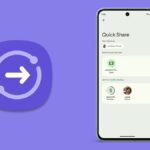
Sending files from one device to another in close proximity is already made incredibly convenient with Quick Share. But by using QR codes, it appears that Google has managed to make it much more practical.

A source claims that Google has added a new feature to its Quick Share feature that enables file sharing between Android devices easier. It seems to be rolling out, as the tech company initially disclosed it in December. Instead of saving contacts or verifying devices before sending files to those nearby, users can now scan QR codes in the Quick Share menu. 

You can select who you wish to share with when Quick Share opens. You can choose to share with your contacts or just the devices that are linked to your Google account. You also have the option to share with everyone in your immediate vicinity, but doing so makes your device discoverable by anybody. You can, however, configure it such that your device can only be found for ten minutes following the use of the feature.

For people who wish to send a file to a non-contact but do not want to use the “Everyone” setting, this presents a challenge. Fortunately, Google is giving these individuals another choice.


The Operation of Quick Share’s QR Code Scanning Function

Users can share and receive pictures, videos, documents, folders, and other files from nearby compatible Android, ChromeOS, and Windows-based devices using Quick Share, a peer-to-peer data transfer capability. Previously called Nearby Share, it uses Wi-Fi Direct and Bluetooth and encrypts files while they are being transferred.

Previously, users could transfer files by adding contacts or authenticating devices, but now, QR code scanning is also supported. This information comes from the folks over at 9to5Google. According to a report, this feature should be enabled by updating Google Play Services to version 24.49.33.

9to5Google made us understand that, when you launch the fullscreen user interface, you will now see a “Use QR code” button in the “Send to nearby devices” area. When you tap this button, a QR code will be generated that the other Android phone can scan. The two devices will connect and the transfer will begin when you click on the quickshare.google link.

If you wish to share something with more than one person, you can use numerous devices to scan this QR code. This feature seems to have been introduced today with Google Play services version 24.49.33.

Google disclosed in December that users may initiate a secure file transfer by simply choosing the media file they wish to share, tapping the QR code, and having others scan it. It eliminates the need to change a device’s sharing settings, verify devices, or add people as contacts.

When delivering data to numerous recipients at once, the ability of the QR code to be read by multiple devices can be useful. You can visit this URL to trigger it as well. Unfortunately, the Quick Share software for Windows does not yet support this feature, and it is only available on Android devices.

In November of last year, Google quietly released the Quick Share app for ARM-powered devices running Windows 11 or later. Despite being previously accessible for Windows-based devices, it was incompatible with ARM-based devices and required extensive hacks to function.

After its launch, customers may now effortlessly share and receive documents, images, and other data between Windows PCs, including the new Snapdragon X Elite laptops, and neighbouring Android handsets.

Related Posts:

  • samsung-quick-share-airdrop
    Galaxy S26 Gets AirDrop-Like Sharing via Google Quick Share
  • Rebranded-Quick-Share-is-finally-rolling-out-to-Pixels-and-its-not-an-exact-copy-of-Samsungs
    Google Brings AirDrop-Like Sharing to Every Android Device
  • google cookies
    Google Fixes Quick Share Crashes, WiFi Issues on Windows
  • WA_QR_CODE_VIEW_FOLLOW_CHANNEL_FEATURE_IOS
    WhatsApp Tests QR Channel & Sticker Pack Sharing
  • How-to-Share-Files-from-Google-Drive
    Google Drive Adds Privacy Screen for Android
  • Google-Photos-10th-year-celebration-1-1024x576
    Google Photos Marks 10th Anniversary with Editor…
  • whatsapp-status
    WhatsApp Tests Quick Status Sharing to Facebook & Instagram
  • WhatsApp
    WhatsApp GhostPairing Scam Lets Hackers Hijack Accounts

Discover more from TechBooky

Subscribe to get the latest posts sent to your email.

Tags: googlegoogle quick shareqr code sharing
Akinola Ajibola

Akinola Ajibola

BROWSE BY CATEGORIES

Receive top tech news directly in your inbox

subscription from
Loading

Freshly Squeezed

  • Anthropic Asked for AI Regulation, Fable 5 May Show What That Really Looks Like June 14, 2026
  • Amazon Raised Anthropic AI Security Concerns Before US Crackdown on Fable 5 and Mythos 5 June 14, 2026
  • Europe Calls Anthropic AI Ban a ‘Wake-Up Call’ as US Shuts Off Access to Fable 5 and Mythos 5 June 14, 2026
  • US Orders Anthropic to Disable Claude Fable 5 and Mythos 5 Over National Security Concerns June 14, 2026
  • Elon Musk Hits $1.1 Trillion as SpaceX Surpasses $2 Trillion Valuation June 13, 2026
  • SpaceX Prices Record $75 Billion IPO as Elon Musk Nears Trillionaire Status June 12, 2026
  • DoorDash Launches AI Chatbot for Food Orders June 12, 2026
  • Pool Launches App That Makes Screenshots More Useful June 12, 2026
  • Deezer Launches Tool to Detect AI-Generated Music June 12, 2026
  • Coinbase Introduces Platform for Agents to Trade Assets and Buy Premium Insights June 12, 2026
  • Meta Expands Edits App With AI Features and Desktop Access June 12, 2026
  • Ready-made LMS and custom development. Pros and cons of each path. June 11, 2026

Browse Archives

June 2026
MTWTFSS
1234567
891011121314
15161718192021
22232425262728
2930 
« May    

Quick Links

  • About TechBooky
  • Advertise Here
  • Contact us
  • Submit Article
  • Privacy Policy
Generic selectors
Exact matches only
Search in title
Search in content
Post Type Selectors
Search in posts
Search in pages
  • African
  • Artificial Intelligence
  • Gadgets
  • Metaverse
  • Tips
  • AI Search
  • About TechBooky
  • Advertise Here
  • Submit Article
  • Contact us

© 2025 Designed By TechBooky Elite

Discover more from TechBooky

Subscribe now to keep reading and get access to the full archive.

Continue reading

We use cookies to ensure that we give you the best experience on our website. If you continue to use this site we will assume that you are happy with it.