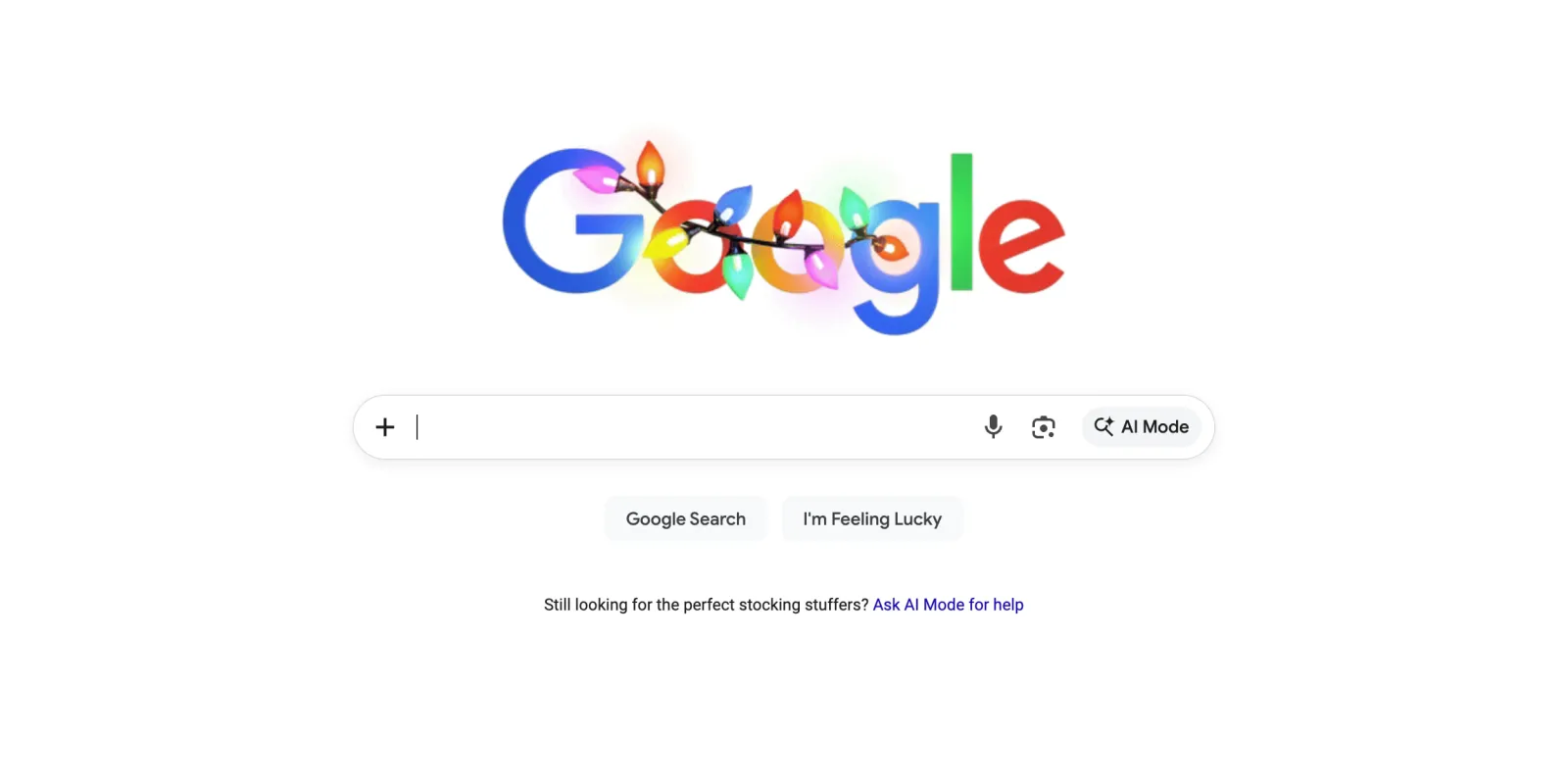
Google is making some changes to its search homepage. The simple white page with a search bar has looked the same for years. But now, there’s something new that you might have noticed when you open google.com on your computer. A small plus icon has appeared on the search bar, and it’s bringing some useful features right to your fingertips.
The plus icon sits at the far left of the search bar where the magnifying glass used to be. When you click on it, you get two options that pop up immediately. You can choose to upload an image or upload a file directly from your computer. This might seem like a small change, but it actually shows how Google is thinking differently about what search means.
For a long time, we’ve used Google mainly to type in questions and find websites. But Google wants people to understand that search can do much more than that. You can upload a picture of something you want to identify, or share a document that you need help understanding. The new plus menu makes these options more visible and easier to find.
This change comes after Google added an AI Mode shortcut to the homepage earlier this year. The plus menu works really well with AI Mode and something called AI Overviews, which are smart summaries that appear at the top of your search results. When you upload an image through the plus menu, Google can tell you what’s in the picture, where it might have been taken, or help you find similar images online. If you upload a file, especially if you’re using AI Mode, Google can read through it and answer questions about what’s inside.
The interesting thing about this update is that it’s only available on desktop computers right now. If you’re searching on your phone, you won’t see the plus menu yet. Google often tests new features on desktop first before bringing them to mobile devices, so it might show up on phones later. Another thing worth noting is that this change is showing up for everyone, even people who aren’t logged into a Google account.
The timing of this update makes sense when you look at what’s happening in the world of technology. More and more people are using AI tools to help them with everyday tasks. Google is competing with other companies that offer similar features, and making these tools easy to find on the homepage helps remind people that Google has these capabilities too.
For users, the plus menu represents a shift in how we can interact with search. Instead of only typing text into a search bar, we now have a clear invitation to use images and files as our starting point. The upload image feature can be really handy in many situations. Maybe you’re shopping and you see someone wearing a jacket you like. You can take a picture and upload it to Google to find out where to buy something similar. Or perhaps you’re trying to identify a plant in your garden, or you want to know more about a painting you saw.
The file upload option is also quite useful, especially for people who work with documents regularly. You can upload things like spreadsheets, presentations, or text documents, and then ask Google questions about them. This works particularly well if you’re using AI Mode, which can read through the content and give you insights or summaries.
The design of the plus menu is simple and clean, which fits with Google’s overall approach to its homepage. The company has always believed that the search page should be uncluttered and easy to use. Even with these new features, the homepage doesn’t feel crowded or confusing.
This update is part of Google’s larger effort to make search more helpful and versatile. The company wants people to think of Google as a place where they can get things done, not just find links to other websites. By making features like image and file upload more prominent, Google is encouraging people to use search in new ways. For people who have never used these features before, the plus menu provides an easy entry point that makes trying them feel less intimidating.
We use cookies to ensure that we give you the best experience on our website. If you continue to use this site we will assume that you are happy with it.