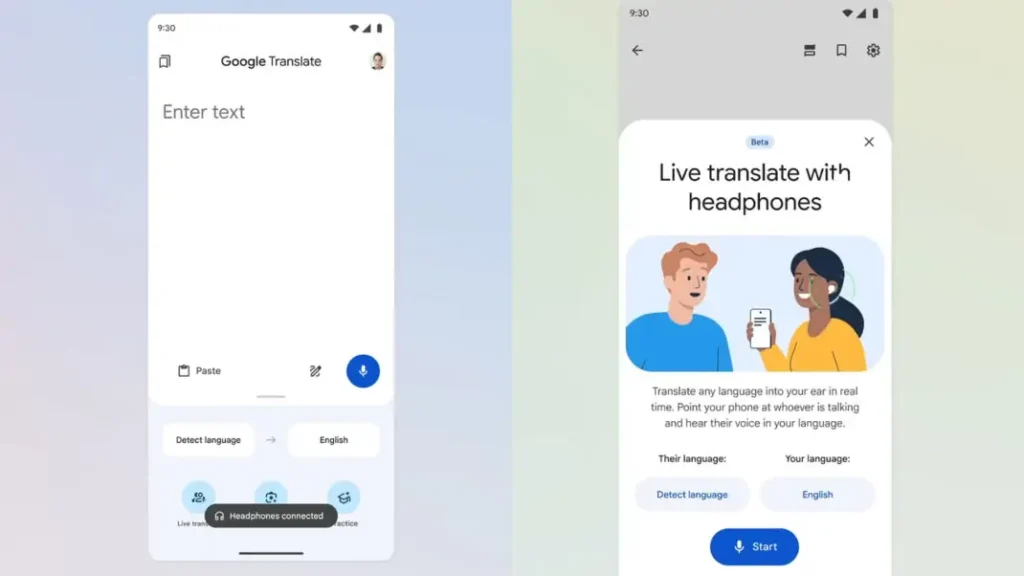
Google announced earlier today its “Live Translate,” an AI-powered Google Translate feature that allows users to listen to real-time translations in their headphones. The “Live Translate with headphones” feature is coming to iOS and additional nations.
This utility, which was first limited to Pixel Buds, is now compatible with any headphones that are connected to a device, and this is powered by the Gemini family of models.
At present this feature is now accessible on iOS and Android in the following countries: the United States, India, Mexico, Germany, Spain, France, Nigeria, Italy, the United Kingdom, Japan, Bangladesh, and Thailand. It used to only be accessible on Android in Mexico, India, and the United States.
Google also said that the feature effectively transforms any headphones into a one-way, real-time translating tool where each speaker’s tone, accent, and cadence are preserved via the real-time headphone translation experience, which makes use of Google’s Gemini AI assistance. According to Google, this facilitates following the discussion and identifying who is saying what.
The internet company claims that users can make use of the tool to understand train announcements while traveling abroad from country to country speaking varying languages or to follow talks with family who speak a different form of a language during dinner.
The feature supports more than 70 languages and may be used with any headphones.
By launching the Google Translate app, selecting the “Live Translate” option, and then plugging in their headphones, users who choose to can access it.
The launch of Live Translate coincides at the same time with Google’s announcement that it will extend Search Live, its AI-powered conversational search function, to all languages and regions where AI Mode is presently accessible worldwide. The service, which was previously limited to the United States and India, will now be accessible to users in over 200 nations and territories.
First introduced in July 2025, Search Live enables users to aim their phone’s camera at things to receive real-time assistance, facilitating back-and-forth conversations that utilize the visual context from the camera feed. Users must launch the Google app for iOS or Android and hit the “Live” symbol beneath the search bar in order to utilize the feature.
The device compatibility according to Google’s live audio translation works with any headphone, in contrast to Apple’s, which is only compatible with certain AirPods models.
To use this, users should open the Google Translate app on their iPhones, connect their headphones, and tap the Live Translate icon to start. And the available modes according to the company
Listening: Translates what it hears (e.g., announcements, lectures) directly into your headphones.
Conversation: Facilitates dialogue; translations play in your headphones while the other person hears them aloud from the phone speaker.
Text-only: Shows translated text on-screen without audio.
We use cookies to ensure that we give you the best experience on our website. If you continue to use this site we will assume that you are happy with it.