Gemini for Google TV is reviewing several improvements in the aspect of graphics after the launch at CES in January. According to Google TV, this rollout of the Gemini update turned the platform into a more interactive AI hub, in which it helps to enhance user interaction with sports and educational content. This upgrade includes a more prominent interface and richer media.
At present the Gemini icon shows up in a top pill with Quick Settings and a screensaver. “Gemini” has been relocated by Google to the upper-left corner of the display screen, next to Home, Live, and Apps. Beside it is also the user’s icon.
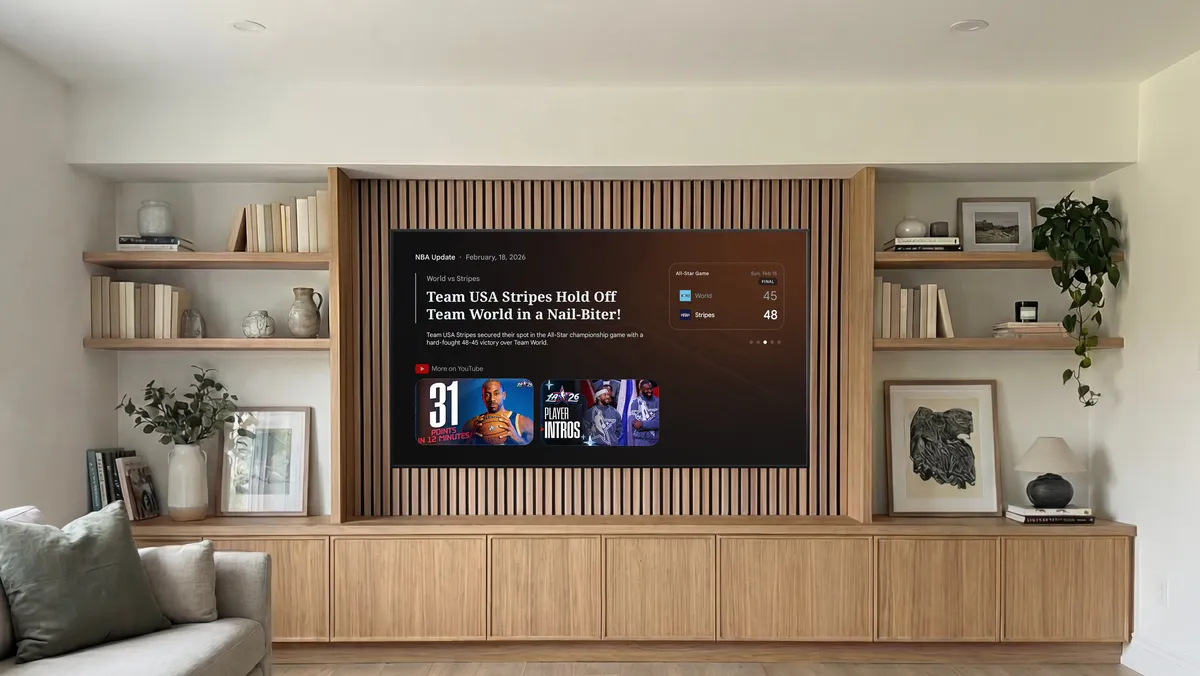
With the following “mix of visuals, videos, and text,” which will now be included in Gemini for Google TV answers. When users search for sports, for instance, this “richer visual help” might display a live scorecard and where to watch, while the search for recipes will be accompanied by video instructions that serve as a guide.
In a similar vein, Gemini answers are becoming more interactive and include “deep dives” when you want to learn more about a subject. “Turn passive viewing into meaningful screen time, enabling you to interact with the subjects that fascinate you most” is the concept.
“Health & wellness, economics, technology, and more” are just a few of the educational subjects that are covered by these “narrated visual breakdowns.” Individuals and users can access them by selecting “Learn” under the Gemini tab or by selecting “Dive deeper” under the replies.
Gemini also provides a personalized, interactive overview with suggested follow-up questions for users and their family to view on the large screen, covering everything from breaking down the physiological effects of cold plunging to showing how matcha is made from scratch.
Lastly, for “fans who live for the highlights but can’t always catch the live action,” Google is enhancing sports briefs. You will receive “timely, narrated overviews of your favourite in-season leagues,” including concise game summaries and player news, as an extension of news briefs.
“NBA, NCAA basketball, NHL, MLB, MLS, and NWSL” are all included. Sports briefs are available under the Gemini tab.
Also, Gemini now has its own dedicated navigation tab that delivers visual answers with commands like “the screen is too dim.” Users can modify TV settings, and Gemini will implement the modifications with images and live data from sources and offer recipe instructions paired with YouTube videos. New features include narrated deep dives for complex and unimagined topics, AI-narrated sports briefs with live scorecards, and natural language controls for TV settings.
Beginning today, Gemini for Google TV in the US and Canada will have richer visual reactions.
In the United States, you may begin experimenting with deep dives and sports briefs on Gemini-capable devices; wider device compatibility will be available this spring.
The rollout began today in the US and Canada, with Australia, New Zealand, and the UK expected later in the coming spring of 2026, with additional nations to follow throughout the year. Not all devices have this TV feature; however, it debuts on select TCL Google TV models, including the Google TV Streamer, and requires Android TV OS 14 or higher.
We use cookies to ensure that we give you the best experience on our website. If you continue to use this site we will assume that you are happy with it.