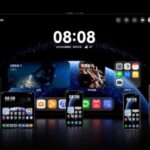
Starting today, the latest Android Q beta is available for download as announced by the tech giant, Google during its conference held at Mountain View, California. The exciting thing is that this new Beta is now available for 15 new non-Google phones and these are:
Asus Zenphone 5Z
Essential Phone
Nokia 8.1
Huawei Mate 20
LG G8
OnePlus 6T
OPPO Reno
Realme 3 Pro
Sony Xperia XZ3
TECNO Spark 3 Pro
Vivo X27, NES S, NEX A
Xiaomi Mi Mix 3 5G and Xiaomi Mi 9
Like we expect with every new Android version, Android Q is chock-full of all sorts of new features. We’ll likely be introduced to even more as beta updates are released throughout the year leading up to the final release, but even right now, there’s a lot to unpack.
We’ll dive into some of the biggest ones below, but if you want a recap of all the main highlights, be sure to check out the roundup below.
Dark mode
Unlike Android 9 Pie, which makes a heavily attempt at dark mode—it’s under Display, Advanced and Device theme in Settings—but it’s much more extensive and complete in Android Q. As yet though, there’s no actual dark mode toggle switch, so make sure you’ve set the theme the way you like it before you abandon Android 9 Pie.
Notification swipes and bell icons
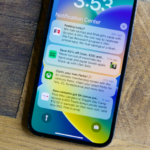
This feature is considered small but it’s potentially significant: with the latest Android Q which allows you dismiss notifications with a swipe to the right. Previously a swipe to the left or the right would dismiss them, but now a swipe to the left brings up the notification options. Oh, and there’s a new ringing bell icon that lets you identify the newest alert when you’ve got a whole bunch of them up on screen.
More notification options
Here’s another change to notifications in the Android Q beta which helps silent irrelevant notification: for instance, when you long-press on a notification you will get three options: Block, Show silently, and Keep alerting. Now, you can click on silent mode on the notifications which will appear without a sound or vibration. This feature is also available in Android 9 Pie too, but you couldn’t get at it from the notifications themselves.
Screenshots support notches and corners
if you take lots of screenshot like we do on your Android devices then you will consider this feature a potentially significant change. Because screenshots now include notches and rounded corners as black cutouts, more closely matching the actual look of your screen. hopefully, as time goes on an option to toggle this feature on and off might appear in future Android Q beta releases.
Privacy Protection
Android was crafted for keeping the users’ privacy and security as the top-most priority. As it has matured over the course of time, it’s been upgraded with a bunch of features for protecting the users. Some of the advanced features added include a file-based encryption, locking down camera/mic background access, encrypted backups, lockdown mode, Google Play Protect, OS controls requiring apps to ask for permission prior to accessing the sensitive resources, etc.
With the update, users can now have more control over different apps and their access to the shared files, and also the users can also keep a track on an app’s access to the images and videos. This is considered to be one of the biggest updates and enhancements of Android.
Besides this, a user can also decide which Download files an app should be able to access. Some other privacy features proffered by Android Q Beta are the limited access to device identifiers like serial numbers, IMEI, etc.
Control over Locations.
While using a app, and the app is requesting for a user’s location for product delivery, it will make sense and the user might allow it to do that. With a greater deal of control over such things, the users will certainly enjoy using Android Q. Because the advanced Operating System of Android Q Beta allows a user to control an app in finding his/her desired locations.
Sharing Shortcuts
With this feature, Sharing will become easier than ever, and it gives users the option of directly switching to another app for sharing content. The developers can now publish the shared targets, which launch a particular activity and these can also be displayed in the share UI.
Sharing Shortcut will work the same as the App Shortcuts. As Google is in the process of expanding the Shortcut Info API for streamlining the process of integration. The API will also enlist the pre-Android Q devices for using their functionalities in the Direct Share. You can get an early sample app source code from this link.
Faster App Launches
With the introduction of Android Q Beta, the new-age developers have earned the ability to process an app data earlier and subsequently send it to the security container so it becomes absolutely ready to launch. It has made opening apps a lot faster and easier as Android has learned more about those parts of an app code that can be used on a frequent manner.
Live Caption transcribes media locally in real-time
Closed captions are crucial for deaf and hard-of-hearing people to understand what’s being said in a video, podcast, game, or any other form of media where words are spoken, and to make sure these are available virtually everywhere, Android Q comes with a feature called “Live Caption.”
Live Caption is able to provide real-time captions for just about anything on your phone where someone is talking, and the best part is that it happens locally on-device. In other words, no internet connection of any kind is required.
You can turn Live Caption on through Android Q’s accessibility settings, and for a lot of users.
Built-in screen recording
One of our most requested features for Android, is a built-in screen recording, and is live in Android Q. However, it is a little tricky to enable right now as it’s hidden deep in the developer options, it is functional and allows you to natively record a video of your screen with an optional voiceover and visual indicators for your taps on the screen. This will hopefully be implemented in a more user-friendly manner in future builds of Q, but it’s still exciting nonetheless that it’s finally here.
The Mode of Wi-Fi Performance
Android Q Beta 1 ensures a very high performance as well as an low-latency mode for different wireless connections. The improved voice calls and real-time gaming can get benefited by this to a great extent.
A Better Network Connection
By rebranding the Wi-Fi stack, the Android Q can bring a discernible improvement in the performance and privacy of a device. Also, it can boost the common use-cases such as the management of IoT devices and suggestion of different Internet connections sans requiring any location permission.
Setting Panels
The inclusion of a brand-new Setting Panel API has made it possible to show the key system settings directly in an app’s context. This is taking advantage of the Slices features, which was found in Android Pie. The Setting Panel refers to a floating UI, which can be evoked from an app to show the system settings as well as toggles.
Related Reading
More contextual TechBooky stories selected from tags, categories and article context.
We use cookies to ensure that we give you the best experience on our website. If you continue to use this site we will assume that you are happy with it.