• Archives
  • Cryptocurrency
  • Earnings
  • Enterprise
  • About TechBooky
  • Submit Article
  • Advertise Here
  • Contact Us
TechBooky
  • African
  • AI
  • Metaverse
  • Gadgets
Generic selectors
Exact matches only
Search in title
Search in content
Post Type Selectors
Search in posts
Search in pages
  • African
  • AI
  • Metaverse
  • Gadgets
Generic selectors
Exact matches only
Search in title
Search in content
Post Type Selectors
Search in posts
Search in pages
TechBooky
Generic selectors
Exact matches only
Search in title
Search in content
Post Type Selectors
Search in posts
Search in pages
Home Social Media

The New Twitter ‘Unmention’ Feature: Tips On How To Untag Oneself From A Tweet

Ayoola by Ayoola
July 28, 2022
in Social Media, Tips
Share on FacebookShare on Twitter


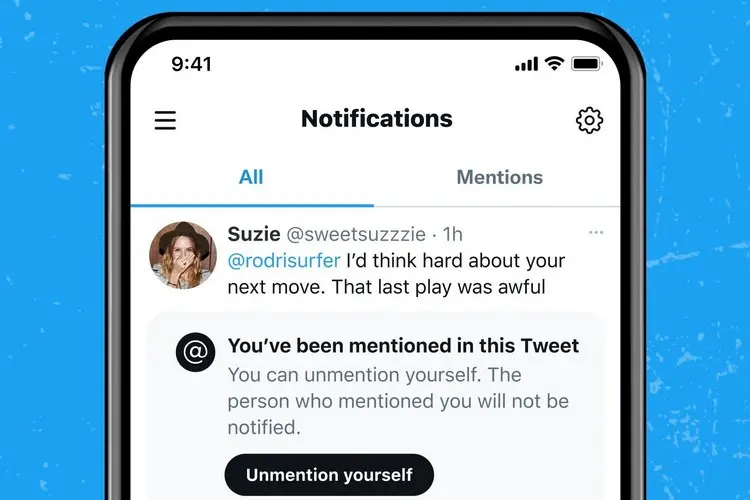
Twitter—has quietly added a safety tool called “Unmention” (or “Leave this conversation” in the latest UI). The feature lets you slip out of any tweet that’s drawing unwanted attention or linking you to a topic you’d rather avoid. Once you use it—on the web, iOS, Android or any other X-compatible client—your @handle is converted to plain text, notifications from that thread stop immediately, and no-one in the conversation can tag you again.

The company says the rollout is part of a broader push to curb harassment and give users granular control over who can reach them. In practice, Unmention works exactly like an untag button: you tap the ⋯ (three-dot) menu, choose Leave this conversation, confirm, and you’re out—no further pings, no fresh mentions, just peace of mind.

We are now going to give steps on how to use the Unmention feature below.

Here are the few steps users must follow to remove themselves from a conversation they found inappropriate or do not  want to be  associated with.

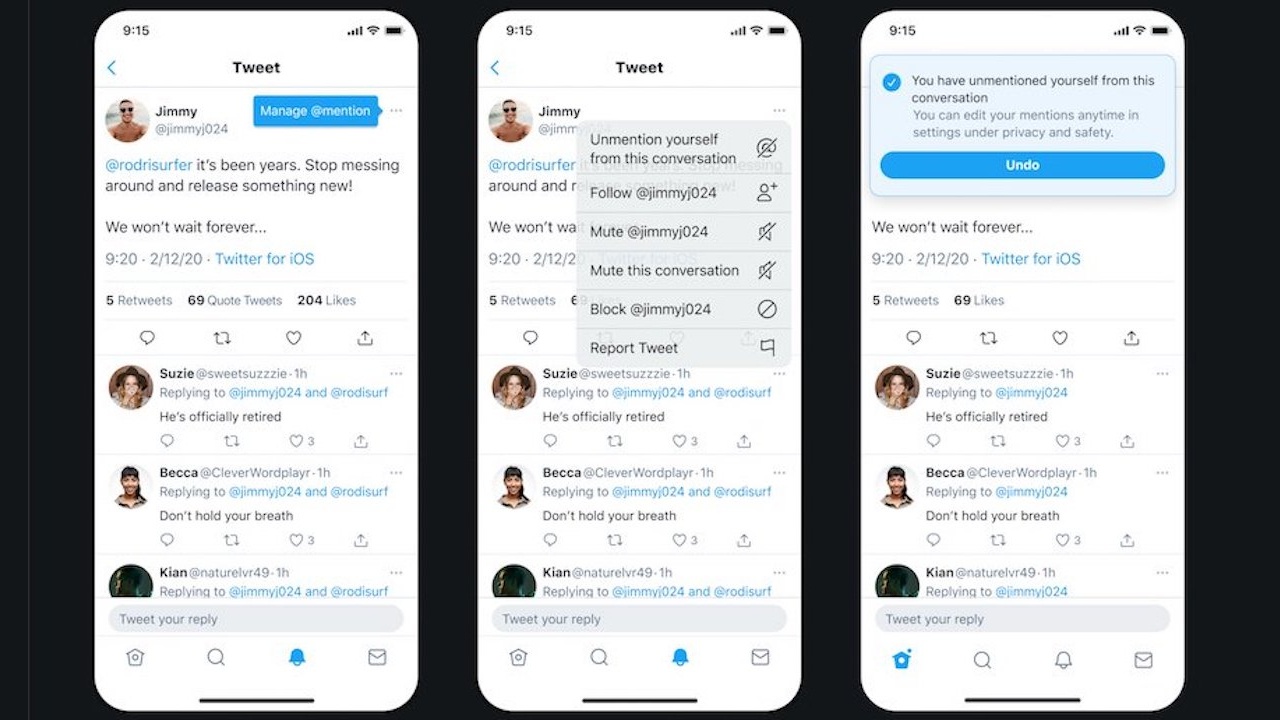
  • User should identify the tweet they want to untag themselves from and tap the 3-dot menu there. 

It is done as shown in the picture below:

  • It would then show “Leave this conversation” option, the user should click on that as shown below.

  • The next step after that is for the user to confirm he/she wants to leave the conversation. The user will then be untagged from all the tweets in that thread or conversation.

It should be noted that the username of the mentioned user who got untagged will remain in the original tweet as a text but the person will be untagged from the original tweet and all replies.  What this implies is that  though the username on the mentioned user  on the initial tweet stays, even after using the ‘Unmention’ feature, it would not highlight to enable other users tap on it to view their profile, and users will not be able to mention the tagged person their future responses to that tweet. 

Note: The ‘Mute’ feature shown in the images above is different from the ‘Unmention’ feature as the former only makes sure the user stops getting notifications from that Tweet conversation he or she was mentioned in, but the latter not only stops the notifications from the tweet but untags the user’s account from the conversation completely. Users can also still tag the mentioned person who used the ‘Mute’ feature unlike the ‘Unmention’ feature where they can’t be tagged anymore.

Related Posts:

  • twitter-1
    The Next Version On Twitter App Updates Will Feature…
  • us-internet-merger-twitter-musk-buyout
    Twitter Blue Launches In Japan
  • hero-image (1)
    Twitter Launches Its "Blue" Service In Japan
  • 05E2CA86-8D2D-42C5-996B-F65E1E872D9C
    Twitter To Increase Tweet Character Length For Paid…
  • Elon-Twitter
    Elon Musk Shakes Up Twitter: The Unthinkable Tweet Caps
  • Meta Platforms Inc. Launches Twitter Inc. Rival Threads
    Meta Launches A New Social App 'Threads', Rival For Twitter
  • l170_7931583229821
    Google Chrome Update Disables Annoying Alerts
  • skynews-whatsapp-phone-messaging_6156083
    WhatsApp Introduces Chat Lock To Lock & Hide Chat Threads

Discover more from TechBooky

Subscribe to get the latest posts sent to your email.

Tags: new featuresocial mediatipstwittertwitter unmention
Ayoola

Ayoola

Ayoola Faseyi, an Abuja based Journalist with interest in Technology and Politics. He is a versatile writer with articles in many renowned News Journals.He is the Co-Founder of media brand, The Vent Republic.

BROWSE BY CATEGORIES

Receive top tech news directly in your inbox

subscription from
Loading

Freshly Squeezed

  • iPadOS 26.2 Arrives With Enhanced Multitasking Tools December 15, 2025
  • Cursor Introduces An AI Coding Tool For Designers December 12, 2025
  • OpenAI Unveils More Advanced Model as Google Rivalry Grows December 12, 2025
  • WhatsApp Is Redefining The Voicemail Features For Users December 12, 2025
  • Microsoft’s Nadella Is Building a Cricket App in His Spare Time December 12, 2025
  • Google Photos Expands ‘Remix’ Feature to More Countries December 12, 2025
  • Google Play Store Reinstates Fortnite December 12, 2025
  • Vodacom Announces Price Hike December 12, 2025
  • ChatGPT Set to Launch ‘Adult Mode’ By Q1 2026 December 12, 2025
  • Amazon to Invest $35B in India by 2030 for Jobs & AI Growth December 11, 2025
  • SpaceX May Launch Its Big IPO Next Year With a $1tr Valuation December 11, 2025
  • GPT-5.2 Debuts as OpenAI Answers “Code Red” Challenge December 11, 2025

Browse Archives

December 2025
MTWTFSS
1234567
891011121314
15161718192021
22232425262728
293031 
« Nov    

Quick Links

  • About TechBooky
  • Advertise Here
  • Contact us
  • Submit Article
  • Privacy Policy
Generic selectors
Exact matches only
Search in title
Search in content
Post Type Selectors
Search in posts
Search in pages
  • African
  • Artificial Intelligence
  • Gadgets
  • Metaverse
  • Tips
  • About TechBooky
  • Advertise Here
  • Submit Article
  • Contact us

© 2025 Designed By TechBooky Elite

Discover more from TechBooky

Subscribe now to keep reading and get access to the full archive.

Continue reading

We use cookies to ensure that we give you the best experience on our website. If you continue to use this site we will assume that you are happy with it.