An exciting feature is now introduced, as Instagram users can now add AI-powered speech effects to their voice notes in Direct Messages (DMs) thanks to a new feature. With the help of this Meta AI-powered upgrade, you may change the rhythm, tone, and emotion of your voice into a variety of character-inspired styles.
The new AI voice effect function for voice notes in direct messages (DMs) has been released by Instagram, allowing users to add filters to their voice notes thanks to this new functionality. A user can select from about eight different speech effects. Accessible through any chat window, the feature is currently operational in India as well. The new function is the most recent addition to the AI tools offered by the social media site. According to a recent source, Instagram is also developing an AI-powered face-swapping feature that the firm may refer to as “Create My Likeness.”
The photo-sharing website said in a press release that it has begun implementing AI Voice Effects, a new AI-powered function. When sending audio notes to others on the social media platform, users have the option to add filters. Members of staff for a press team were able to confirm that the new AI-powered feature is currently operational in India.
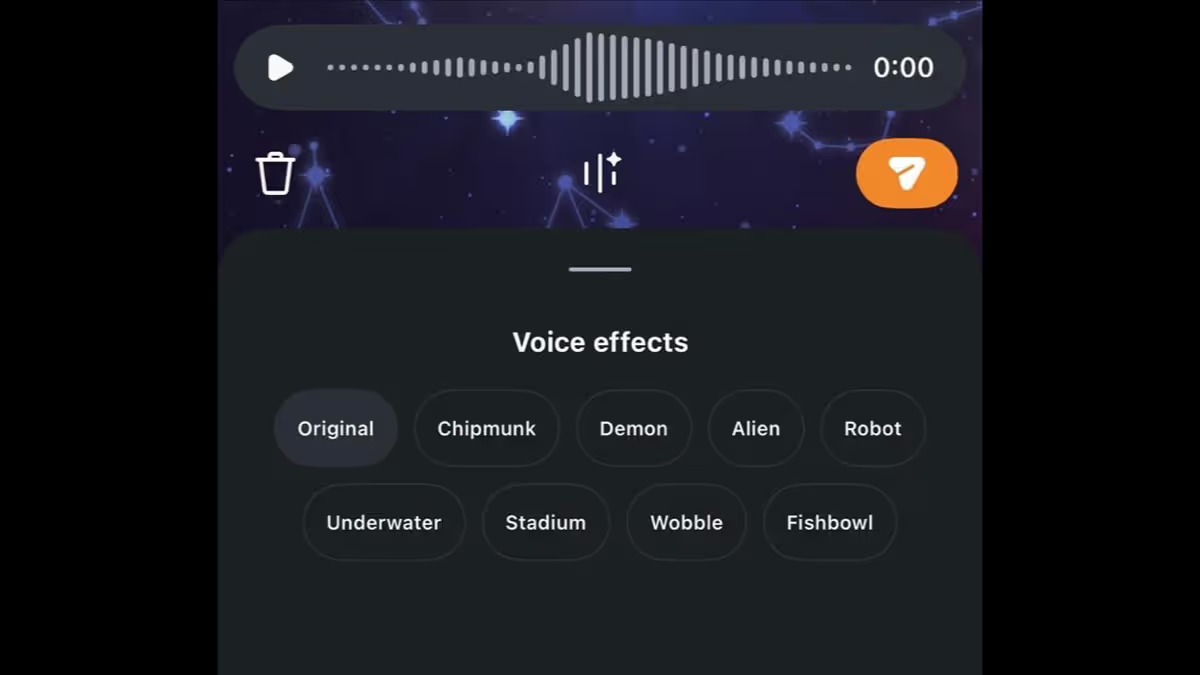
AI voice filters, which are now available, include eight unique filters in the rollout to give users conversations personality or humour. The eight AI speech effects, including “Chipmunk – Playful and high-pitched,” “Demon – Dramatic and profound,” “Alien – Unsettling and supernatural,” “Robot – Synthetic, metallic sound,” “Underwater – Bubbling, submerged effect underwater,” “Stadium – Sound that reverberates like it’s in a big arena,” “Wobble – A trembling or shaky voice,” and “Fishbowl – An enclosed, muffled sound effect” are available to users via direct messages. By selecting the original option, users can also return to the voice note in its pure form. By clicking on the voice note, customers may also see the name of the voice filter that was added, according to the business. Before delivering it, the receivers can also tap on it to simulate the AI voice effect.
Users must first launch Instagram, open any direct message thread, press the voice note record button, click the AI voice effects button beneath the voice note, and record the voice note in order to utilize Instagram’s AI voice effects. After a voice recording is made, the user can alter its tone by clicking on one of the AI voice effects listed above. Before sending the voice message to others, users have the option to preview it.
This contributes to the social media platform’s efforts to offer additional AI-powered features to its app, as was already mentioned. According to a recent report, Instagram intends to launch “Create my likeness,” an AI-powered face-swap function. Beyond generating images and videos from text prompts, the AI tool is also reported to allow users to create content based on another individual’s likeness.
To apply these new effects, these filters are readily accessible within any direct message thread:
To begin recording, open a direct message and tap the microphone icon. In the message composer, click the “Voice Effects” button. As usual, record your message, preview it, and apply. To hear how the various effect icons sound, tap them. If necessary, you can also go back to the “Original” voice. Lastly, send the message. After the message is sent, the recipient can see which effect was applied and tap it to “mimic” the same effect in their response.
Many users in places like India have already confirmed that this functionality is operational as it rolls out globally on both iOS and Android devices.
Paul Balo is the founder of TechBooky and a highly skilled wireless communications professional with a strong background in cloud computing, offering extensive experience in designing, implementing, and managing wireless communication systems.
We use cookies to ensure that we give you the best experience on our website. If you continue to use this site we will assume that you are happy with it.