• AI Search
  • Cryptocurrency
  • Earnings
  • Enterprise
  • About TechBooky
  • Submit Article
  • Advertise Here
  • Contact Us
TechBooky
  • African
  • AI
  • Metaverse
  • Gadgets
Generic selectors
Exact matches only
Search in title
Search in content
Post Type Selectors
Search in posts
Search in pages
  • African
  • AI
  • Metaverse
  • Gadgets
Generic selectors
Exact matches only
Search in title
Search in content
Post Type Selectors
Search in posts
Search in pages
TechBooky
Generic selectors
Exact matches only
Search in title
Search in content
Post Type Selectors
Search in posts
Search in pages
Home Artificial Intelligence

Microsoft 365 Copilot Receives Faster Performance Features & Redesigned Look

Akinola Ajibola by Akinola Ajibola
May 29, 2026
in Artificial Intelligence
Share on FacebookShare on Twitter

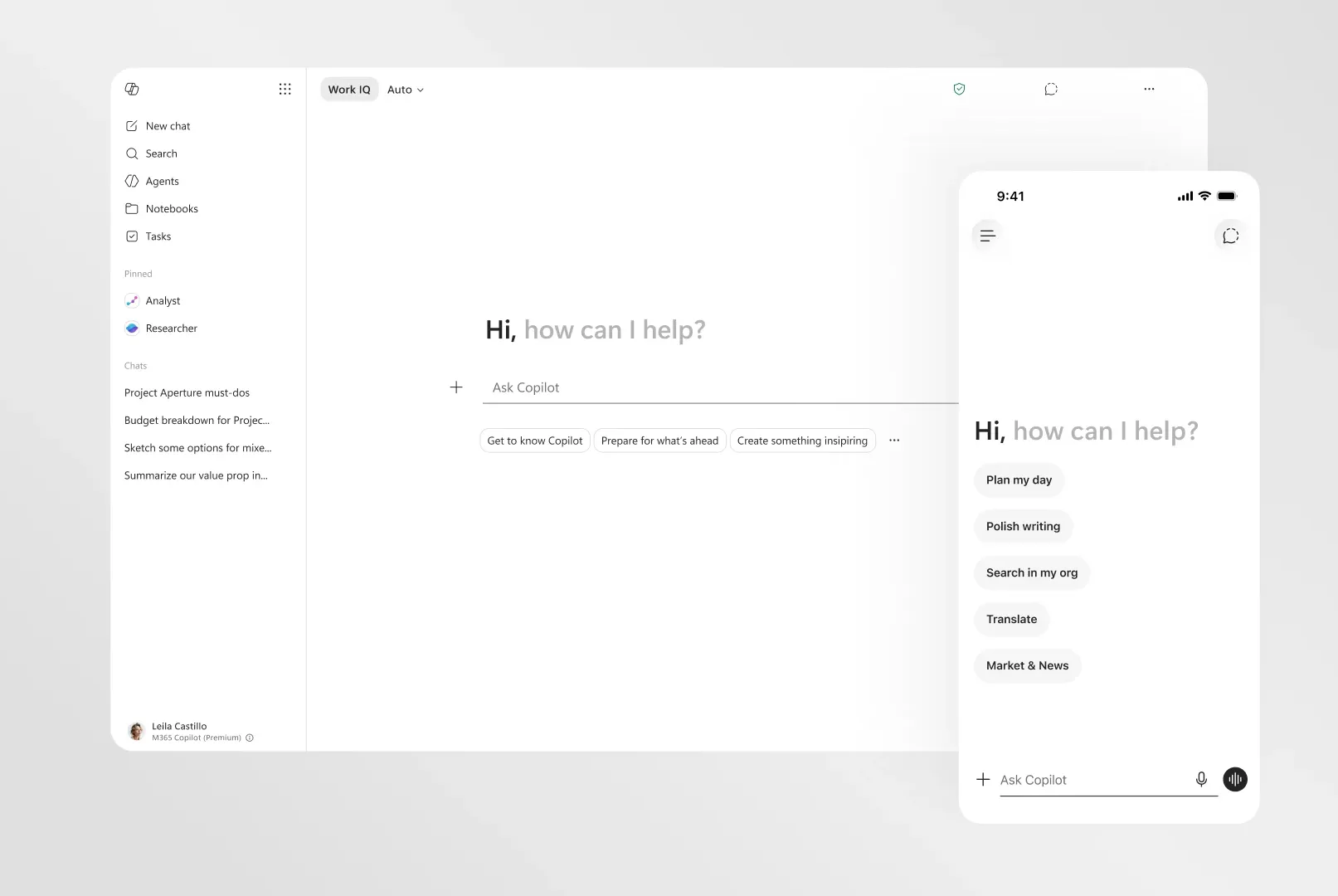
Microsoft is releasing a redesigned version of Microsoft 365 Copilot that loads twice as quickly and has a cleaner interface. Microsoft claims that as part of this update, Copilot will offer more dependable, organised results that are simpler to scan.

Microsoft refers to the redesign’s “progressive disclosure” feature, which is being implemented on desktop and mobile devices. This implies that rather than displaying a large number of alternatives at once, Copilot will provide you with tools and controls based on your input. Copilot’s improved prompt box, which will enlarge to accommodate anything you input or paste in, now allows you to format your content straight within.

In a similar vein, Google last week released a significant design change for its Gemini AI app that enables the chatbot to organize its answers according to your input.

Copilot opens in a side panel within Microsoft 365 apps, where it can respond to inquiries and offer recommendations and modifications to your content. Additionally, a chat window can be launched from within a slide, spreadsheet cell, or paragraph.

We've redesigned Copilot to be simpler, faster, and more intuitive, to help keep you in the flow of your work.

Try it out: https://t.co/iBuMPZ6L4b

— Satya Nadella (@satyanadella) May 28, 2026

The redesigned Microsoft 365 Copilot is expected to deliver performance upgrades, including doubled loading speed for over 50% faster launch and content loading, a 10% reduction in response times for complex chat requests, and up to 50% faster general background interactions across different models for a noticeably smoother workflow.

The design revamp introduces a progressive disclosure workspace that hides complex configurations until needed while dynamically surfacing relevant tools, an expanding prompt box with built-in text formatting to comfortably accommodate large blocks of copy or data, and structured and scannable layered outputs for easier digestion of key action points, while retaining the accessible left navigation panel for quick transitions between recent chats, searches, AI agents, and Copilot Notebooks.

This update will appear immediately in users’ Windows, mobile, and web workspaces if the user is using the app.

Related Posts:

  • edgeredesign
    Microsoft Edge Gets A Redesign Inspired By Copilot
  • 01_Wire-Hero-1920x1080-1
    Microsoft's Xbox Copilot Now Available On Windows 11…
  • OMB_Hero-WholeNewWayToWork
    Microsoft Denies Office-to-Copilot Rebranding Reports
  • 257700_Xbox_copilot_CVirginia
    Microsoft Tests Copilot for the Xbox Assistant
  • microsoft-copilot-2
    Windows 11 Preview Adds Shared Audio and Taskbar Copilot
  • Microsoft-Edge-browser-gains-Copilot-Mode-Integrated-AI-naviagtes-searches-and-soon-shops-for-you
    Edge Gets New Copilot Mode Feature Making it an AI Browser
  • Copilot-en-SharePoint
    Microsoft Copilot Introduces Groups Feature
  • Copilot-PC-hero-approved
    Microsoft Rolls Out New Windows 11 AI Copilot Features

Discover more from TechBooky

Subscribe to get the latest posts sent to your email.

Tags: Copilotmicrosoftredesign
Akinola Ajibola

Akinola Ajibola

BROWSE BY CATEGORIES

Receive top tech news directly in your inbox

subscription from
Loading

Freshly Squeezed

  • DataHub Turns SQL Query History into Context Layer to Cut AI Data Errors May 29, 2026
  • DeepSeek Locks in 75% Price Cut on V4 Pro, Undercutting Western AI Models by up to 25x May 29, 2026
  • Mistral AI Targets Enterprise with Industrial Push, New Data Center and Assistant Rebrand May 29, 2026
  • Microsoft 365 Copilot Receives Faster Performance Features & Redesigned Look May 29, 2026
  • Anthropic Surges To A $965 Billion Valuation, Overtaking OpenAI May 29, 2026
  • Google Rolls Out Media App Switcher For Android Auto May 29, 2026
  • Bluesky Adopts Long-Form Content To Rival X Articles May 29, 2026
  • Meta Rolls Out Subscriptions For Instagram, Facebook, & WhatsApp, With AI Plans May 28, 2026
  • TELCOs (Airtel & Glo) Resumes Airtime Borrowing To Customers May 27, 2026
  • Over 185,000 Affected By 7-Eleven Data Breach May 26, 2026
  • Kenya’s $21 Million Appeal To Track Social Media May 26, 2026
  • Huawei Reveals New Chip Strategy to Beat US Sanctions and Challenge Nvidia May 25, 2026

Browse Archives

May 2026
MTWTFSS
 123
45678910
11121314151617
18192021222324
25262728293031
« Apr    

Quick Links

  • About TechBooky
  • Advertise Here
  • Contact us
  • Submit Article
  • Privacy Policy
Generic selectors
Exact matches only
Search in title
Search in content
Post Type Selectors
Search in posts
Search in pages
  • African
  • Artificial Intelligence
  • Gadgets
  • Metaverse
  • Tips
  • AI Search
  • About TechBooky
  • Advertise Here
  • Submit Article
  • Contact us

© 2025 Designed By TechBooky Elite

Discover more from TechBooky

Subscribe now to keep reading and get access to the full archive.

Continue reading

We use cookies to ensure that we give you the best experience on our website. If you continue to use this site we will assume that you are happy with it.