• Cryptocurrency
  • Earnings
  • Enterprise
  • About TechBooky
  • Submit Article
  • Advertise Here
  • Contact Us
TechBooky
  • African
  • AI
  • Metaverse
  • Gadgets
Generic selectors
Exact matches only
Search in title
Search in content
Post Type Selectors
Search in posts
Search in pages
  • African
  • AI
  • Metaverse
  • Gadgets
Generic selectors
Exact matches only
Search in title
Search in content
Post Type Selectors
Search in posts
Search in pages
TechBooky
Generic selectors
Exact matches only
Search in title
Search in content
Post Type Selectors
Search in posts
Search in pages
Home Security

Microsoft Accounts Can Now Go Fully Passwordless.

Olagoke Ajibola by Olagoke Ajibola
September 15, 2021
in Security
Share on FacebookShare on Twitter


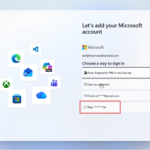
Microsoft now lets you remove passwords from Microsoft accounts to embrace a passwordless future. Starting today, the software giant will let consumers sign in to Microsoft accounts with its Microsoft Authenticator app, Windows Hello, a security key, or an SMS / email verification code instead of a password.

The new option arrives just months after Microsoft started rolling out passwordless authentication for commercial users in March to help people adjust to the realities of remote work. “When I think of security, I think you’ve got to protect your whole life,” says Vasu Jakkal, corporate vice president of Microsoft security, compliance & identity, in an interview. “It’s no longer enough just to think about work or home and anything in between.”

Microsoft has been working toward a passwordless future for years, and the pandemic has only accelerated things. “When you have digital transformation and businesses having to go remote overnight, the number of digital surfaces has increased exponentially,” explains Jakkal. “The number of attack surfaces has increased exponentially, so that was a big driving factor for us in accelerating a lot of our security initiatives.”

Today is a major milestone for Microsoft’s passwordless ambitions after the company enabled security keys in 2018 and made Windows 10 passwordless in 2019. “We have been rolling this out at Microsoft and nearly 100 percent of Microsoft is now passwordless,” says Jakkal. More than 200 million people are already using passwordless options, and Jakkal is optimistic about the adoption among consumers.

It’s a relatively simple process to remove your password, too. You’ll need to have the Microsoft Authenticator mobile app installed and linked to your personal Microsoft Account. Once that’s complete, you can visit Microsoft and choose advanced security options and then enable passwordless accounts in the additional security section. You then approve the change from your Authenticator app and you’ll be password-free. You can always reverse the change and add a password back to your Microsoft account in the future.

Related Posts:

  • Microsoft_passwordless
    Microsoft Will Roll Out Passkey Support For All Consumers
  • microsoft_account_changename
    Microsoft Requires Account Sign-In Starting February
  • Microsoft
    Microsoft Outage Affects Thousands Of Users Worldwide
  • Announcing-the-new-admin-center-1c
    Microsoft 365 Admin Center Logins Will Require MFA
  • ms authenticator 3
    Microsoft Authenticator Blocks Rooted and Jailbroken Devices
  • microsofts-surface-duo-dualscreen-androi-5f1f3d057e8c350ae07dd862-1-jul-28-2020-15-24-20-poster
    Microsoft Patch Tuesday Fixes 63 Bugs, 1 Zero-Day
  • csm_1200x630wa_5026e9630c
    Microsoft Pushes Edge & Disables Authenticator Autofill
  • VoidProxy_adminPanel_Login
    VoidProxy Targets Microsoft 365 & Google Accounts

Discover more from TechBooky

Subscribe to get the latest posts sent to your email.

Tags: enterprisegadgetinternetmicrosoftnew featurepasswordsecuritysoftwareusers
Olagoke Ajibola

Olagoke Ajibola

Olagoke Ajibola is a creative writer and content producer with an eye for details and excellence. He has a demonstrated history of telling stories for TV, Film and Online. Aside from being fascinated by the power of imagination, his other interest are travel, sport, reading and meeting people.

BROWSE BY CATEGORIES

Receive top tech news directly in your inbox

subscription from
Loading

Freshly Squeezed

  • Trump-Linked Crypto Push Faces Lawsuit, Ethics Fight and Market Setbacks May 3, 2026
  • OpenAI Ignored Employee Warnings Before ChatGPT-Linked Shooting, Report Says May 3, 2026
  • NGX Q1 profit jumps 94% as trading-fee income soars 189% May 3, 2026
  • AI Beats Doctors in Harvard ER Study, Showing Major Shift in Healthcare May 3, 2026
  • Meta Acquires Robotics Startup To Boost & Improve Its Humanoid AI Efforts May 2, 2026
  • xAI Rolls out Grok 4.3 and a New Voice Cloning Suite May 2, 2026
  • Pentagon Taps Nvidia, Microsoft And AWS To Bring AI To Classified Networks May 1, 2026
  • Hackers Are Exploiting Critical cPanel Bug, Putting Millions of Websites at Risk May 1, 2026
  • Alibaba’s Metis Agent Aims to Fix ‘Trigger‑Happy’ AI Tool Use With New RL Framework May 1, 2026
  • Samsung Q1 2026 Earnings: Record Profit Driven by AI Memory Chip Boom May 1, 2026
  • Qualcomm Q1 2026 Earnings: China Weakness and AI Push Drive Mixed Results May 1, 2026
  • Amazon Q1 2026 Earnings: AWS and AI Drive Strong Growth Despite Spending Concerns May 1, 2026

Browse Archives

May 2026
MTWTFSS
 123
45678910
11121314151617
18192021222324
25262728293031
« Apr    

Quick Links

  • About TechBooky
  • Advertise Here
  • Contact us
  • Submit Article
  • Privacy Policy
Generic selectors
Exact matches only
Search in title
Search in content
Post Type Selectors
Search in posts
Search in pages
  • African
  • Artificial Intelligence
  • Gadgets
  • Metaverse
  • Tips
  • AI Search
  • About TechBooky
  • Advertise Here
  • Submit Article
  • Contact us

© 2025 Designed By TechBooky Elite

Discover more from TechBooky

Subscribe now to keep reading and get access to the full archive.

Continue reading

We use cookies to ensure that we give you the best experience on our website. If you continue to use this site we will assume that you are happy with it.