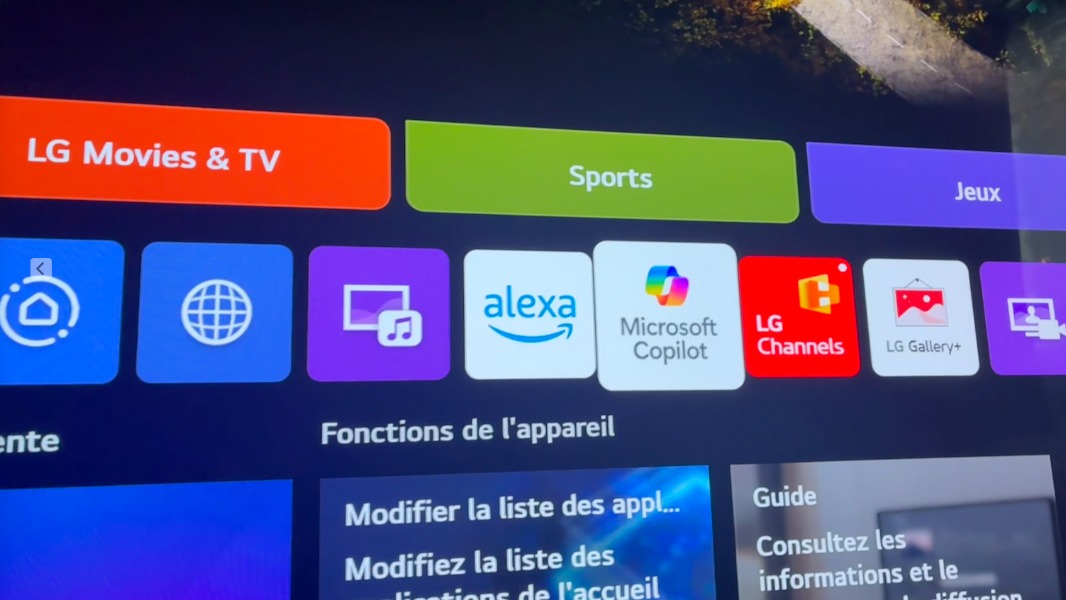
If you own an LG smart TV, you might have noticed something new appearing on your home screen recently. Microsoft Copilot, the company’s assistant tool, has started showing up on LG televisions after a recent software update. The surprising part is that many owners didn’t ask for it, and even more frustrating, they can’t remove it.
The issue first came to light when someone shared their experience on reddit, posting a picture of their TV screen with Copilot sitting right there among their other apps like YouTube. The post quickly gained attention, with thousands of people sharing similar stories. Many LG TV owners were confused about why this app suddenly appeared and even more annoyed that they couldn’t get rid of it.
According to reports from people who have tried to remove the app, Copilot behaves differently from regular apps you might download from an app store. While you can normally delete apps you don’t want, Copilot appears to be treated as a built-in part of the TV system. LG’s own help documents mention that some apps on their TVs cannot be deleted, only hidden. This means that while you might be able to move Copilot out of sight, it’s still technically installed on your television.
This development didn’t come completely out of nowhere. Earlier this year at a big technology event called CES, LG announced they would be bringing Microsoft Copilot to their newest smart TVs. At the time, the company said this feature would help people find shows and movies more easily by understanding what they’re looking for in a more natural way. LG claimed that Copilot would help users organize information and make searching for content smoother.
But there’s a big difference between announcing a feature and forcing it onto people’s TVs without giving them a choice. The way this rollout happened has left many users feeling like they’ve lost control over their own devices. When you buy a television, you expect to decide what apps and features you want to use, not have them pushed onto you automatically.
The Copilot app on LG TVs currently works as a shortcut to Microsoft’s web-based assistant. It’s meant to answer questions and provide recommendations, similar to how you might use it on a computer. However, many people are questioning what value this brings to their TV watching experience. After all, most people use their televisions to watch movies, play games, or stream shows, not to have conversations with an assistant or search for complex information.
Some TV owners have tested the app and found it’s not particularly useful for their needs. One person mentioned they already have Copilot turned off on their computer, so they certainly don’t want it on their TV. Others pointed out that their TVs already come with too many apps they never use, and adding another one that can’t be removed just makes the situation worse.
The frustration goes beyond just having an unwanted app. Many people are concerned about what Copilot might be doing in the background. Smart TVs already have a reputation for collecting information about what people watch and how they use their devices. Adding another piece of software from a major technology company raises questions about privacy and data collection, even if the app is just sitting there unused.
For people who want to avoid this situation, there are a few options, though none of them are perfect. Some LG TV owners are choosing to turn off automatic updates in their TV settings. This prevents the TV from installing new software without permission, which means Copilot won’t show up if you haven’t updated yet. However, this also means you might miss out on other improvements or fixes that come with software updates.
Another approach that some people are taking is to simply not connect their smart TV to the internet at all. Instead, they’re using separate streaming devices like Apple TV, Roku, or similar products to watch their content. These devices plug into the TV and handle all the streaming and app functions, which means the TV itself just acts as a screen. This gives users more control over what software runs and what apps appear on their screen.
The situation with LG and Microsoft isn’t unique to these two companies. Samsung also announced they would be bringing Copilot to their TVs this year. This suggests that the push to add assistant features to televisions is becoming a broader trend in the industry. Technology companies see TVs as another place where people spend a lot of time, and they want their assistant tools to be available everywhere.
However, the backlash from LG TV owners shows that people don’t necessarily want these features, especially when they’re forced upon them. The response has been strong enough that it’s making headlines across technology news sites, with many observers pointing out that this kind of forced installation feels similar to unwanted software that used to plague computers years ago.
What makes this particularly frustrating for consumers is that smart TVs are becoming harder to avoid. Almost every new television sold today has smart features built in. Finding a high-quality TV that’s just a screen without all the extra software and apps has become nearly impossible. Manufacturers make TVs more affordable by including these features and showing ads, which means a simple TV without smart capabilities would likely cost significantly more.
For now, LG TV owners who want to minimize Copilot’s presence are limited in their options. They can hide the app from their main screen, turn off automatic updates, or disconnect their TV from the internet entirely. Unless LG decides to change course and give people the option to fully remove the app, these workarounds are the best solutions available.
We use cookies to ensure that we give you the best experience on our website. If you continue to use this site we will assume that you are happy with it.