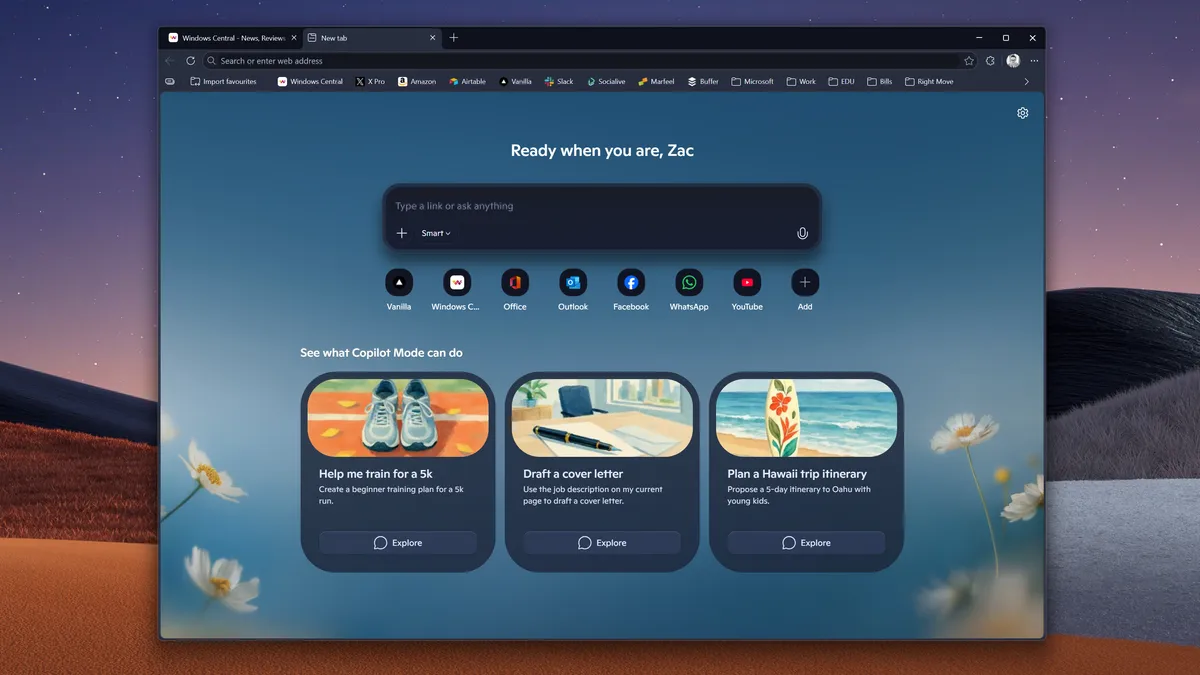
Microsoft is at it again as it gets ready to release a significant user interface update for its Edge browser. The developer has begun integrating the Copilot design language into early Canary and Dev test versions of its Microsoft Edge browser. The redesign marks a move away from the traditional Fluent Design language toward a more unified, AI-driven interface.
A redesigned tab page, revised context menus, and a settings section that resembles the Copilot app are among the design modifications. According to Windows Central, Edge will have rounded corners and utilise the same fonts and colours as Microsoft’s Copilot program.
Some of the new visual components (such as rounded edges and redesigned menus) may continue to function even if the particular “Copilot Mode” is turned off, according to early tester reports.
Additionally, the Copilot Mode of Microsoft’s browser is not connected to the new Microsoft Edge user interface. Microsoft seems to be moving forward with integrating Copilot’s distinctive design language into Edge, which may indicate that we will eventually see components of this user interface in Windows as well as other Microsoft web domains.
Last year, Mustafa Suleyman, CEO of Microsoft AI, disclosed that the company’s strategy with Edge is to improve the browser rather than develop a completely new AI browser. In an interview with Notepad, Suleyman stated, “This is just going to be one experience; there won’t be a new browser.”
Microsoft’s browser will undoubtedly feel more focused on AI capabilities than it does now if the Copilot design language is incorporated more thoroughly into Edge. The Fluent design approach that Microsoft employs in many of its products is very different from the Copilot design language. After the majority of the Inflection AI team joined Microsoft in 2024, Copilot initially received this redesigned design. The Pi AI assistant that Inflection AI was developing has a very identical design.
The major redesign features are visual aesthetics with the new colour palettes, aggressively rounded corners, and typographic styles that are directly taken from the Copilot standalone app have been included into the browser. Another redesigned features is the updated Components which has the Settings menu, dropdown elements, and context menus (right-click) are just a few of the UI elements that have been redesigned. Also the redesigned new tab page with a centralised input box for chat, search, and navigation, the new tab experience has been simplified to mimic the Copilot splash screen. And finally the Copilot Mode, the new Copilot Mode, which users may toggle on for a more proactive AI-driven browsing experience, is where the most noticeable visual improvements are being implemented.
The update adds “agentic” features in addition to visuals that includes the Copilot actions that enables the AI to carry out multi-step processes, such as making reservations or organising email inboxes. There is also a multi-tab context feature where Copilot can now compare products or provide complex answers by analysing and reasoning across all open tabs at once. The Journeys mode assists users in starting new research sessions by automatically organising previous browsing projects into topic-based summaries.
We use cookies to ensure that we give you the best experience on our website. If you continue to use this site we will assume that you are happy with it.