Microsoft is attempting to update its Microsoft Teams, which is set to launch in July 2026 with a revamped sharing panel, a sleeker meeting toolbar, and custom-made controls.
The most popular online communication and collaboration platform in Redmond is Microsoft Teams, which is mostly utilized in government, business, and educational settings. Even while it’s not flawless, Microsoft keeps improving it to keep and satisfy its current clients while drawing in new ones. It has now revealed a significant redesign for Teams in order to achieve this.
Microsoft notified IT administrators that Teams is undergoing a revamp that would streamline the user experience overall in a message posted on its admin center. The meeting control toolbar and the sharing panel have gotten overly cluttered due to Teams’ frequent feature additions, which overwhelms users and causes inadvertent clicks. Last month, it made a brief mention of this, stating that it would be reorganizing the hand-raising button to avoid accidental clicks
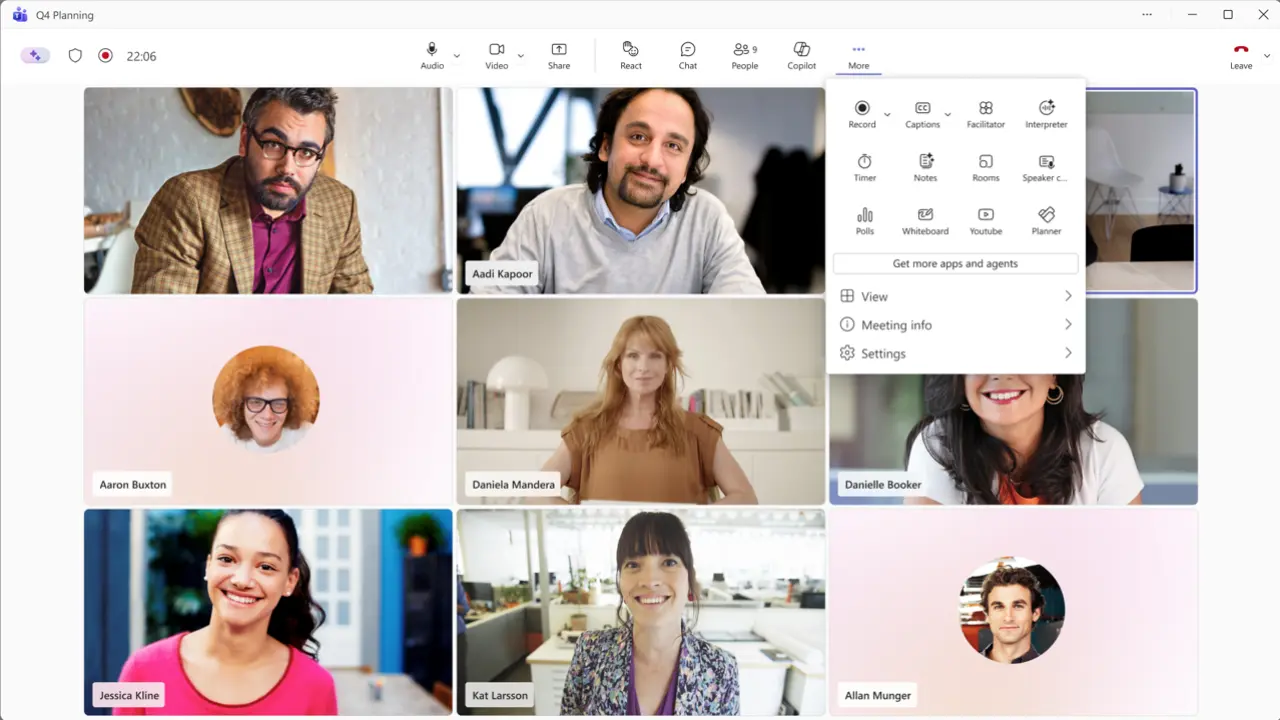
But the impending revamp of Teams is much more than that. The meeting controls will be positioned in the center after it lands, and the leave button will be on the far-right, so you will only need to click on it on purpose. The buttons for the microphone, camera, and share will be gathered together, while additional features like record, captions, polls, and more will be grouped under a “More” overflow menu that can be accessed by clicking the three dots. Additionally, users will be able to personalize this toolbar so that they can drag and drop and pin items as they see fit. Here is a preview of the initial look:
The new Teams redesign features a centred control bar to prevent accidental clicks, safer screen sharing with two-step verification, a simplified auto-resizing gallery view to reduce hardware load, and customizable toolbars that let users pin two favourite apps while moving extras to a “More” menu.
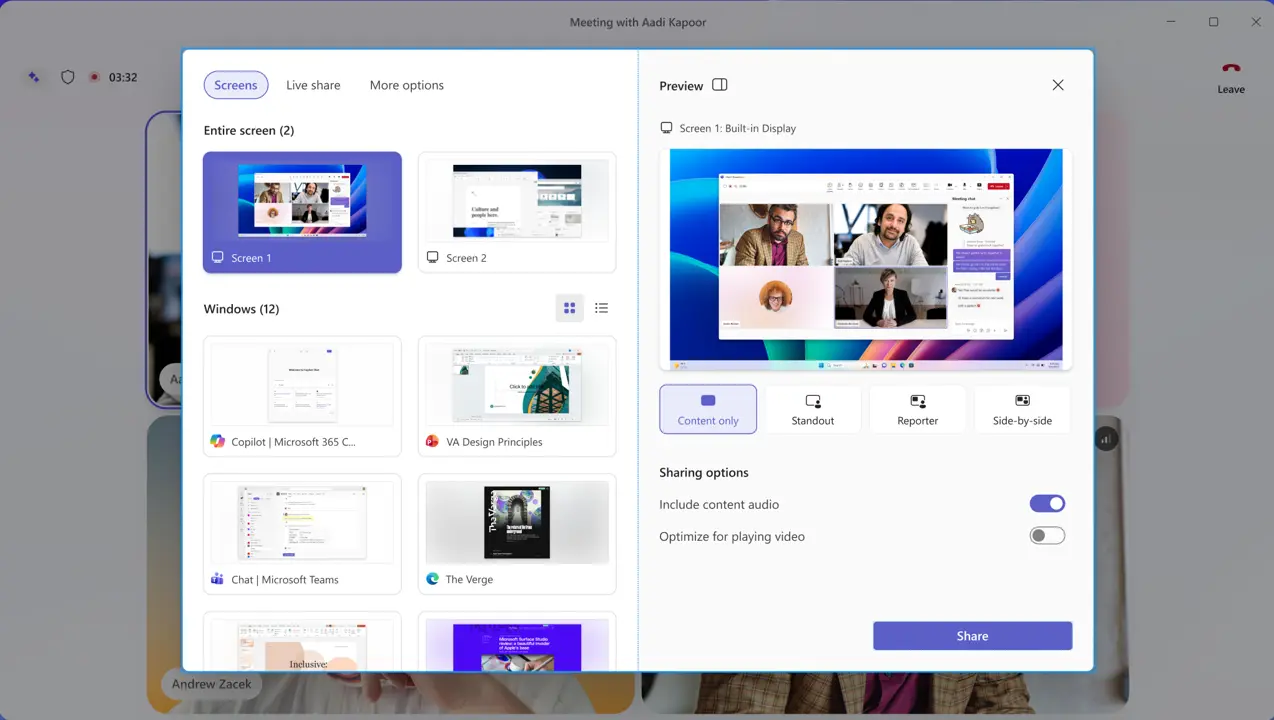
Additionally, a significant redesign is being implemented for the share panel. A tabbed interface that distinguishes between Screens and Apps, Interactive Files, and More options will be displayed on the left, while live screen and window previews will be displayed on the right. To avoid unintentional sharing, a two-step confirmation procedure will also be followed by the sharing option. People will probably ultimately grow acclimated to all of this, even though it may seem overwhelming at the moment. Take a look below:
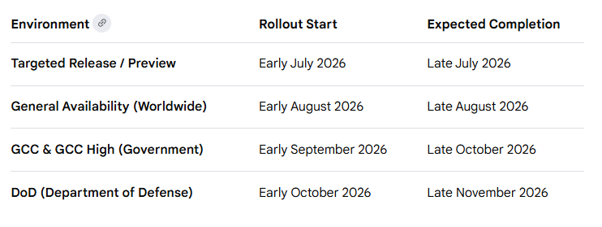
Here is the following timeline for the implementation of this redesign:
Targeted Release: We plan to start rolling out in early July 2026 and finish by late July of the same year.
Global General Availability: We plan to start rolling out in early August 2026 and anticipate finishing by late August 2026.
General Availability (GCC, GCC High): We anticipate finishing by late October 2026. We will start rolling out in early September 2026.
General Availability (DoD): The rollout is scheduled to start in early October 2026 and be finished by late November of the same year.
However, there are some factors to take into account. Users that choose this UX early in the preview will be allowed to switch back to the previous view, but after the rollout is over, this will be the default view and cannot be changed at the tenant level. Additionally, the toolbar’s current app pinning policies will still be followed; however, the new policies will only allow two apps to be pinned, with the remaining apps being relegated to the “More” overflow menu.
There will also be a few known restrictions after the redesign launches. Customization of the toolbar will only be available on the current device during meetings; cross-device syncing is scheduled for a later time. Furthermore, the opt-out toggle will only be accessible for individual users and not at the tenant level. In the end, it will be eliminated in a subsequent Teams release.
It’s undoubtedly an intriguing change that will probably be met with both praise and criticism. Microsoft, for its part, has stressed that telemetry signals and customer feedback are the foundation of its overhaul. When the redesign begins to be accessible for Windows, Mac, and the web in July 2026, we’ll be able to assess public opinion more precisely. The mobile, Linux, and consumer versions of Teams are not currently included in this scope.
The key limitation, which is also an important restriction aspect, is that there is no tenant-level opt-out, and the redesign is final after late August. Custom toolbars only store data locally on each device; cross-device syncing is added later. Only Windows, Mac, and the web are affected by the update; consumer and mobile versions are not.
We use cookies to ensure that we give you the best experience on our website. If you continue to use this site we will assume that you are happy with it.