• AI Search
  • Cryptocurrency
  • Earnings
  • Enterprise
  • About TechBooky
  • Submit Article
  • Advertise Here
  • Contact Us
TechBooky
  • African
  • AI
  • Metaverse
  • Gadgets
Generic selectors
Exact matches only
Search in title
Search in content
Post Type Selectors
Search in posts
Search in pages
  • African
  • AI
  • Metaverse
  • Gadgets
Generic selectors
Exact matches only
Search in title
Search in content
Post Type Selectors
Search in posts
Search in pages
TechBooky
Generic selectors
Exact matches only
Search in title
Search in content
Post Type Selectors
Search in posts
Search in pages
Home Artificial Intelligence

Microsoft Tests Recall Snapshots and AI Agents in Windows 11

Akinola Ajibola by Akinola Ajibola
June 16, 2025
in Artificial Intelligence
Share on FacebookShare on Twitter

AI agents allow Windows 11 users to simply explain changes in Settings, and the changes will be carried out automatically.

Last week, Microsoft published the most recent version of the Windows 11 Insider Preview build to the Dev channel. Two new artificial intelligence (AI) features are available to users with the latest release. First, Windows 11 included AI agents that, when prompted by the user, may now locate and carry out changes in the Settings menu on their own. The IT behemoth from Redmond is also offering third-party apps and websites in the European Economic Area (EEA) the ability to share the images that Recall stores.

Microsoft described the new features in a blog post, with the inclusion of AI agents being the most noteworthy. AI agents are now only accessible to users who have chosen the Dev Channel as their preferred update channel and enrolled in the Windows Insider Program. They will also need a Copilot+ PC with a Snapdragon processor in order to utilize this capability.

In the Settings menu, users will be able to type desired adjustments, like “my mouse pointer is too small,” and an AI agent will suggest the best course of action to address the problem. The agent can also complete the task on its own with the user’s consent, saving the user a few clicks. According to Microsoft, the new functionality only functions when English is selected as the primary display language on the device. Soon, Copilot+ PCs with AMD and Intel chipsets will be supported.

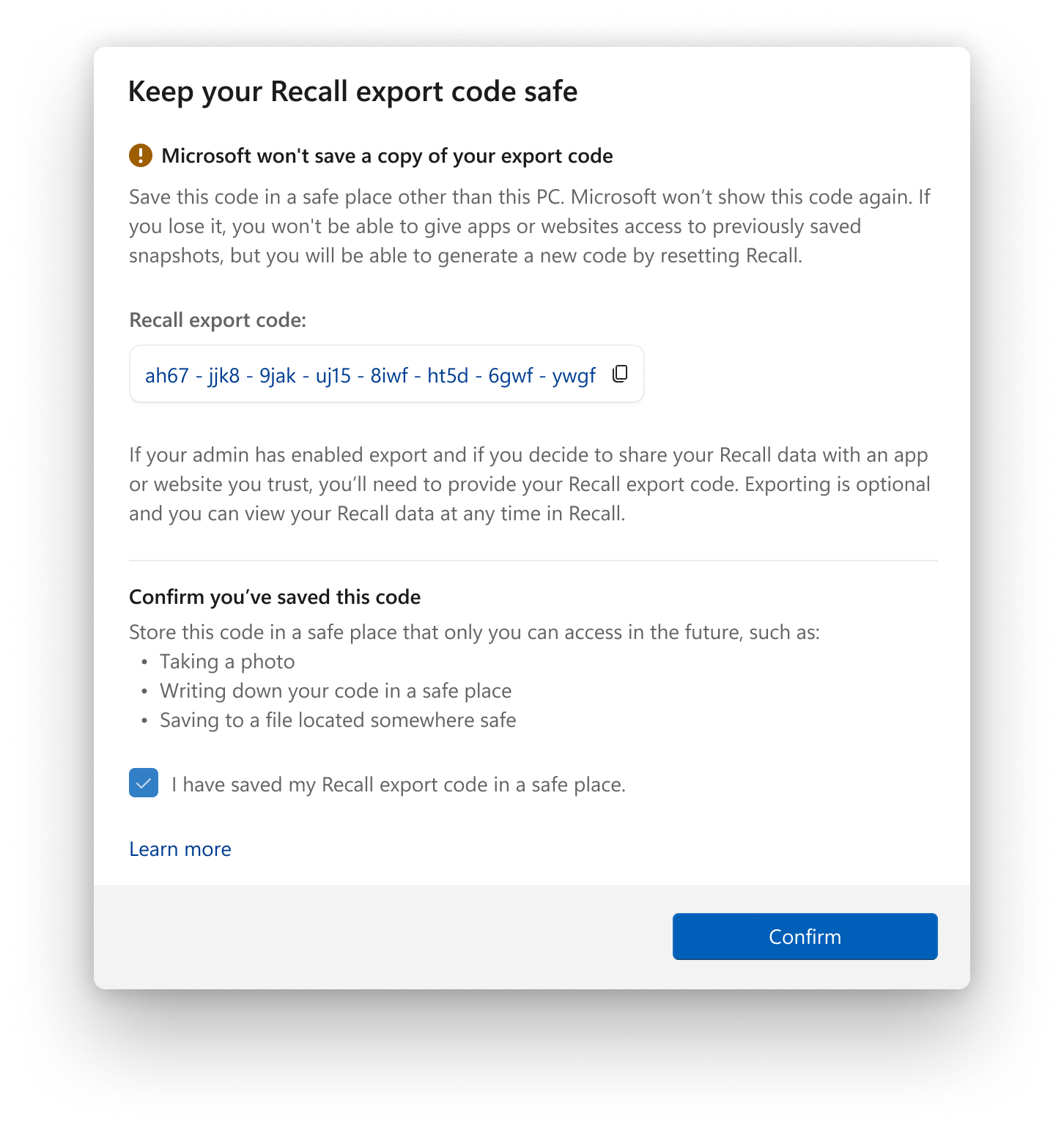
Recall sharing is another new function that is exclusive to EEA users. Now, Windows Insiders in the area can share their Recall pictures with other websites and apps by exporting them. Users must remember their special Recall export code, which appears when they launch Recall for the first time, in order to accomplish this. They can choose to save these screenshots.

The export code, which decrypts the encrypted screenshots, must be shared once users authenticate using Windows Hello before sharing the Recall photos with a third-party vendor. Please take note that when the functionality is first set up, the export code is only displayed once. The post also stated that “Microsoft does not have access to your export code and cannot help you recover it if it is lost.”

Nonetheless, a user can reset Recall if they have misplaced the export code or believe someone may have unauthorized access to it. Resetting Recall will restore the feature’s default settings and automatically remove all screenshots. After opting in, users can access the feature to locate a new export code.

Users must select Settings, then Privacy & Security, and finally Recall & Snapshots in order to export the snapshots. After authentication, they will need to proceed to Advanced Settings and start exporting the data. There are two ways to share recall data at the moment. The first option is “Export past snapshots,” which enables users to export data from the previous seven days, the previous thirty days, or all previous data. The second option, “Export snapshots from now on,” allows snapshots to be continuously exported once sharing has started. Sharing can be disabled at any moment by users.

Related Posts:

  • get-latest-updates-toggle
    Ads Could Be Coming To Windows 11 Shortly
  • 2983e300-db83-11eb-9fef-e9efcab072f3
    Microsoft Updates Windows 11 Blue Screen of Death
  • microsoft-copilot-2
    Windows 11 Preview Adds Shared Audio and Taskbar Copilot
  • 8566bb3a-a332-47bd-9234-ab9fe44fc82a
    Microsoft's Quick Test to Fix Non-Booting PCs
  • CeeYjMDncRmSGNPVY3oH7B
    Microsoft Tests New AI-Powered Windows Search
  • iOS-Blog-Post-Image
    Microsoft; Windows 11 Start Menu Gets iPhone Feature
  • powershell-1024×683
    Microsoft Drops PowerShell 2.0 from Windows 11 & Server
  • Microsoft-delays-controversial-Recall-feature-rollout-for-Copilot-Plus-PCs-once-again.jpg
    Microsoft delays Copilot+ PC Recall to December

Discover more from TechBooky

Subscribe to get the latest posts sent to your email.

Tags: ai agentsCopilotwindows 11windows 11 recall
Akinola Ajibola

Akinola Ajibola

BROWSE BY CATEGORIES

Receive top tech news directly in your inbox

subscription from
Loading

Freshly Squeezed

  • YouTubers Sue Snap Over Copyright Infringement in AI Models January 28, 2026
  • Sony Plans A State of Play Broadcast in February January 28, 2026
  • TikTok Avoids Trial, Settles Lawsuit Over Addiction Claims January 27, 2026
  • Ezra Olubi Sues David Hundeyin for ₦140M Over X Defamation January 27, 2026
  • Lagos & MTN Team Up on Eco-Friendly Obalende Bus Park January 27, 2026
  • France Ditches Microsoft Teams, Zoom for Homegrown ‘Sovereign’ Platform January 27, 2026
  • Meta Tests Premium Subscriptions on Facebook, Instagram & WhatsApp January 27, 2026
  • Microsoft Introduces New IT Admin Tool to Analyse Security Breaches January 27, 2026
  • Google May Bring Apple-Like “Liquid Glass” Design to Android 17 January 27, 2026
  • TikTok Blames Power Outage for US Service Problems January 27, 2026
  • Nvidia Backs CoreWeave With $2B to Support Data Centre Growth January 27, 2026
  • Google Agrees $68M Settlement in Google Assistant Privacy Lawsuit January 27, 2026

Browse Archives

January 2026
MTWTFSS
 1234
567891011
12131415161718
19202122232425
262728293031 
« Dec    

Quick Links

  • About TechBooky
  • Advertise Here
  • Contact us
  • Submit Article
  • Privacy Policy
Generic selectors
Exact matches only
Search in title
Search in content
Post Type Selectors
Search in posts
Search in pages
  • African
  • Artificial Intelligence
  • Gadgets
  • Metaverse
  • Tips
  • AI Search
  • About TechBooky
  • Advertise Here
  • Submit Article
  • Contact us

© 2025 Designed By TechBooky Elite

Discover more from TechBooky

Subscribe now to keep reading and get access to the full archive.

Continue reading

We use cookies to ensure that we give you the best experience on our website. If you continue to use this site we will assume that you are happy with it.