• Archives
  • Cryptocurrency
  • Earnings
  • Enterprise
  • About TechBooky
  • Submit Article
  • Advertise Here
  • Contact Us
TechBooky
  • African
  • AI
  • Metaverse
  • Gadgets
Generic selectors
Exact matches only
Search in title
Search in content
Post Type Selectors
Search in posts
Search in pages
  • African
  • AI
  • Metaverse
  • Gadgets
Generic selectors
Exact matches only
Search in title
Search in content
Post Type Selectors
Search in posts
Search in pages
TechBooky
Generic selectors
Exact matches only
Search in title
Search in content
Post Type Selectors
Search in posts
Search in pages
Home Service news

Microsoft to Bring Store App Updates to Windows Update

Akinola Ajibola by Akinola Ajibola
November 28, 2025
in Service news
Share on FacebookShare on Twitter

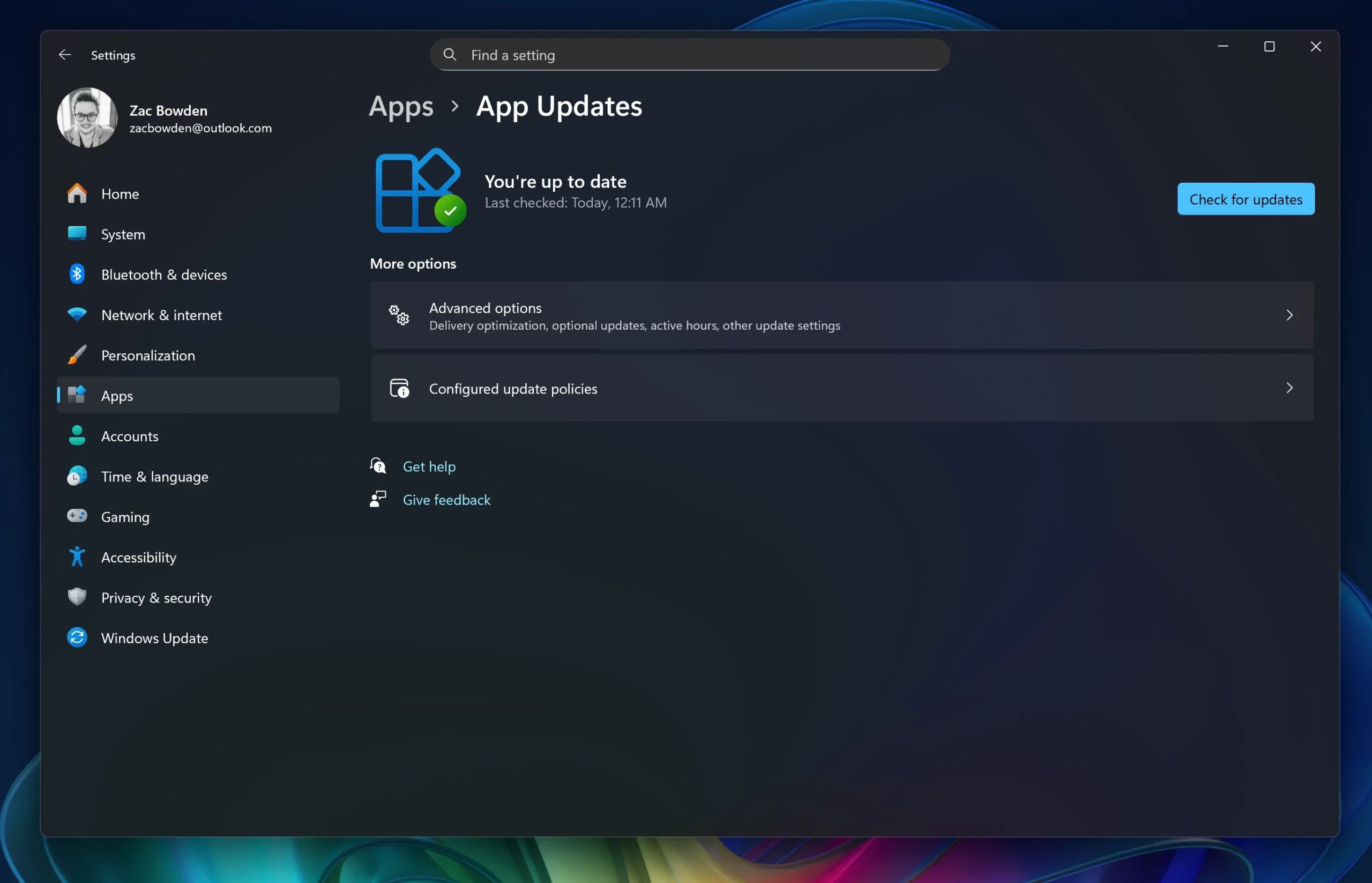
Yes, Microsoft is developing a new feature that will enable users to manage and update Microsoft Store apps from the Windows Update settings page. This is part of a larger initiative to provide a “unified, intelligent update orchestration platform” for Windows.

The newest and most recent Windows 11 preview releases suggest that Microsoft is working on some new approach for customers to update Microsoft Store apps that may be less irritating than updating through the Microsoft Store. The new “App Updates” page has debuted under Settings > Apps. This page allows users to check for updates to apps that support this functionality, even if the Microsoft Store app is not installed or accessible due to IT policies. The build reveals and proves that Microsoft is developing an update system that will allow you to check for app install updates via the Windows Update service, rather than the Microsoft Store itself.

The approach allows apps to remain updated even when the Microsoft Store is unavailable, whether because of administrative policies or the Store app being uninstalled. This idea also is to give a single, streamlined site for managing operating system and application upgrades, which has previously been a fragmented experience.

The page is currently not totally functional, and tapping the check for update button does not operate. The site was thought to be reserved for business-oriented programs, however it has been proven that any application would be able to delegate updates to Windows Update.

Earlier this year, Microsoft stated that the Windows environment can feel fragmented when it comes to program upgrades for IT administrators. To address this issue, the company stated that it is developing a “unified, intelligent update orchestration platform capable of supporting any update (apps, drivers, etc.) to be orchestrated alongside Windows updates.”

It will be interesting to watch whether Microsoft adopts a model in which app updates are distributed with Windows Updates to streamline updating. Many Linux users are already familiar with this method, as software and security updates are typically given in one go via an update manager, particularly on systems such as Linux Mint.

It is important to note that this feature is still in development, and it is unclear when it will be available in stable releases. 

This capability is not available for all Microsoft Store apps; instead, developers can delegate the app’s updating process to the Windows updating platform. This is especially beneficial for line-of-business (LOB) applications in enterprise situations.

The feature is still being developed and tested through the Windows Insider channels. The “Check for updates” option on the new site is not fully functioning in current preview builds, although it is planned to be improved before a general release.

Most programs will continue to work normally with the existing automatic update mechanism via the Microsoft Store app.

Related Posts:

  • microsoft-365-app-icon-1
    M365 Apps on Windows 10 to Receive Security Updates…
  • windows update
    New Upgrade Policy Announced for Windows Users
  • windows-update-close
    Microsoft Releases Emergency Patch For Windows Update Bug
  • File-Explorer-dark-mode-dialogs-for-Delete-Folder-1
    KB5070311 Update Resolves File Explorer and Search Bugs
  • microsoft-copilot-2
    Microsoft Fixes Copilot Auto-Install Bug and Apologizes
  • 11-1024×576
    Count Down To The End Of Windows 10 Microsoft Support
  • Windows_11
    Microsoft Fixes Windows Certificate Enrolment Bug
  • os5thFN78X3TYYym27AxkT
    Microsoft Puts An End To Support For Cortana in Windows 11

Discover more from TechBooky

Subscribe to get the latest posts sent to your email.

Tags: microsoftmicrosoft Store App Updateswindows update
Akinola Ajibola

Akinola Ajibola

BROWSE BY CATEGORIES

Receive top tech news directly in your inbox

subscription from
Loading

Freshly Squeezed

  • X Limits Grok Image Generation Citing Safety Risks to Minors January 11, 2026
  • Google & Walmart Team Up To Transform Retail January 11, 2026
  • X Algorithm to Be Publicly Released Next Week, Musk Says January 11, 2026
  • Google Reveals New Framework For AI-Driven Digital Commerce January 11, 2026
  • Meta Secures Nuclear Power Contracts to Fuel AI Infrastructure January 10, 2026
  • SoftBank & OpenAI Back Energy and Data Centre Supplier With $1B January 10, 2026
  • ChatGPT Now Available for Healthcare Providers, OpenAI Says January 9, 2026
  • Paramount Flags Netflix–WBD Merger as “Presumptively Unlawful” January 9, 2026
  • The World’s Top 10 Tech Giants as 2026 Kicks Into Gear — And What to Watch January 9, 2026
  • Microsoft and PayPal Team Up to Enable Copilot Checkout January 9, 2026
  • YouTube Rolls Out Search Filter Overhaul January 9, 2026
  • Cisco Network Switches Hit by DNS-Related Reboot Bug January 9, 2026

Browse Archives

January 2026
MTWTFSS
 1234
567891011
12131415161718
19202122232425
262728293031 
« Dec    

Quick Links

  • About TechBooky
  • Advertise Here
  • Contact us
  • Submit Article
  • Privacy Policy
Generic selectors
Exact matches only
Search in title
Search in content
Post Type Selectors
Search in posts
Search in pages
  • African
  • Artificial Intelligence
  • Gadgets
  • Metaverse
  • Tips
  • About TechBooky
  • Advertise Here
  • Submit Article
  • Contact us

© 2025 Designed By TechBooky Elite

Discover more from TechBooky

Subscribe now to keep reading and get access to the full archive.

Continue reading

We use cookies to ensure that we give you the best experience on our website. If you continue to use this site we will assume that you are happy with it.