In order to prioritise more secure Kerberos-based authentication and due to security flaws that leave businesses vulnerable to cyberattacks, Microsoft said that it will disable the 30-year-old NTLM (NT LAN Manager) authentication system by default in future Windows editions. This modification, which is a component of the “secure-by-default” strategy, attempts to shield enterprises against persistent weaknesses like relay assaults and pass-the-hash exploits.
The challenge-response authentication protocol known as NTLM (short for New Technology LAN Manager) replaced the LAN Manager (LM) protocol and was first released with Windows NT 3.1 in 1993.
The default protocol for domain-connected devices running Windows 2000 or later is now Kerberos, replacing NTLM. Even though NTLM employs poor cryptography and is susceptible to assaults, it is nevertheless utilised today as a backup authentication method when Kerberos is unavailable, despite being the default protocol in earlier Windows editions.
Since its introduction, NTLM has been extensively exploited in NTLM relay attacks, where attackers compel compromised network devices to authenticate with attacker-controlled servers, allowing them to escalate privileges and gain full control of the Windows domain. Because NTLM is still in use on Windows servers, attackers can circumvent NTLM relay attack mitigations by taking advantage of vulnerabilities like PetitPotam, ShadowCoerce, DFSCoerce, and RemotePotato0.
Pass-the-hash attacks, in which hackers use malicious software or system flaws to obtain NTLM hashes (hashed passwords) from targeted systems, have also been directed towards NTLM. By using these hashed passwords to authenticate as the compromised user, the attackers are able to steal confidential information and propagate laterally throughout the network.
Microsoft announced on Thursday that NTLM will finally be disabled by default in the upcoming major Windows Server release and related Windows client versions as part of a larger push toward passwordless, phishing-resistant authentication methods. This represents a significant shift away from the legacy protocol and toward more secure Kerberos-based authentication.
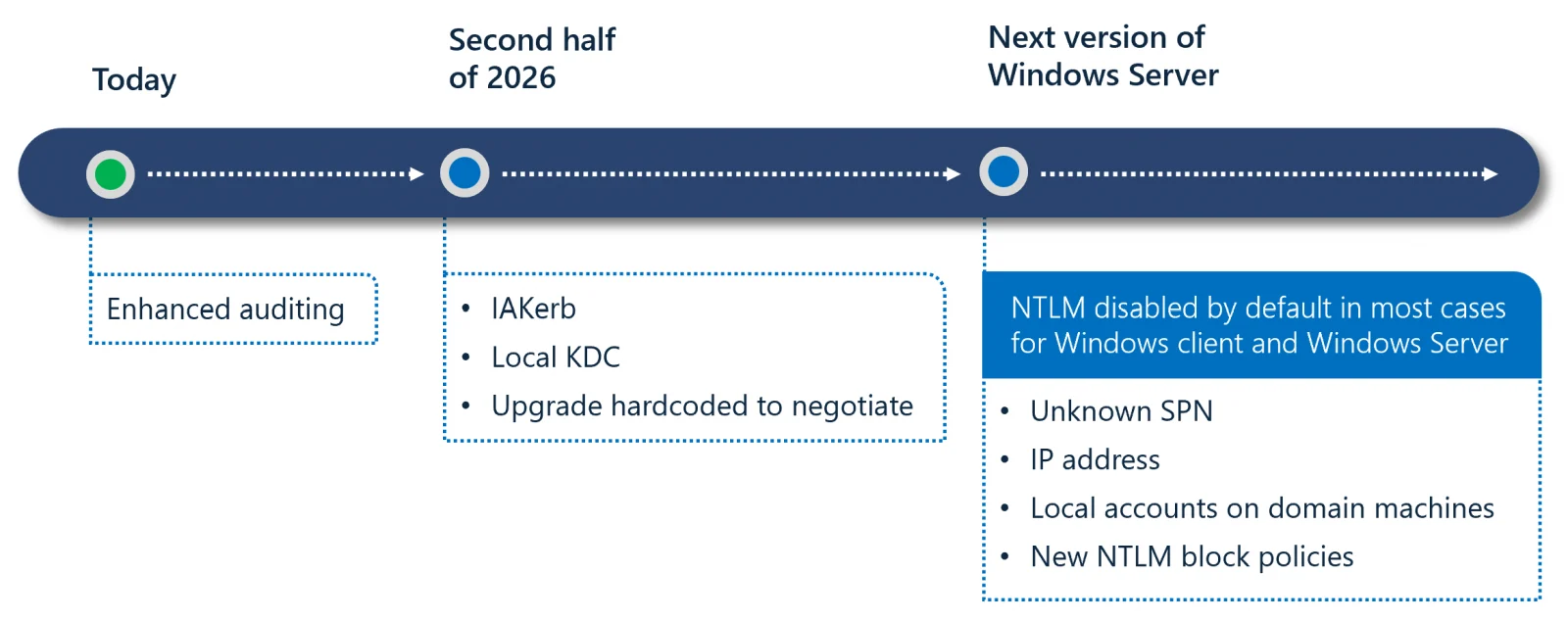
Additionally, Microsoft presented a three-phase transition strategy intended to minimise inconvenience and reduce risks associated with NTLM. In phase one, administrators will be able to determine where NTLM is still in use by using the improved auditing tools found in Windows 11 24H2 and Windows Server 2025.
In order to address typical instances that cause NTLM fallback, phase two, which is slated for the second half of 2026, will provide new features like IAKerb and a Local Key Distribution Center.
Although the protocol will still exist in the operating system and can be specifically re-enabled through policy controls if necessary, phase three will disable network NTLM by default in subsequent releases.
Microsoft said that disabling NTLM by default does not imply that NTLM has yet to be fully removed from Windows. Rather, it means that Windows will be supplied in a secure-by-default state, meaning that network NTLM authentication will no longer be employed automatically.
Modern, safer Kerberos-based alternatives will be preferred by the OS. At the same time, new forthcoming features like Local KDC and IAKerb (pre-release) will solve frequent legacy circumstances.
In October 2023, Microsoft initially declared its intention to retire the NTLM authentication mechanism. It also stated that it wished to provide management controls so that administrators would have more freedom to monitor and limit NTLM usage in their environments.
In July 2024, it also formally deprecated NTLM authentication for Windows and Windows servers, encouraging developers to switch to Kerberos or Negotiation authentication to avoid further problems.
Since 2010, Microsoft has been cautioning developers not to use NTLM in their applications and encouraging Windows administrators to either disable NTLM or set up their servers to use Active Directory Certificate Services (AD CS) to prevent NTLM relay attacks.
To identify programs that still depend on NTLM, configure the environment using the audit user and enable enhanced NTLM auditing, now available in Windows Server 2025.
Mapping dependencies helps determine which hardware or legacy applications, such as older NAS devices, may rely solely on NTLM. Developers should replace NTLM-specific calls with the negotiating protocol, which prioritises Kerberos while retaining a fallback option if needed.
Begin testing “NTLM-off” configurations in non-production environments to detect any potential issues early.
We use cookies to ensure that we give you the best experience on our website. If you continue to use this site we will assume that you are happy with it.