• Archives
  • Cryptocurrency
  • Earnings
  • Enterprise
  • About TechBooky
  • Submit Article
  • Advertise Here
  • Contact Us
TechBooky
  • African
  • AI
  • Metaverse
  • Gadgets
Generic selectors
Exact matches only
Search in title
Search in content
Post Type Selectors
Search in posts
Search in pages
  • African
  • AI
  • Metaverse
  • Gadgets
Generic selectors
Exact matches only
Search in title
Search in content
Post Type Selectors
Search in posts
Search in pages
TechBooky
Generic selectors
Exact matches only
Search in title
Search in content
Post Type Selectors
Search in posts
Search in pages
Home Security

Microsoft Confirms Emergency Update for Millions of Outlook Users

Akinola Ajibola by Akinola Ajibola
January 27, 2026
in Security
Share on FacebookShare on Twitter

Finally, a solution has been found. Since Microsoft delivered its required security patches in January, millions of Outlook users have been tormented by unsuccessful restarts and missing emails. In an effort to make things right, the corporation has now confirmed a fresh emergency update.

This is a step In order to fix serious issues impacting millions of Outlook users, Microsoft has confirmed and issued a second emergency “out-of-band” update in January 2026. 

Microsoft acknowledged that “Classic Outlook profiles with POP accounts and PSTs hang after Windows updates on January 13, 2026” very quickly. Additionally, a warning that there isn’t a solution but that more instructions will be available shortly.

The Outlook issue is the required Patch Tuesday security update on January 13, 2026, which caused the issue. Users that were impacted encountered:

Outlook becomes unusable when an application freezes, especially for users of Outlook Classic with POP accounts.

This has been a major situation. “Microsoft makes Outlook ‘completely unusable’ as the Windows 11 25H2/24H2 update breaks it,” according to Neowin. Random hangs and freezes, unsaved email progress, and more are some of these problems.

For the cloud storage conflict, when it opens or saves files to cloud-backed places like OneDrive or Dropbox, there are frequent crashes and hangs.

For the failed restarts, unless the process was manually stopped in Task Manager, Outlook will not reopen.

Also, data problems include missing “Sent Items” or re-downloading previously downloaded emails.

According to Microsoft, the problem is now more precise. “When opening files from or saving files to cloud-based storage, like OneDrive or Dropbox, some programs became unresponsive or encountered unexpected errors. ” Outlook may hang and not open again unless the process is stopped or the machine is restarted in specific Outlook configurations that save PST files on OneDrive. Additionally, “missing sent items or previously downloaded emails being re-downloaded” would be visible to impacted users.

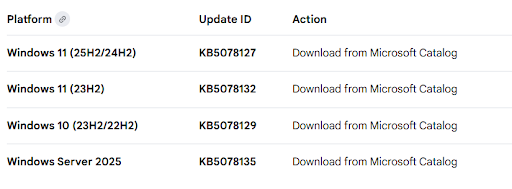
The emergency update is available for Windows 10, Windows 11 25H2, and Windows 11 23H2 (but you should stop using this right immediately).

Windows Latest claims that this emergency update comes after last week’s, which addressed “a much more widespread” remote desktop login failure affecting 24H2 and 25H2, as well as a failure to power down issue.

The new emergency updates are cumulative, which means they incorporate security fixes from earlier in January as well as solutions for prior issues (including system shutdown failures and Remote Desktop login errors) and the security update and the out-of-band update from January 17, 2026,” according to Microsoft. You don’t need to update if everything is functioning properly and you have applied the security updates from January. However, that isn’t the situation for millions of people.

Microsoft advises all users to take the follow actions:

Check for Updates: To find out if the patch is automatically available, select “Check for updates” under Settings > Windows Update.

Manual Install: Using the Microsoft Update Catalogue links mentioned above, you can manually download the update if it doesn’t show up.

Temporary Fix: Microsoft previously recommended removing PST files from cloud-synced folders (such as OneDrive) to fix the problem if you are unable to update right away.

Related Posts:

  • windows-update-close
    Microsoft Releases Emergency Patch For Windows Update Bug
  • Microsoft
    Microsoft Outage Affects Thousands Of Users Worldwide
  • exchange online
    Microsoft Exchange Online Outage Disrupts IMAP4…
  • unnamed (10)
    Users, Even Microsoft Staff, Confused Over Several Outlooks
  • outlook-mobile-tips-cover
    Downtime Update On Microsoft Outlook
  • Microsoft_Office_Outlook_(2018–present).svg
    New Outlook Can’t Open Excel Files With Non-ASCII…
  • Exchange
    Exchange Online Outage Blocks Access to Outlook Mailboxes
  • File-Explorer-dark-mode-dialogs-for-Delete-Folder-1
    KB5070311 Update Resolves File Explorer and Search Bugs

Discover more from TechBooky

Subscribe to get the latest posts sent to your email.

Tags: emailmicrosoftOutlooksecurity patchwindows
Akinola Ajibola

Akinola Ajibola

BROWSE BY CATEGORIES

Receive top tech news directly in your inbox

subscription from
Loading

Freshly Squeezed

  • Google May Bring Apple-Like “Liquid Glass” Design to Android 17 January 27, 2026
  • TikTok Blames Power Outage for US Service Problems January 27, 2026
  • Nvidia Backs CoreWeave With $2B to Support Data Centre Growth January 27, 2026
  • Google Agrees $68M Settlement in Google Assistant Privacy Lawsuit January 27, 2026
  • Big Tech Firms To Stand Trial Over Youth Addiction Allegations January 27, 2026
  • Elon Musk’s X Under EU Investigation Over Sexualised AI Pictures January 27, 2026
  • Microsoft Confirms Emergency Update for Millions of Outlook Users January 27, 2026
  • TELCOs Face One-Week Deadline To Propose Data Price Reductions January 25, 2026
  • Flutterwave Rolls Out Turnkey-Powered Stablecoin Wallets for Merchants January 25, 2026
  • MTN Nigeria Says Fibre Cuts and Theft Hit 211 Sites in 2025 January 25, 2026
  • TikTok Star Khaby Lame Sells Company for $900M January 25, 2026
  • Meta Faces UK Scrutiny Over WhatsApp Data Request Compliance January 24, 2026

Browse Archives

January 2026
MTWTFSS
 1234
567891011
12131415161718
19202122232425
262728293031 
« Dec    

Quick Links

  • About TechBooky
  • Advertise Here
  • Contact us
  • Submit Article
  • Privacy Policy
Generic selectors
Exact matches only
Search in title
Search in content
Post Type Selectors
Search in posts
Search in pages
  • African
  • Artificial Intelligence
  • Gadgets
  • Metaverse
  • Tips
  • About TechBooky
  • Advertise Here
  • Submit Article
  • Contact us

© 2025 Designed By TechBooky Elite

Discover more from TechBooky

Subscribe now to keep reading and get access to the full archive.

Continue reading

We use cookies to ensure that we give you the best experience on our website. If you continue to use this site we will assume that you are happy with it.