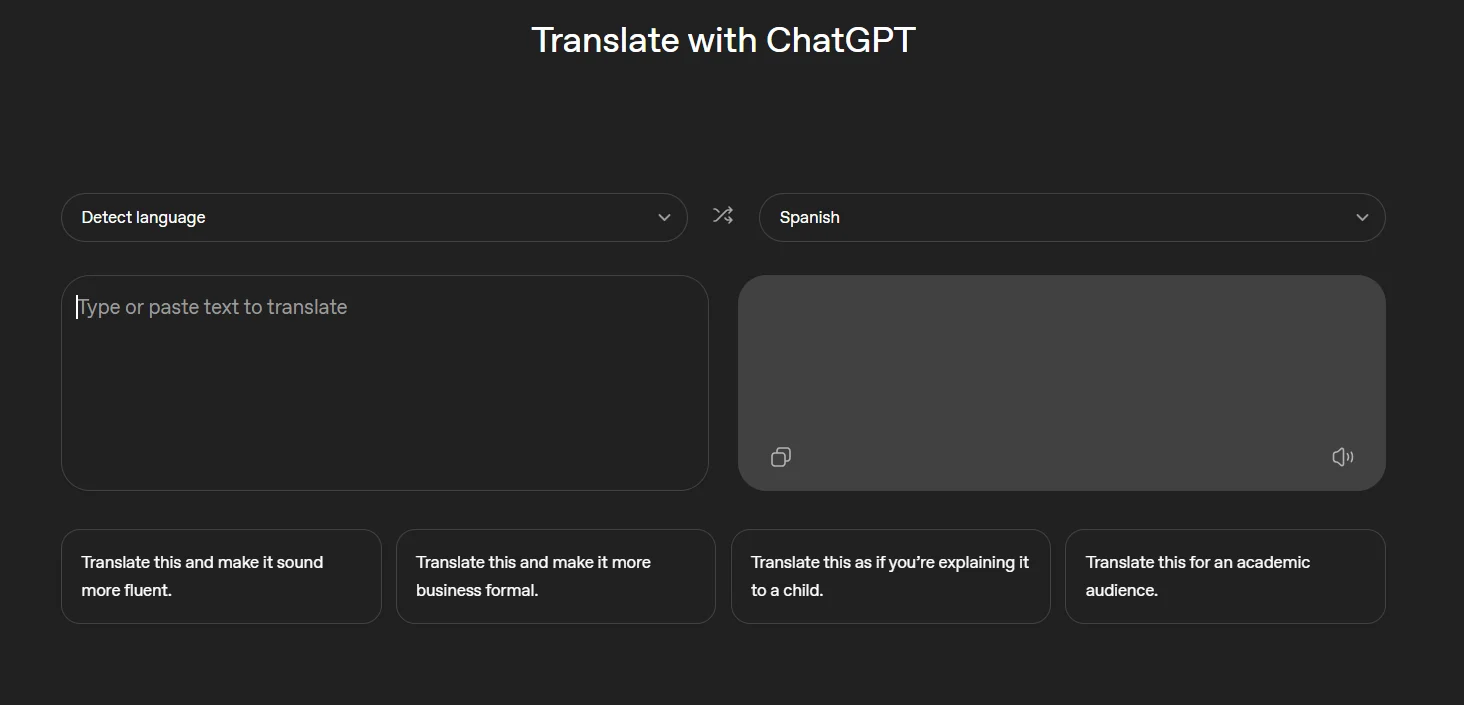
As a direct rival to Google Translate, OpenAI has introduced ChatGPT Translate, a stand-alone web translation engine with support for more than 50 languages. The two services share a similar visual style. They both have dropdown options to control which languages you are translating to or from, as well as two text boxes, one for inputting or pasting the original text and another that shows the translated results.
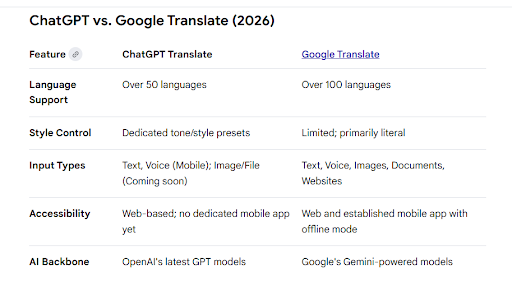
But there are a few significant distinctions. Along with the standard text inputs, Google Translate enables users to upload documents, photos, and even websites for translation. Although image capability is not yet accessible on any version of the service, the ChatGPT Translate webpage states that it can translate text, graphics, and speech. While mobile browsers let you use either text or the microphone on your device, desktop websites only enable text translation. Additional presets, like “translate this and make it more business formal,” are also included in OpenAI’s service to guide the final translation’s style.
This is essentially OpenAI exposing translation capabilities as a separate web service; the standard ChatGPT chatbot has supported translation features for years. Unlike Google Translate, which is accessible as both an app and a website, there isn’t yet a ChatGPT Translate app on the Google or Apple app stores. OpenAI has not disclosed which AI model powers the translation tool or made any statements regarding its release.
The ket features of the ChatGPT Translate are;
Dual-Box Interface: With text boxes for the source and target languages next to each other, this interface mimics the well-known layout of conventional translators.
Context-Aware Translation: It concentrates on maintaining tone, idioms, and profound meaning in contrast to literal word-for-word methods.
Instant Style Presets: Contains “one-tap” refining buttons that allow you to quickly change the output to different tones, like academic, business formal, or simple/child-friendly.
Conversational Editing: Following the generation of a translation, users can still communicate with the AI in the same chat to clarify certain terms, request explanations, or change styles.
Multimodal Potential: Although the tool’s initial functionality is restricted to text and speech (on mobile devices), it will eventually enable the uploading of files and images.
While Google Translate is still more complete for travellers and processing large amounts of documents, ChatGPT Translate is an excellent solution for people who require subtle writing and stylistic refinement.
We use cookies to ensure that we give you the best experience on our website. If you continue to use this site we will assume that you are happy with it.