Spotify is rolling out new controls that let users switch off video across the app, giving those who just want audio a way to strip the experience back to music and podcasts without moving images.
The update introduces universal video toggles that apply across devices once you set them, covering everything from looping artwork on the Now Playing screen to full music videos and short-form clips.
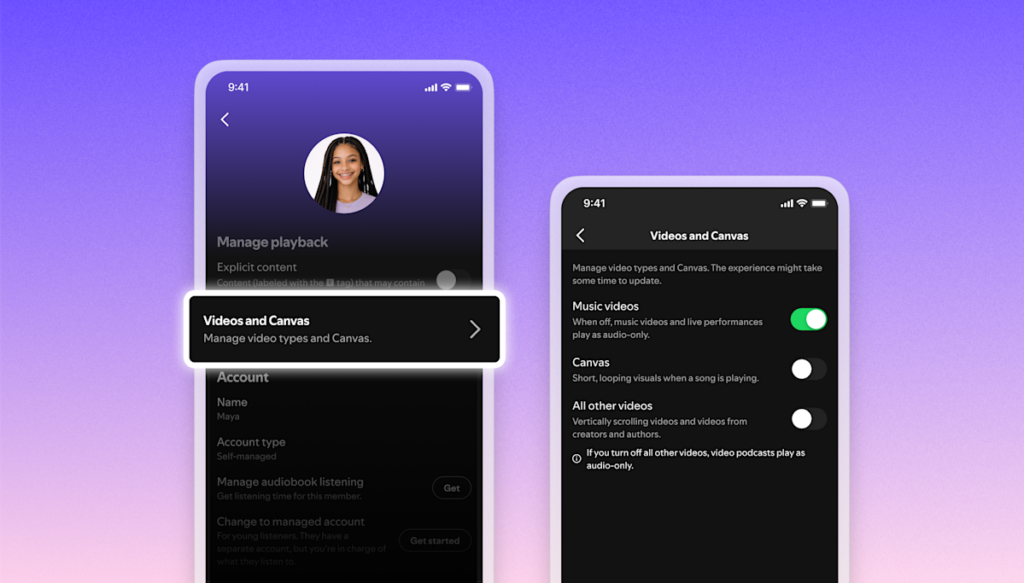
Spotify’s video options now sit together in one place, under Settings > Content and display. From there, you can manage three separate categories:
Canvas: The existing toggle that controls the short video loops shown on the Now Playing screen.
Music videos: A new switch that determines whether Spotify plays music videos.
“All other videos”: A broader control that covers video podcasts, vertically scrolling videos and artist clips.
Once you set your preferences, Spotify says those choices apply universally across platforms, so you don’t have to repeat the process on every device you use.
There’s also a level of control for household accounts: family plan managers can adjust these video settings for everyone on the plan from the same menu.
The new toggles sit against years of Spotify layering more video into what started as an audio-first service.
2018: Spotify introduced Canvas, the looping visuals that replace static album artwork on the Now Playing screen.
2020: Video podcasts arrived on the platform during a wider boom in podcast listening.
2024: Spotify added music videos in multiple countries, with the feature reaching the US later in the year.
Artist clips: The company also added 30-second vertical videos where artists can address fans with short, promotional-style messages.
Spotify says that more than 70 percent of its users report that additional video would improve their experience, suggesting the company doesn’t plan to slow down on video features overall. But the new switches acknowledge that a portion of listeners still prefer a simpler, audio-focused app and don’t want a TikTok-style, video-first interface.
For now, the universal toggles offer a straightforward compromise, Spotify can keep experimenting with new video formats, while users who aren’t interested can turn nearly all of it off with a few taps.
Paul Balo is the founder of TechBooky and a highly skilled wireless communications professional with a strong background in cloud computing, offering extensive experience in designing, implementing, and managing wireless communication systems.
We use cookies to ensure that we give you the best experience on our website. If you continue to use this site we will assume that you are happy with it.