This Smart Shuffle feature was first introduced in 2023 where the business were aware that their users enjoy making their own playlists to commemorate significant occasions; in fact, user-made playlists frequently rank as their most-streamed playlists during the first few months. However, as time passes, users’ interest in listening to these playlists gradually wanes, and they are keen to try new music. And this is why the disable feature was introduced.
As at the time of introduction in 2023 the business was thrilled to introduce Smart Shuffle, a new play mode that keeps listening sessions interesting and offers tailored suggestions that precisely fit the tone of any listener’s playlist.
Although both Free and Premium users have long relied on the classic shuffle playback, Smart Shuffle seeks to improve your listening experience by adding song recommendations straight into your playlists.
Using only Linear and Shuffle play modes, users can fully prevent Smart Shuffle from appearing in playlists.
A feature that would enable users to completely turn off Smart Shuffle across the app is being tested by Spotify. Despite assurances of daily new selections, users often complain that Smart Shuffle repeats similar tracks. The global deactivate option may not yet be available to everyone as it is being rolled out progressively.
The “broken” shuffle order on Spotify is one of the main grievances that customers voice. It is challenging to produce a suitable “shuffle” for music streaming apps because users may not perceive true randomization as truly random. The fact that certain users require randomization in addition to music discovery further exacerbates the problem. With the Smart Shuffle play option, Spotify attempted to address this issue, but the outcomes weren’t flawless either. Spotify is now allowing customers to disable the Smart Shuffle option if they are dissatisfied with it and would prefer not to have it.
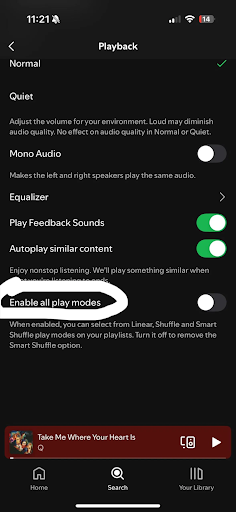
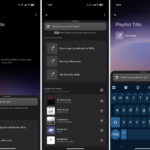
A new option in Spotify’s Playback settings was noticed by Reddit member kwabb. Users can disable the Smart Shuffle feature from the app by turning off the new Enable all play modes toggle.
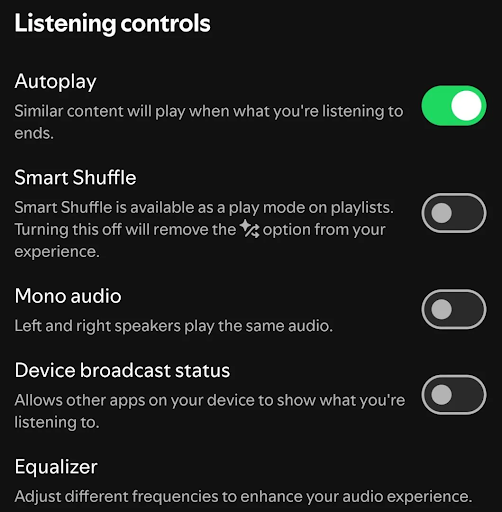
Jayfuson_Vong, a Reddit user, has a slightly different version of the Listening controls option, but the outcome is the same.
However, why would you ever want to turn off Spotify’s Smart Shuffle feature? According to Spotify, Smart Shuffle recommendations are tailored and include a number of variables, including what you’re paying attention to by listening to and when, the listening preferences of others who share your tastes, and the knowledge of Spotify’s own music experts.
However, people who have used Smart Shuffle report that it introduces the same recommendations for weeks on end, thus interfering with the Shuffle functionality. Although it is said that Smart Shuffle recommendations are updated daily, not enough additions and deletions are made each day. Instead of featuring your favourite artists or genres, the list eventually takes on the appearance of a Top 10 list for your area, dominated by classic pop songs.
Anecdotally, Spotify usually leads me via recommendations after I’ve been shuffled through my Liked Songs playlist for roughly 20 minutes. After a few days, even on your Liked Songs playlist, it becomes monotonous to listen to the same “recommended” songs that you haven’t liked. Smart Shuffle can be turned on and off for each playlist, but a global setting helps users who have lost faith in it.
On a user’s iPhone 16 Pro and Pixel 9 Pro XL, the user was unable to fully turn off Smart Shuffle. It’s possible that Spotify is only testing the option and gathering feedback by implementing it gradually.
Did your smartphone provide you the option to turn off Smart Shuffle entirely? Which version of the app and phone? Why would you like to turn off Smart Shuffle? Tell us in the comments section below!
We use cookies to ensure that we give you the best experience on our website. If you continue to use this site we will assume that you are happy with it.