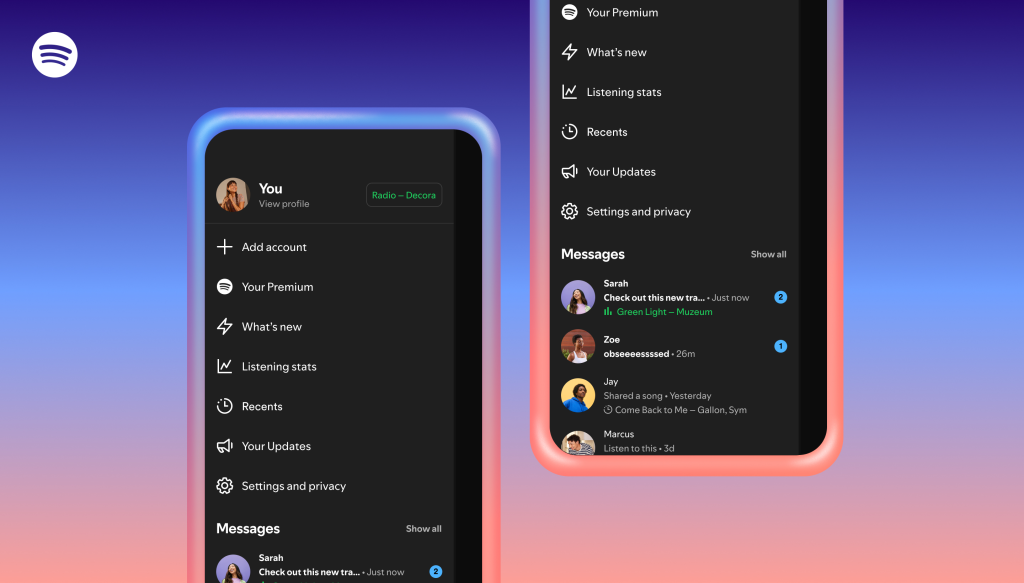
As it looks to keep music sharing within its app, Spotify is rolling out additional social tools. The company said on Wednesday that a new Messages feature will allow users to view friends’ real-time listening activity and request Jams, Spotify’s collaborative listening feature. The two new social features which are Listening Exercise and Jam Request let users enable their real-time music sharing on mobile devices in-app Messages platform on Spotify.
The first step would be for users to go to their Settings and activate the “listening activity” function in the “Privacy & Social” section. Your listening activity will then show up at the top of Messages chats. To play the song, save it, access the menu, or respond with an emoji, simply tap a friend’s listening activity.
To initiate a jam, Premium members can send a request to their friends by tapping the “Jam” button in the upper-right corner. Both users would be able to add tracks to a shared queue and listen to music together if the other user agrees to host the jam.
One of the new features newly introduced, Listening Activity allows users a one-on-one conversation threads with friends and family where the users can see precisely what they are streaming in real time thanks to this opt-in feature. It provides a visibility to users to see their current track in the side drawer or at the top of the chat. Your most recent music is shown if you are not actively listening. It also allows an Interaction where friends and family can respond with one of six common emojis, play the same song, or save it to their library by tapping your activity.
While the other new feature Request to Jam, allows its premium members to use a chat window to invite friends to a live, synchronised listening session. Mode on how it operates, when a request is sent by tapping the “Jam” button located in the upper-right corner of a message. Both users can upload songs to a shared queue and listen simultaneously if the request is accepted, making the recipient the host. The Tier Access allows Spotify Free users can join if a Premium subscriber invites them, but Premium users are required to start the Jam.
The opt-in is necessary and by default, listening activity is disabled. It must be explicitly enabled by going to Settings > Privacy & Social > Listening Activity.
For restricted use, only contacts you have previously connected with via Spotify Messages are able to use these services, which are presently only available to users 16 years of age and older. Spotify says that the features is limited to users aged 16 and over, as both are accessed through Messages.
For temporary privacy, users can still conceal their activity for a maximum of six hours by using the Private Session option.
By early February, these features Listening Activity and Request to Jam will be widely accessible in markets where Messages is available through the iOS and Android apps. All users who have access to Messages can participate in Listening Activity, and Free users can join a Request to Jam session upon being invited by a Premium user.
In an effort to become a more social software, the streaming service introduced Messages in August 2025. The new messaging features indicate an effort to retain more interactions within the app as the firm attempts to boost user retention metrics and draw in more paying users, even if users have long shared Spotify links to music and podcasts outside the platform.
Currently, you can only send messages to specific users on Spotify, and you can only converse with individuals with whom you have already shared content, such collaborators on a playlist or participants in a Jam or Blend. Although they are encrypted both in transit and at rest, messages are not end-to-end encrypted.
We use cookies to ensure that we give you the best experience on our website. If you continue to use this site we will assume that you are happy with it.