• Archives
  • Cryptocurrency
  • Earnings
  • Enterprise
  • About TechBooky
  • Submit Article
  • Advertise Here
  • Contact Us
TechBooky
  • African
  • AI
  • Metaverse
  • Gadgets
Generic selectors
Exact matches only
Search in title
Search in content
Post Type Selectors
Search in posts
Search in pages
  • African
  • AI
  • Metaverse
  • Gadgets
Generic selectors
Exact matches only
Search in title
Search in content
Post Type Selectors
Search in posts
Search in pages
TechBooky
Generic selectors
Exact matches only
Search in title
Search in content
Post Type Selectors
Search in posts
Search in pages
Home Tips

Ways To Clone Your Voice With This iOS Accessibility Tool

Akinola Ajibola by Akinola Ajibola
June 4, 2025
in Tips
Share on FacebookShare on Twitter

Apple subtly introduces new accessibility-related features with each iOS version. The purpose of these features is to provide users and consumers with options on how to engage with and utilize their iPhones. Personal Voice is a new feature that was implemented when iOS 17 was announced. This new function, which allowed you to essentially train your iPhone to speak and sound like you, sounded fantastic. However, it has now been released for over two years. How does it function, then?

Watch our video below if you would like to see some of these features in action. The personal voice can be heard in the opening 20 seconds of the video.

A Guide to Set Up;

It does require some time, even if the setup procedure is really easy. It takes at least fifteen minutes to recite your voice, after which you must keep it locked and charging for it to render (I left it overnight). The steps are as follows:

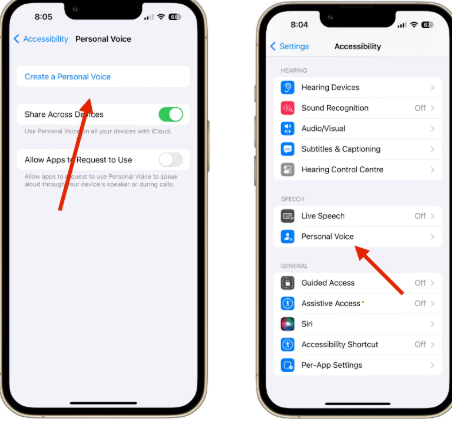
In the Speech section, select Settings > Accessibility > Personal Voice.

Select “Create Personal Voice.”

You must schedule some time from now on to complete this. There will be 150 brief phrases that you will go through. These will just be questions, exclamations, and declarations. Your phone should be able to hear you in a variety of intonations and inflections. The entire process does take roughly fifteen minutes. Although you can halt it, I would advise against doing so as it tends to interfere with the procedure. When the phrases are finished, you will be prompted to leave the phone charging and locked so that the voice can process them. By the next morning, it ought to be prepared for use.

Now that everything is configured, you need to make sure it is switched on. A live speech component may be found under the Speech section, which is also where the Personal voice options are located. Make sure it is turned on by tapping in there. You will be able to use it when you need it because of this.

You triple-press your lock button to activate it once it’s switched on. This displays the live speech option on a menu. You can start typing what you want your phone to say in your voice by tapping on live speech. This user interface sits on top of whatever you are doing because it is an accessibility feature. You can still interact with the iPhone’s main screen while this is up, which is fantastic, in my opinion.

Related Posts:

  • GettyImages-1250200824
    Your iPhone Will Soon Be Able To Replicate Your…
  • cf121196-1-CHATGPT
    ChatGPT Launches Desktop Apps with Voice Mode
  • WA_CALL_META_AI_FEATURE_ANDROID
    WhatsApp Develops 2-Way Voice Chats and AI-Powered…
  • iOS-26-7-new-features-Apple-might-introduce-on-June-9
    Apple Adds Major Accessibility Features to iOS 26…
  • first-google-pixel-6-ad-7
    New Tensor Chips to Boost Pixel 10, 11 Camera Power
  • WorkspaceDrops_Thumbnail.max-1300×1300
    Google Workspace March Update Brings New Features to…
  • WhatsApp-Apple-Watch_Header
    WhatsApp Now Available on Apple Watch
  • google-lens-updated-with-voice-search-feature-ability-find-similar-products-while-shopping
    Google Lens Adds Voice Search and Shopping Comparisons

Discover more from TechBooky

Subscribe to get the latest posts sent to your email.

Tags: iosios accessibilitytipsvoice clone
Akinola Ajibola

Akinola Ajibola

BROWSE BY CATEGORIES

Receive top tech news directly in your inbox

subscription from
Loading

Freshly Squeezed

  • Amazon to Invest $35B in India by 2030 for Jobs & AI Growth December 11, 2025
  • SpaceX May Launch Its Big IPO Next Year With a $1tr Valuation December 11, 2025
  • GPT-5.2 Debuts as OpenAI Answers “Code Red” Challenge December 11, 2025
  • Netflix Plans Heavy Borrowing to Fund Warner Bros Deal December 11, 2025
  • OpenAI Resolves Brief ChatGPT Outage on Android December 11, 2025
  • State AGs Urge AI Giants to Address “Delusional” Responses December 11, 2025
  • Google Launches Managed Remote MCP Servers for Cloud December 11, 2025
  • Reddit Runs Verification Tests December 11, 2025
  • Meta Rolls Out New Algorithm Controls on Instagram December 11, 2025
  • ChatGPT Becomes Most-Downloaded U.S. App of 2025 December 11, 2025
  • Reports: Microsoft Retreats on AI Goals Amid Weak Copilot Use December 11, 2025
  • Disney Invests $1B in OpenAI, Licenses Characters for Sora December 11, 2025

Browse Archives

December 2025
MTWTFSS
1234567
891011121314
15161718192021
22232425262728
293031 
« Nov    

Quick Links

  • About TechBooky
  • Advertise Here
  • Contact us
  • Submit Article
  • Privacy Policy
Generic selectors
Exact matches only
Search in title
Search in content
Post Type Selectors
Search in posts
Search in pages
  • African
  • Artificial Intelligence
  • Gadgets
  • Metaverse
  • Tips
  • About TechBooky
  • Advertise Here
  • Submit Article
  • Contact us

© 2025 Designed By TechBooky Elite

Discover more from TechBooky

Subscribe now to keep reading and get access to the full archive.

Continue reading

We use cookies to ensure that we give you the best experience on our website. If you continue to use this site we will assume that you are happy with it.