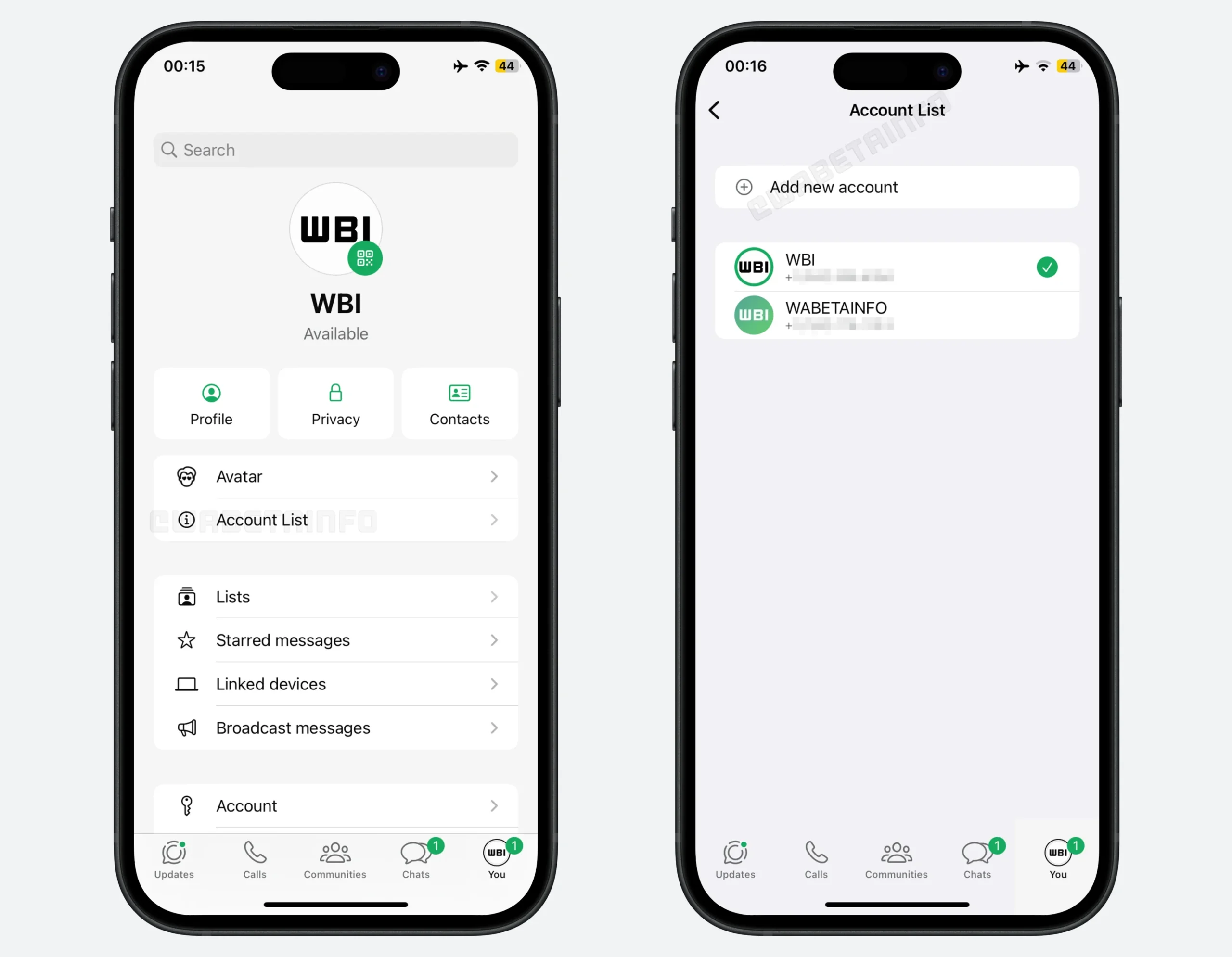
WhatsApp is at it again as part of its significant update, as it announced several quality-of-life enhancements that will be available on its chat app starting today. WhatsApp formally began introducing multi-account capability for iOS. This means that having two accounts on a single iOS device is the first long-awaited option. Users of iPhones may now log into two different accounts simultaneously, a feature that has been available for years on Android. To confirm whose persona you are messaging as, the account’s profile picture will be displayed on the bottom tab.
This is without the need for a second phone or the WhatsApp Business app; this eagerly anticipated feature enables iPhone users to manage two WhatsApp accounts, such as a personal and a professional profile, simultaneously on a single device.
Chat history can be moved more easily between platforms and devices within the same ecosystem thanks to the other new features. When upgrading to a new phone, especially if you’re transferring between iOS and Android, this chat transfer should make it easier to remember messages. To prevent storage clutter, there’s now a new option to remove big files straight from a WhatsApp discussion. You can access it by tapping the name of a chat under the Manage Storage option. One of its features is the ability to remove only media files from a chat.
Naturally, without at least some AI elements, it wouldn’t be a tech news announcement. WhatsApp now allows light photo editing with Meta AI, such as eliminating backgrounds, altering aesthetic styles, and removing composition elements. Additionally, there is a Writing Help prompt that uses AI to assist with message drafting; nevertheless, according to Meta’s blog post, employing this still maintains chat privacy. All WhatsApp users should receive the aforementioned capabilities “soon,” according to the firm.
The key update features that comes with this on the iOS device as announced are
Dual Accounts: Log into two accounts on one iPhone with profile picture indicators.
Cross-Platform Transfer: Native chat migration now available between iOS and Android.
Storage Management: Delete large files from individual chats while keeping text.
Meta AI Enhancements: AI photo editing (remove objects, change backgrounds, apply styles) and contextual reply suggestions
Emoji-triggered sticker recommendations
To use the multiple accounts, users need to follow these easy steps
Update: Install the latest version from the Apple App Store.
Add Account: Go to your Profile tab, tap the arrow next to your name (or “Account List”), and select Add Account.
Requirements: A second phone number with SIM or eSIM is needed for verification.
Switching: Toggle between accounts from the profile menu or by double-tapping the settings tab.
And note that the feature is rolling out globally in phases, so it may take a few weeks or months to appear on your device, as this is a gradual process.
We use cookies to ensure that we give you the best experience on our website. If you continue to use this site we will assume that you are happy with it.