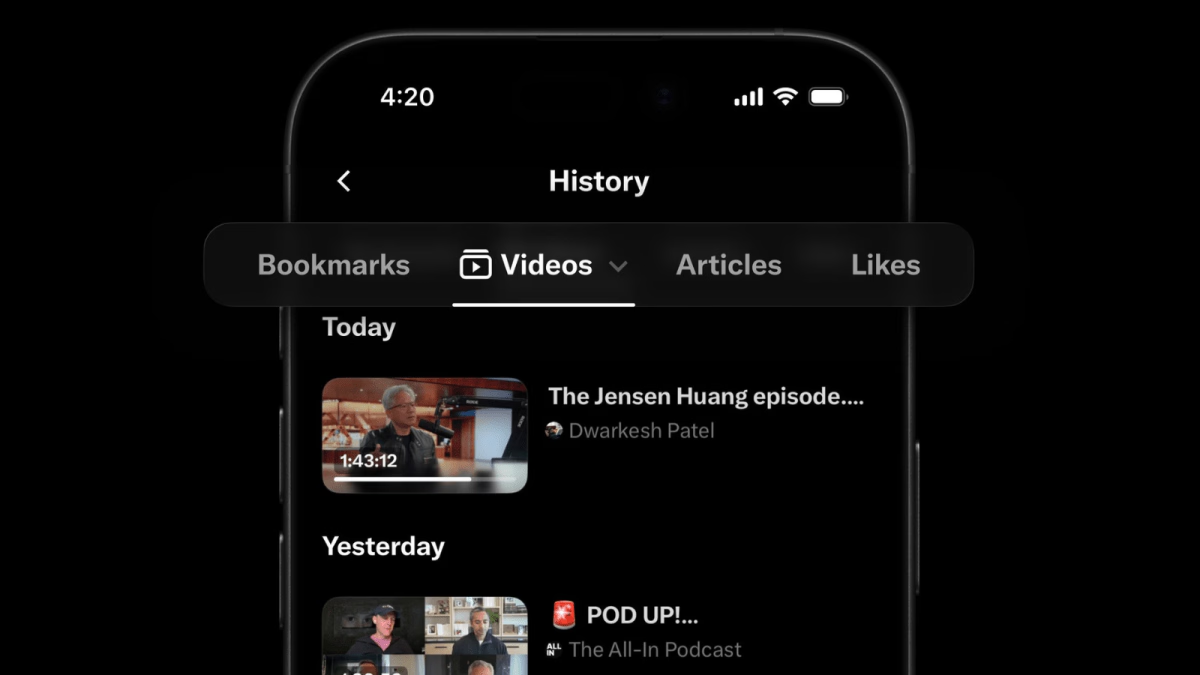
With the introduction of a new History tab that gathers users’ bookmarks, likes, videos, and articles in one convenient location, X is becoming more of a “save-it-for-later” tool.
Nikita Bier, head of product at X, describes it by saying the new resource, which is first available on iOS, is a better way to keep track of all your favourite material and go back to stuff you want to finish reading or watching later at a more convenient time.
The update has significantly changed the name of the Bookmarks button in the X mobile app’s left-side menu to History. The new page makes it simple to revisit your saved information at any time by dividing it into four tabs: Bookmarks, Likes, Videos, and Articles. The Videos and Articles tabs will fill in according to what you watch or read on X, but Bookmarks and Likes are deliberate saves. According to Bier’s release to the press, the history portion is still confidential.
The new History tab, which replaces the old Bookmarks button in the app’s mobile side menu, features four sub-tabs that organize content into distinct categories for Bookmarks, Likes, Videos, and Articles. While Bookmarks and Likes require manual user action, the Videos and Articles tabs populate automatically as you watch or read, with all retrieved items sorted chronologically and organized into sections like “Today” and “Yesterday,” and the entire History tab remains strictly private, visible only to the account holder.
With the update, the feature on X starts to resemble a web browser in that users can access previously viewed content even if they didn’t specifically click a button to store it. With bookmarks located in the main menu and likes hidden away as a tab on the user profile, it unifies functions that were previously located in various areas of the app.
The firm has been promoting X’s long-form article format as a means for companies and creators to publish updates that go beyond the platform’s typical post limit of 280 characters, and this shift might inspire more people to use it. X users create a customized news reader for themselves within the app by tracking the articles they come across while scrolling.
The new History tab introduces browser-like functionality, allowing users to easily return to content they did not explicitly save before scrolling past it. It is also designed to support long-form content, helping users catch up on videos and X articles away from the fast-moving timeline.
Due to changing algorithms and AI-powered experiences that decreased visits to external websites, web publishers have noticed a drop in referral traffic from platforms like Facebook and Google, encouraging them to host their content natively on X. With distribution and discovery built in, X views this change as a chance to draw in more publishers and creators to write directly on its platform.
The feature is currently available only on the X iOS app, and the feature is scheduled to be rolled out to Android and web versions in the coming months.
Related Reading
More contextual TechBooky stories selected from tags, categories and article context.
We use cookies to ensure that we give you the best experience on our website. If you continue to use this site we will assume that you are happy with it.