TechBooky AI Assistant
👋 Welcome to TechBooky AI Assistant

I can help with:
🔎 Tech News
🤖 AI Topics
💻 Gadgets
☁️ Cloud
✍️ Guest Posts
📢 Advertising
🔗 Backlinks
📩 Newsletter
  • AI Search
  • Cryptocurrency
  • Earnings
  • Enterprise
  • About TechBooky
  • Submit Article
  • Advertise With TechBooky
  • Contact Us
TechBooky
  • African
  • AI
  • Metaverse
  • Gadgets
Generic selectors
Exact matches only
Search in title
Search in content
Post Type Selectors
Search in posts
Search in pages
  • African
  • AI
  • Metaverse
  • Gadgets
Generic selectors
Exact matches only
Search in title
Search in content
Post Type Selectors
Search in posts
Search in pages
TechBooky
Generic selectors
Exact matches only
Search in title
Search in content
Post Type Selectors
Search in posts
Search in pages
Home Security

You Can Now Use An Android Phone As A Physical Security Key For 2FA On iOS

Theresa Casimir by Theresa Casimir
June 13, 2019
in Security, Software
Share on FacebookShare on Twitter
Share this story

Send it to someone who should read it.

f Facebook X X in LinkedIn wa WhatsApp tg Telegram @ Email

In Brief
  • Google is making it a little easier to sign into your Google apps and services on an iOS device.
  • The company is taking advantage of the new security key feature in Android to allow people to use their Android phone to log in to Google...
  • You also need two-step verification enabled, and if both of those criteria are met, you will be able to hold down the volume key on your...

Google is making it a little easier to sign into your Google apps and services on an iOS device.

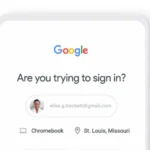
The company is taking advantage of the new security key feature in Android to allow people to use their Android phone to log in to Google services on iOS — The new feature works through Google’s Smart Lock app, which you need to have installed on your iPad or iPhone to make the Android security key feature work. You also need two-step verification enabled, and if both of those criteria are met, you will be able to hold down the volume key on your phone to sign in to your services.

“Compromised credentials are one of the most common causes of security breaches,” wrote Google software engineer Kaiyu Yan and product manager of identity and security Christiaan Brand in a blog post. “While Google automatically blocks the majority of unauthorized sign-in attempts, adding two-step verification (2SV) considerably improves account security … [and now,] you can use your Android phone to verify your sign-in on Apple iPads and iPhones.”

Back in April during its Cloud Next 2019 developer conference, Google rolled out a feature that allows Android phones running Android 7.0 Nougat and up to act as Fast Identity Online (FIDO) security keys, enabling them to protect G Suite, Cloud Identity, and Google Cloud Platform accounts across Bluetooth-enabled Chrome OS, macOS, and Windows 10 devices.

FIDO is a standard certified by the nonprofit FIDO Alliance that supports public key cryptography and multifactor authentication — specifically, the Universal authentication Framework (UAF) and Universal Second Factor (U2F) protocols. When you register a FIDO device with an online service, it creates a pair of keys: (1) an on-device and offline private key and (2) an online public key. During authentication, the device “proves possession” of the private key by prompting you to enter a PIN code or password, supply a fingerprint, or speak into a microphone. Today, security keys on Android phones can verify sign-ins on Apple iPads and iPhones.

Also worth reading
EU Orders Google To Open Android And Search Data To Rival AI Assistants Google Loses Final Android Antitrust Appeal as EU Upholds €4.1 Billion Fine OpenClaw Brings Its Agentic AI Apps to iOS and Android Android 17 Is Here and Google Wants Gemini to Run Your Entire Phone Google Launches Gemini 3.6 Flash, Flash-Lite And Flash Cyber Models Apple And Google Ordered To Remove AI Nudify Apps From App Stores

Here’s how you can set up your devices to sign in on iOS using an Android phone’s built-in security key:

  • On a computer, sign in to your Google account and visit the 2-step verification page (make sure you’ve signed up for 2SV).
  • Click on ‘Add Security Key’ on the 2-step verification page.
  • Pick your Android smartphone from the list of available devices.
  • Turn on Bluetooth on your Android and iOS devices.
  • Sign in to your Google account using the Google Smart Lock app on your iPhone or iPad.
  • Check your Android smartphone, it’ll receive a notification.
  • Follow the instructions on your Android phone to confirm your login.

You’ll need an Android smartphone running Android 7.0 or above and an iOS device running iOS 10.0 or above, according to Google. The company also recommends that you register a backup hardware-based security key and keep it in a safe place. It can be used to sign in in case you lose your Android smartphone.

The new feature should be available today on all Google accounts.

Related Reading

More contextual TechBooky stories selected from tags, categories and article context.

  • android_17_os_verification_google_main_1778753538832
    Google Announces New OS Verification Tool To Fight Fake OS
  • google-messages-hero
    Google Messages Lets Users Edit RCS Messages to iPhone
  • twostep
    Google Sign in Will Require 2FA Verification
  • android-14-header
    Google Finally Unveils Android 14 With Expanded Features
  • ios-16-notifications-iphone-hero
    Android 16 Could Borrow iPhone's Sleek Alert Design
  • WhatsApp Password Feature (1)
    WhatsApp Adds Password Feature for Stronger Account Security
  • Google-Play-Store
    Google Play Store Will Let You Download 2 Apps…
  • gemini_features_1734936766589
    Google’s Gemini-powered ‘Rambler’ Dictation comes to…
Keep Reading Smarter

Search TechBooky with AI

Use TechBooky's AI Search to explore the context behind this story and related coverage across the site.

Try AI Search
More On This Topic
Security Software
Follow TechBooky

Follow TechBooky for more technology stories and newsroom updates.

f Facebook X X in LinkedIn ig Instagram wa WhatsApp

Tags: 2faandroidgoogleiosnew featuresecuritysecurity keysoftwaretwo factor authentication
Theresa Casimir

Theresa Casimir

New at TechBooky, write on important tech stuff from around the world

Search TechBooky
Open TechBooky AI Search Try the AI Assistant

BROWSE BY CATEGORIES

Receive top tech news directly in your inbox

subscription from
Loading

Freshly Squeezed

  • Samsung Memory Warning Shows AI Chip Shortage May Last Into 2028 August 1, 2026
  • Siri AI Paywall Would Make Apple Intelligence A Services Business July 31, 2026
  • Mirage Kitten Malware Shows Cyber-Espionage Pressure Across Africa And MEA July 31, 2026
  • Snapchat Stops Paying Fully AI-Generated Spotlight Videos As AI Slop Spreads July 31, 2026
  • Anthropic Says Claude Models Breached Real Systems During Cyber Tests July 31, 2026
  • DeepSeek V4 Flash API Raises The Pressure In The AI Agent Price War July 31, 2026
  • MTN Nigeria Fintech Revenue Slump Shows Airtime Lending Risk July 31, 2026
  • Google Earth AI Image Tool Shows How Fake Satellite Proof Could Spread July 31, 2026
  • Lesotho Launches National CSIRT As Cybersecurity Becomes Core Digital Infrastructure July 31, 2026
  • Gabon Data Centre Push Shows Africa Digital Sovereignty Is Becoming Infrastructure July 31, 2026
  • Inforcer Raises $50M As AI Turns Microsoft 365 Security Into An MSP Problem July 31, 2026
  • Rwanda 3G Shutdown Shows Africa Mobile Money Needs A Careful 4G Migration July 31, 2026

Browse Archives

August 2026
M T W T F S S
 12
3456789
10111213141516
17181920212223
24252627282930
31  
« Jul    

Quick Links

  • About TechBooky
  • Advertise With TechBooky
  • Contact us
  • Submit Article
  • Privacy Policy
Generic selectors
Exact matches only
Search in title
Search in content
Post Type Selectors
Search in posts
Search in pages
  • African
  • Artificial Intelligence
  • Gadgets
  • Metaverse
  • Tips
  • AI Search
  • About TechBooky
  • Advertise With TechBooky
  • Submit Article
  • Contact us

© 2025 Designed By TechBooky Elite

Discover more from TechBooky

Subscribe now to keep reading and get access to the full archive.

Continue reading

We use cookies to ensure that we give you the best experience on our website. If you continue to use this site we will assume that you are happy with it.