Every laptop is equipped with hardware that can communicate with the operating system and software in the most efficient way. But it’s never enough – and as technology advances, we are sure that you can make your laptop even smarter.
But how do you make your laptop smarter?
There are plenty of ways. Laptops are already smart, but you have to help them so they can achieve their full potential!
And in this post, you’ll find every bit of advice that will help your laptop run smoother, faster, longer, and even smarter!
Things You Can Do to Make Your Laptop Even Smarter
Most of the things mentioned below are pretty familiar to most laptop users – but there are also some things that will be able to transform your laptop into a smarter version in just minutes.
Therefore, whether you choose things you would try or you do them all, you can give these things a try and let us know how smarter your laptop has become!
Delete Clutter and Tidy Things Up
If you have a new laptop, you might think – what clutter? Even new laptops come with clutter known as bloatware.
Bloatware is all software that’s pre-installed with the laptop for the purpose of partnership with the manufacturer. Therefore, some software might not be really helpful to every user out there.
Therefore, head to your Settings -> System -> Apps & Features section and click “View all installed apps”.
Then, sift through the list and leave only apps and software that you need. If you don’t know what each software does – do a quick Google search and find out how important is the particular software for your laptop.
You don’t want to delete the drivers of your laptop, so be careful when sifting through your installed apps.
Most laptop users don’t know that Windows offers a pretty great way to adjust the power your battery can produce.
By clicking on the battery icon in your taskbar, you will be prompted with a new popup window that will allow you to either set your battery into performance or balanced mode.
Great thing is that you can put the slider in the middle to get the best of both worlds. This way, you will be able to get at least 30+ minutes more than you previously used to get.
Battery life will also depend on the tasks you perform, so the lighter the demand you have – the longer your battery will last.
Don’t Be Afraid of Hardware Upgrades!
Even though all laptops come with needed hardware to run properly – if your laptop is getting older and it’s past the warranty date – you can upgrade your laptop.
Every laptop is different, but by performing a quick Google search, you could easily learn how to open it without damaging anything.
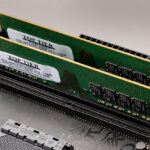
The best yet quickest upgrades you could do are RAM and storage swaps. If your laptop has 4 GB of RAM, you can easily purchase two identical RAM sticks to turn your laptop into a 16 GB RAM laptop.
The same applies to the storage unit. You can swap your storage for a bigger one, or you can upgrade it to an SSD in case your laptop has an HDD. These two things should ramp up the speed of your laptop in no time, yet at a slight investment cost.
Ensure That Your Software is Up to Date
Everyone hates updates, but a laptop that isn’t up to date might not be able to run efficiently at all. Therefore, you should always click on the update notification when it pops up and do the update as soon as possible.
This also applies to the software updates. Whenever you see an update available – you should go for it!
Put Your Virtual Assistant to Use
Almost every laptop has a virtual assistant integrated into the operating system and yet no one seems to be using it to its fullest potential.
If you are using Windows, that little circle on the left side of your taskbar is called Cortana. Cortana is a virtual assistant that can communicate with you via voice and help you type, search for things a lot quicker, or even perform various tasks for you.
And if you’ve just purchased your new Windows laptop – you could see that the whole setup process can happen via voice – thanks to the smart virtual assistant that comes included with Windows.
Install a Rainmeter
Rainmeter is one of the most underrated software for Windows yet it’s one of the software that has the ability to change the way your laptop’s OS looks like.
Rainmeter is a piece of software you can install to your Windows laptop and yet it allows you to completely change your desktop interface.
It’s one of the most efficient Windows 10 customization software out there that won’t do any damage to your laptop. So if you are bored of the standard Windows 10 look – you can turn your laptop into a neat looking laptop in just 5 minutes.
Treat Your Laptop with a Case or Stickers
Once you did everything in your power to make your laptop work smarter – it’s the perfect time to make your laptop look smarter, don’t you think?
Depending on your laptop brand and model, you will be able to browse stores such as eBay or Amazon to find cases that will fit your laptop.
If you can’t find a case – there’s nothing to worry about. Not all laptops will look better with a case. Yet, on the other hand, some laptops will look a lot better with stickers that will represent either your personality or your laptop’s theme.
Conclusion
Do you think our laptops are smart enough? Until you read this post, did you believe that there is a way to make your laptop even smarter?
With the technology available and creativity from various software and operating systems – there are plenty of other ways to make your laptop smarter.
How many tips from the list did you follow? Is there anything specific you need to address with your laptop?
Feel free to leave a comment down below and let us know how smarter your laptop is now!
Related Reading
More contextual TechBooky stories selected from tags, categories and article context.
We use cookies to ensure that we give you the best experience on our website. If you continue to use this site we will assume that you are happy with it.