TechBooky AI Assistant
👋 Welcome to TechBooky AI Assistant

I can help with:
🔎 Tech News
🤖 AI Topics
💻 Gadgets
☁️ Cloud
✍️ Guest Posts
📢 Advertising
🔗 Backlinks
📩 Newsletter
  • AI Search
  • Cryptocurrency
  • Earnings
  • Enterprise
  • About TechBooky
  • Submit Article
  • Advertise With TechBooky
  • Contact Us
TechBooky
  • African
  • AI
  • Metaverse
  • Gadgets
Generic selectors
Exact matches only
Search in title
Search in content
Post Type Selectors
Search in posts
Search in pages
  • African
  • AI
  • Metaverse
  • Gadgets
Generic selectors
Exact matches only
Search in title
Search in content
Post Type Selectors
Search in posts
Search in pages
TechBooky
Generic selectors
Exact matches only
Search in title
Search in content
Post Type Selectors
Search in posts
Search in pages
Home Artificial Intelligence

Microsoft 365 Copilot, An AI Solution For Word, Excel, PowerPoint And Teams

Paul Balo by Paul Balo
March 17, 2023
in Artificial Intelligence, Software
Share on FacebookShare on Twitter
Share this story

Send it to someone who should read it.

f Facebook X X in LinkedIn wa WhatsApp tg Telegram @ Email
In Brief
  • Microsoft has introduced new AI capabilities to its Microsoft 365 suite of applications.
  • The Microsoft 365 Copilot brings AI to several programs such as Word, Excel, PowerPoint, and Teams.
  • The idea behind this new feature is to utilize AI to generate content in a smart way.

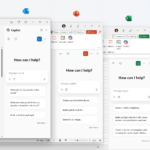
Microsoft has introduced new AI capabilities to its Microsoft 365 suite of applications. The Microsoft 365 Copilot brings AI to several programs such as Word, Excel, PowerPoint, and Teams. The idea behind this new feature is to utilize AI to generate content in a smart way.

According to a blog post from Microsoft, Copilot is currently being tested by 20 customers, with eight of them being Fortune 500 companies. The preview of Copilot will be made available to more customers over the next few months.

During the unveiling event, Microsoft demonstrated some of the capabilities of Copilot, such as asking it to prepare for a meeting, generating meeting notes for a Teams call, and creating a presentation using PowerPoint based on a specific document. These new features are aimed at making work easier and more efficient for Microsoft 365 users.

Microsoft’s new Copilot feature is designed to generate content intelligently by using insights and information from one Microsoft app to another. For example, it can help create a PowerPoint presentation by using details from a Word document.

With Copilot, users can now rely on AI to prepare for and catch up on Teams meetings. If someone joins a meeting late, Copilot can generate meeting notes for everything they’ve missed, helping them get up to speed quickly without having to rely on other attendees for information.

Also worth reading
Inforcer Raises $50M As AI Turns Microsoft 365 Security Into An MSP Problem Huawei Pushes Enterprise AI Solutions In South Africa Threads Users Can Now DM Meta AI As The Assistant Moves Deeper Into Social Apps Claude Opus 5 Gives Anthropic A Cheaper Answer To The Fable 5 Problem SAP Cloud Growth Eases Fears That AI Will Weaken Enterprise Software US Lawmakers Push AI Kill Switch Bill After OpenAI Rogue-Model Incident

Moreover, Copilot can also create a meeting agenda by analyzing the chat history of previous meetings. This feature can help to streamline future meetings by providing a clear outline of what needs to be discussed and what actions need to be taken. Additionally, Copilot can suggest which attendees should be responsible for specific tasks, helping to ensure that everyone is on the same page and that nothing falls through the cracks.

These features are particularly useful for businesses that have a lot of meetings or have remote teams who may not always be able to attend meetings in person. By using Copilot to automate note-taking and agenda creation, businesses can save time and increase productivity while ensuring that all attendees are informed and engaged.

According to Microsoft, Copilot’s capabilities extend beyond Teams. Business Chat, a new experience from Microsoft, brings together information from various sources like documents, files, emails, and more. The feature is accessible through Teams and Microsoft365.com.

In addition, within Outlook, Copilot can read an email and generate a reply. As Microsoft continues to develop AI capabilities, this new feature is just one of several announcements they’ve made this year, including launching the new Bing powered by ChatGPT and adding features to Microsoft Teams.

Related Reading

More contextual TechBooky stories selected from tags, categories and article context.

  • OMB_Hero-WholeNewWayToWork
    Microsoft Denies Office-to-Copilot Rebranding Reports
  • excelagentmode
    Microsoft Introduces ‘Vibe Working’ Mode To Word,…
  • Microsoft_Office_Excel_(2019–present).svg
    New List of Features on Microsoft Excel this March 2025
  • Layered-WXPO
    Microsoft Office Adds Free Copilot Chat
  • M365Copilot_HeroBanner_Apps_BLOG-FEATURE
    Microsoft 365 Adds Copilot AI, Raises Subscription Costs
  • microsoft-365-logo-with-some-of-its-apps-beside-it-and-a-field-to-add-alt-text
    Microsoft Tests Ad-Supported Free Version of 365 Apps
  • M365-Blog_09292025_agentMode_Hero_v1-809x455
    Microsoft Adds ‘Vibe Working’ to Word and Excel
  • Microsoft-365
    Students Get One Year of Free Microsoft 365 Personal…
Keep Reading Smarter

Search TechBooky with AI

Use TechBooky's AI Search to explore the context behind this story and related coverage across the site.

Try AI Search
More On This Topic
Artificial Intelligence Software
Follow TechBooky

Follow TechBooky for more technology stories and newsroom updates.

f Facebook X X in LinkedIn ig Instagram wa WhatsApp

Tags: AIartificial intelligencemicrosoft 365Microsoft 365 Copilotmicrosoft office
Paul Balo

Paul Balo

Paul Balo is the founder of TechBooky and a highly skilled wireless communications professional with a strong background in cloud computing, offering extensive experience in designing, implementing, and managing wireless communication systems.

Search TechBooky
Open TechBooky AI Search Try the AI Assistant

BROWSE BY CATEGORIES

Receive top tech news directly in your inbox

subscription from
Loading

Freshly Squeezed

  • Gemini Hits 1B Users. Here Are Google’s 13 Other Billion-User Products August 12, 2026
  • Gemini Hits 1B Monthly Users As Google’s AI Distribution Kicks In August 11, 2026
  • Intel Raises $20B As Its Chip Comeback Gets More Expensive August 11, 2026
  • Nvidia Turns AI Compute Into A $500B Wall Street Asset August 11, 2026
  • Manus Goes Solo Again As Meta’s $2B AI Deal Unwinds August 11, 2026
  • Anthropic’s IPO Pitch Now Has To Answer AI Backlash August 11, 2026
  • xAI Co-Founder’s River AI Raises $1.1B To Bring AI Back Home August 11, 2026
  • Claude Watermarks Show The EU Is Rewriting AI Rules August 11, 2026
  • AI Is Testing India’s IT Jobs Machine August 11, 2026
  • OpenAI Gives Vetted Defenders GPT-5.6-Cyber August 11, 2026
  • Apple’s Glass iPhone Plan Is Reportedly Still Alive August 11, 2026
  • Claude Did Not Solve Riemann, But It Moved The Math August 11, 2026

Browse Archives

August 2026
M T W T F S S
 12
3456789
10111213141516
17181920212223
24252627282930
31  
« Jul    

Quick Links

  • About TechBooky
  • Advertise With TechBooky
  • Contact us
  • Submit Article
  • Privacy Policy
Generic selectors
Exact matches only
Search in title
Search in content
Post Type Selectors
Search in posts
Search in pages
  • African
  • Artificial Intelligence
  • Gadgets
  • Metaverse
  • Tips
  • AI Search
  • About TechBooky
  • Advertise With TechBooky
  • Submit Article
  • Contact us

© 2025 Designed By TechBooky Elite

Discover more from TechBooky

Subscribe now to keep reading and get access to the full archive.

Continue reading

We use cookies to ensure that we give you the best experience on our website. If you continue to use this site we will assume that you are happy with it.