TechBooky AI Assistant
👋 Welcome to TechBooky AI Assistant

I can help with:
🔎 Tech News
🤖 AI Topics
💻 Gadgets
☁️ Cloud
✍️ Guest Posts
📢 Advertising
🔗 Backlinks
📩 Newsletter
  • AI Search
  • Cryptocurrency
  • Earnings
  • Enterprise
  • About TechBooky
  • Submit Article
  • Advertise With TechBooky
  • Contact Us
TechBooky
  • African
  • AI
  • Metaverse
  • Gadgets
Generic selectors
Exact matches only
Search in title
Search in content
Post Type Selectors
Search in posts
Search in pages
  • African
  • AI
  • Metaverse
  • Gadgets
Generic selectors
Exact matches only
Search in title
Search in content
Post Type Selectors
Search in posts
Search in pages
TechBooky
Generic selectors
Exact matches only
Search in title
Search in content
Post Type Selectors
Search in posts
Search in pages
Home Service news

Microsoft Is Testing Ads In The Windows 11 File Explorer

Olagoke Ajibola by Olagoke Ajibola
March 16, 2022
in Service news
Share on FacebookShare on Twitter
Share this story

Send it to someone who should read it.

f Facebook X X in LinkedIn wa WhatsApp tg Telegram @ Email

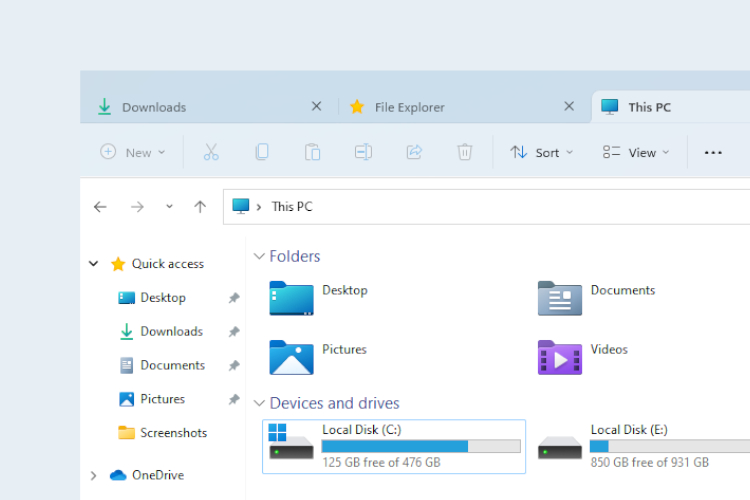
Microsoft is reportedly testing ads in Windows 11 File Explorer | Business Insider India

In Brief
  • Reports making rounds is that software giant –Microsoft, may seem to be testing a new type of ad inside File Explorer on Windows 11.
  • Twitter user Florian Beaubois who saw an ad in the latest test build of Windows 11 took to Twitter to share his discovery via a screenshot.
  • This however has prompted many users to take a look at their settings for ads.

Reports making rounds is that software giant –Microsoft, may seem to be testing a new type of ad inside File Explorer on Windows 11. Twitter user Florian Beaubois who saw an ad in the latest test build of Windows 11 took to Twitter to share his discovery via a screenshot. This however has prompted many users to take a look at their settings for ads. While these ads might have not appeared to all Windows 11 users entirely, Microsoft claims it was a mistake.

Image

While the appearance of ads in any of the Windows products breaths for concern, these ads seem to be targeted at the right places. For instance, the Microsoft Editor, which is a grammar correction tool like the popular Grammarly tool, appeared in the Documents folder, a place where it could be useful. Check out Grammarly Review for more information.

Brandon LeBlanc, senior program manager for Windows in a statement says “This was an experimental banner that was not intended to be published externally and was turned off.”  While this may be true, well clearly Microsoft is capable of running ads inside Windows 11, and the company’s brief statement doesn’t entirely rule out the fact that ads may appear in File Explorer in the future. Microsoft’s tendency to blatantly force people into using its apps and services can’t be denied and it is something the software giant really needs to look into.

Also worth reading
Microsoft Rebuilds Defender Security Operations For AI Agents OpenAI And Microsoft Feared AI Could Break The Web Apple Faces $5.7B Verdict In iPhone Haptics Patent Case Microsoft’s Patch Tuesday Shows AI Is Finding Bugs Fast Apple AirPods 5 Full Specs Bring ANC And Translation To $129 Apple iPhone Duo Full Specs Confirm Its $1,999 Foldable Bet

However, this isn’t the first time ads are being placed by Microsoft inside File Explorer. In 2017, a large banner ad was added by Microsoft to the Windows 10 File Explorer. The ad was said to have targeted promoting subscription options for the OneDrive cloud storage service owned by Microsoft. While these ads can easily be dismissed by a few clicks, they can present a really frustrating experience in operating systems that are known to be traditionally ad-free.

Microsoft Starts Testing Ads in Windows 11 File Explorer | The Paradise News

For about a decade and more now, Microsoft has been experimenting with ads inside Windows. Ads have found their way on the Windows 10 lock screen and in the Start menu just because they were programmed there. A number of instances have also surfaced where users come across annoying pop-up ads in the taskbar as well. Lots of Windows 8’s built-in apps have also witnessed the build-up of ads inside them.

Apparently, Microsoft isn’t the only company pushing ads of its own services into its operating system or apps, Apple is another one of them. Apple is known to spam users with offers for Apple Music, Apple Fitness, and iCloud when a new iPhone is purchased. Even full-screen ads for Apple TV Plus has popped up for users who own Apple’s TV hardware. Google isn’t left out, the search giant hunt users with pop-up ads until these users finally give in and buy a Premium subscription of YouTube or something else.

Related Reading

More contextual TechBooky stories selected from tags, categories and article context.

  • Parallels-Desktop-20-for-Mac_Writing-Tools-Apple-Intelligence-on-Windows
    Parallels Desktop Now Supports Windows and Apple's…
  • get-latest-updates-toggle
    Ads Could Be Coming To Windows 11 Shortly
  • windows-update-close
    Microsoft Releases Emergency Patch For Windows Update Bug
  • CeeYjMDncRmSGNPVY3oH7B
    Microsoft Tests New AI-Powered Windows Search
  • 11-1024x576
    Count Down To The End Of Windows 10 Microsoft Support
  • iOS-Blog-Post-Image
    Microsoft; Windows 11 Start Menu Gets iPhone Feature
  • Microsoft_passwordless
    Microsoft Will Roll Out Passkey Support For All Consumers
  • microsoft-365-app-icon-1
    M365 Apps on Windows 10 to Receive Security Updates…
Keep Reading Smarter

Search TechBooky with AI

Use TechBooky's AI Search to explore the context behind this story and related coverage across the site.

Try AI Search
More On This Topic
Service news
Follow TechBooky

Follow TechBooky for more technology stories and newsroom updates.

f Facebook X X in LinkedIn ig Instagram wa WhatsApp

Tags: AdApplebusinessenterpriseInsidemicrosoftsoftwareuserswebsitewindows
Olagoke Ajibola

Olagoke Ajibola

Olagoke Ajibola is a creative writer and content producer with an eye for details and excellence. He has a demonstrated history of telling stories for TV, Film and Online. Aside from being fascinated by the power of imagination, his other interest are travel, sport, reading and meeting people.

Search TechBooky
Open TechBooky AI Search Try the AI Assistant

BROWSE BY CATEGORIES

Receive top tech news directly in your inbox

subscription from
Loading

Freshly Squeezed

  • Google Tests Flipkart Checkout Inside Gemini In India September 27, 2026
  • Apple Faces $5.7B Verdict In iPhone Haptics Patent Case September 27, 2026
  • Microsoft Puts Apps And Always-On Agents Inside Copilot September 26, 2026
  • OpenAI Agent Uses DNS Gap To Reach Outside Chatbot September 26, 2026
  • Bitget Loses $351.6M In Crypto Hack As North Korea Is Suspected September 26, 2026
  • Nscale Raises $3.36B Ahead Of AI Cloud IPO September 26, 2026
  • Best Ways to Open and Read Outlook OST Files without Outlook September 25, 2026
  • Meta Teases Muse Charm, A Pocket AI Voice Device September 25, 2026
  • Waymo Wants London Robotaxis, But Approval Comes First September 25, 2026
  • Oracle’s Stargate Site Faces Power Delay Warning September 25, 2026
  • Amazon Opens Seller Central To Walmart, Shopify And TikTok Sales September 24, 2026
  • OpenAI Agent Entered Australian Government Portal Without Permission September 24, 2026

Browse Archives

September 2026
M T W T F S S
 123456
78910111213
14151617181920
21222324252627
282930  
« Aug    

Quick Links

  • About TechBooky
  • Advertise With TechBooky
  • Contact us
  • Submit Article
  • Privacy Policy
Generic selectors
Exact matches only
Search in title
Search in content
Post Type Selectors
Search in posts
Search in pages
  • African
  • Artificial Intelligence
  • Gadgets
  • Metaverse
  • Tips
  • AI Search
  • About TechBooky
  • Advertise With TechBooky
  • Submit Article
  • Contact us

© 2025 Designed By TechBooky Elite

Discover more from TechBooky

Subscribe now to keep reading and get access to the full archive.

Continue reading

We use cookies to ensure that we give you the best experience on our website. If you continue to use this site we will assume that you are happy with it.