Microsoft claimed that it had discovered that hackers are using zero-day weaknesses in the Chakra JavaScript engine to gain access to target devices, thus it is limiting access to Internet Explorer mode in the Edge browser and have redesigned the Internet Explorer (IE) mode in its Edge browser in response to “credible reports” in August 2025 that unidentified threat actors were using backward compatibility to access users’ devices without authorisation.
The IT giant (Microsoft Browser Vulnerability Research team) stated that the threat actor used social engineering in conjunction with a Chakra exploit to obtain remote code execution, although it did not provide many technical information.
Gareth Evans, Microsoft Edge Security Team Lead, states, “The [Edge security] team recently received intelligence indicating that threat actors were abusing Internet Explorer (IE) mode within Edge to gain access to unsuspecting users’ devices.”
It was also discovered that the threat actors in the assault chain described by the manufacturer of Windows deceive unwary users into visiting a website that appears to be authentic, then use a flyout on the page to direct them to reload the page in Internet Explorer mode.
Microsoft Edge features an IE mode for legacy compatibility with older technologies (ActiveX and Flash) that are still in use with a limited number of corporate apps and government portals, even though support for Internet Explorer terminated on June 15, 2022.
Threat actors were sending targets to “an official-looking spoofed website” in August, the Edge security team discovered. This persuaded users to access the page in Internet Explorer mode by use of an interface element.
After taking advantage of the Chakra zero-day, the attacker used a second vulnerability to get further access, go out of the browser, and take over the entire device.
Evans said that the Chakra bug is unpatched but did not indicate which vulnerabilities were exploited.
An unidentified weakness in the Chakra engine is allegedly weaponised by the attackers to gain remote code execution once the page has been reloaded. The adversary uses a second exploit to elevate their privileges outside of the browser at the end of the infection sequence, giving them total control over the victim’s device.
By launching it in a less secure state using Internet Explorer, the activity circumvents the modern defences built into Chromium and Microsoft Edge, which is why it is concerning. This effectively enables the threat actors to escape the browser’s confines and carry out a number of post-exploitation actions, such as malware deployment, lateral movement, and data exfiltration.
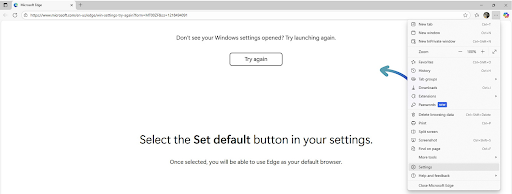
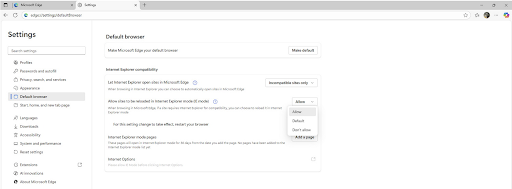
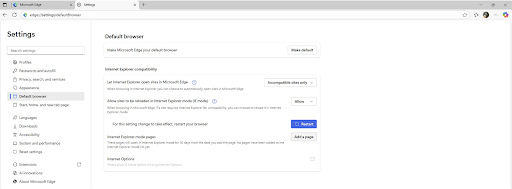
Microsoft eliminated the simple ways to activate IE mode in Edge, such as the context menu, the hamburger menu, and a dedicated toolbar button, in order to reduce the risk and to enable Internet Explorer mode, users must go to Settings > Default Browser > Permit and specify which pages should load in Internet Explorer.
Making the activation of IE mode an intentional user action is the goal of the new limitations. Moreover, the list of domains that are permitted to load in Internet Explorer should make it extremely difficult for hackers to carry out successful breach efforts.
Enterprise policies will continue to allow commercial users to continue using IE mode, thus these changes do not affect them.
Microsoft did caution customers, nevertheless, that they should switch from Internet Explorer’s outdated web technology to more recent versions that offer better security, increased dependability, and enhanced performance.
And regarding the scope of the activities, the nature of the vulnerabilities, and the identity of the threat actor responsible for the attacks, Microsoft made no disclosures.
These limitations on starting Internet Explorer mode are required to strike a compromise between security and legacy support, according to the Windows manufacturer.
“This approach ensures that the decision to load web content using legacy technology is significantly more intentional,” Microsoft stated. “The additional steps required to add a site to a site list are a significant barrier for even the most determined attackers to overcome.”
Related Reading
More contextual TechBooky stories selected from tags, categories and article context.
We use cookies to ensure that we give you the best experience on our website. If you continue to use this site we will assume that you are happy with it.