TechBooky AI Assistant
👋 Welcome to TechBooky AI Assistant

I can help with:
🔎 Tech News
🤖 AI Topics
💻 Gadgets
☁️ Cloud
✍️ Guest Posts
📢 Advertising
🔗 Backlinks
📩 Newsletter
  • AI Search
  • Cryptocurrency
  • Earnings
  • Enterprise
  • About TechBooky
  • Submit Article
  • Advertise With TechBooky
  • Contact Us
TechBooky
  • African
  • AI
  • Metaverse
  • Gadgets
Generic selectors
Exact matches only
Search in title
Search in content
Post Type Selectors
Search in posts
Search in pages
  • African
  • AI
  • Metaverse
  • Gadgets
Generic selectors
Exact matches only
Search in title
Search in content
Post Type Selectors
Search in posts
Search in pages
TechBooky
Generic selectors
Exact matches only
Search in title
Search in content
Post Type Selectors
Search in posts
Search in pages
Home Service news

Microsoft’s Revamp, The Windows BSOD May Become Black

Akinola Ajibola by Akinola Ajibola
March 31, 2025
in Service news
Share on FacebookShare on Twitter
Share this story

Send it to someone who should read it.

f Facebook X X in LinkedIn wa WhatsApp tg Telegram @ Email

In Brief
  • Microsoft has said that it would be redesigning Windows 11’s Blue Screen of Death (BSOD) error message.
  • Instead of the classic blue hue, frowning face, and QR code, the new design has a streamlined screen that resembles the black screen that appears when...
  • It’s unclear at this time if the new BSOD will continue to appear as a black screen when Microsoft releases the update’s final version.

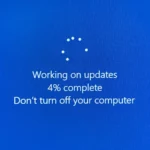
Microsoft has said that it would be redesigning Windows 11’s Blue Screen of Death (BSOD) error message. Instead of the classic blue hue, frowning face, and QR code, the new design has a streamlined screen that resembles the black screen that appears when Windows is updating. It’s unclear at this time if the new BSOD will continue to appear as a black screen when Microsoft releases the update’s final version.

In a blog post on the update, Microsoft said, “We’re previewing a new, more streamlined UI for unexpected restarts which better aligns with Windows 11 design principles and supports our goal of getting users back into productivity as fast as possible.” “We’ve kept the technical information on the screen while streamlining your experience.”

It seems as though the notorious Blue Screen of Death is waiting around every corner. It lurks in the background, apparently waiting for the perfect opportunity to destroy your day. It is the bane of both PC gamers and IT professionals. Microsoft has already revealed that the most recent Windows Insider build includes a “more streamlined UI for unexpected restarts” peek, and there are rumours of a new Black Screen of Death to keep me up at night.

The new BSOD will first display as a green screen in test releases of the Beta, Dev, and Canary Channels before being deployed as a black or blue screen, although Windows Insiders may test it out in these versions. This is the first significant alteration to the BSOD since Windows 8 when Microsoft added a dejected face to the screen. This updated design only says “your device ran into a problem and needs to restart” and incorporates the BSOD error or malfunctioning driver.

In test releases of Windows 11 in 2021, Microsoft did temporarily change the BSOD to a black screen before returning to the blue screen that had been in use since Windows 8. The need to contact Microsoft to find out if they plan to transition from a blue screen to a black one when this new BSOD appears to be handed out to the current Windows 11 version 24H2 shortly.

The UI for teeth-clenching system crashes will be changed in Preview Build 26120.3653 (KB5053658), according to Microsoft’s Windows Insider blog. In this instance, Microsoft likes to refer to them as “unexpected restarts”:

They are showing off a new, more efficient user interface for unexpected restarts that better complies with Windows 11 design guidelines and advances our objective of restoring people to productivity as quickly as possible. The technical information on the screen has been preserved while your experience has been made simpler.

Also worth reading
Microsoft Cloud Growth Jumps As Azure Gives AI Spending A Better Answer Microsoft Launches MAI-Cyber-1-Flash As AI Security Becomes A Model Race Microsoft And Mistral Sign Multibillion-Dollar European AI Deal AMD Lands Microsoft As Helios AI Rack Customer In Nvidia Challenge Nvidia-Powered Windows PCs Debut as Microsoft Bets on Local AI Computing Microsoft Introduces Automatic Rollbacks For Faulty Windows Drivers

“Remember that this is a “green screen” to Windows Insiders. Windows Insiders using Windows 11, version 24H2 and later, are starting to receive this in the Beta, Dev, and Canary Channels.

However, according to Windows Latest, Microsoft has changed the Blue Screen of Death’s appearance and substituted a Black Screen of Death. Although the source of Windows Latest’s information is unclear, the sample pictures appear to depict a nearly identical error warning screen—this time, it’s all black.

Dark like the minuscule depths of deep space. Black is how it feels when the computer crashes due to a vague message that no longer seems to display a QR code for quick crash lookups. It seems that there isn’t even a sad face emoji to represent my inner turmoil. Only the message that haunts the night-time dreams of all PC gamers, a stop code, and a menacing nothingness.

“Your device ran into a problem and needs to restart.” and the BSOD appears. It doesn’t help that a BSOD system crash usually causes an audible blip that makes you jump out of your seat. The whole procedure seems to be designed to produce a jump fright, which will surely be followed by a diagnostic phase that begins with a restart and the hope that your system won’t repeatedly blue screen (and now maybe black screen) without warning.

Similarly to the notorious Crowdstrike outage, which was able to bring down a significant amount of infrastructure throughout the globe. Perhaps the problem messages themselves will eventually become more helpful on the new website, even though they presently look to be QR-codeless. One is not sure if a black screen over a blue screen would have improved matters.

And yet here one will definitely not test the system by forcing it into a blue screen/black screen situation. Rather, it will install the preview build and wait for it to finish. The empty space. It appears to arrive for all of us in due time.

Related Reading

More contextual TechBooky stories selected from tags, categories and article context.

  • 2983e300-db83-11eb-9fef-e9efcab072f3
    Microsoft Updates Windows 11 Blue Screen of Death
  • ZcEQEPVsszUfc3r74WWPLD
    Microsoft Offers Guide to Fix Windows Blue Screen Errors
  • 1764244442_v7f6s4rnfs8wghk3qecgd5
    Microsoft to Bring Store App Updates to Windows Update
  • windows-update-close
    Microsoft Releases Emergency Patch For Windows Update Bug
  • Media
    Microsoft Reveals Rejected Start Menu Redesigns
  • microsoft-365-app-icon-1
    M365 Apps on Windows 10 to Receive Security Updates…
  • get-latest-updates-toggle
    Ads Could Be Coming To Windows 11 Shortly
  • 11-1024x576
    Count Down To The End Of Windows 10 Microsoft Support
Keep Reading Smarter

Search TechBooky with AI

Use TechBooky's AI Search to explore the context behind this story and related coverage across the site.

Try AI Search
More On This Topic
Service news
Follow TechBooky

Follow TechBooky for more technology stories and newsroom updates.

f Facebook X X in LinkedIn ig Instagram wa WhatsApp

Tags: Blue Screen of Death (BSOD)microsoftwindows 11
Akinola Ajibola

Akinola Ajibola

Search TechBooky
Open TechBooky AI Search Try the AI Assistant

BROWSE BY CATEGORIES

Receive top tech news directly in your inbox

subscription from
Loading

Freshly Squeezed

  • OpenAI Gives Vetted Defenders GPT-5.6-Cyber August 11, 2026
  • Apple’s Glass iPhone Plan Is Reportedly Still Alive August 11, 2026
  • Claude Did Not Solve Riemann, But It Moved The Math August 11, 2026
  • Myspace Comeback Would Test Social Media Nostalgia August 10, 2026
  • China Review Of Palo Alto Networks Deepens Tech-Security Split August 10, 2026
  • Ethio Telecom And ZTE Push Ethiopia Closer To Nationwide 4G August 10, 2026
  • SeerBit Adds PayPal To Help African Merchants Sell Globally August 10, 2026
  • Nigeria Crypto Tax Rules Put VASPs On The Hook August 10, 2026
  • Nigeria Local Cloud Push Is Now About AI Sovereignty August 10, 2026
  • Data-Centre Bans Turn AI Compute Into Local Politics in the U.S August 10, 2026
  • Claude Agent Gym Hack Shows Everyday AI Risk August 10, 2026
  • Why China May Win The AI Race And How The US Can Still Fight August 9, 2026

Browse Archives

August 2026
M T W T F S S
 12
3456789
10111213141516
17181920212223
24252627282930
31  
« Jul    

Quick Links

  • About TechBooky
  • Advertise With TechBooky
  • Contact us
  • Submit Article
  • Privacy Policy
Generic selectors
Exact matches only
Search in title
Search in content
Post Type Selectors
Search in posts
Search in pages
  • African
  • Artificial Intelligence
  • Gadgets
  • Metaverse
  • Tips
  • AI Search
  • About TechBooky
  • Advertise With TechBooky
  • Submit Article
  • Contact us

© 2025 Designed By TechBooky Elite

Discover more from TechBooky

Subscribe now to keep reading and get access to the full archive.

Continue reading

We use cookies to ensure that we give you the best experience on our website. If you continue to use this site we will assume that you are happy with it.