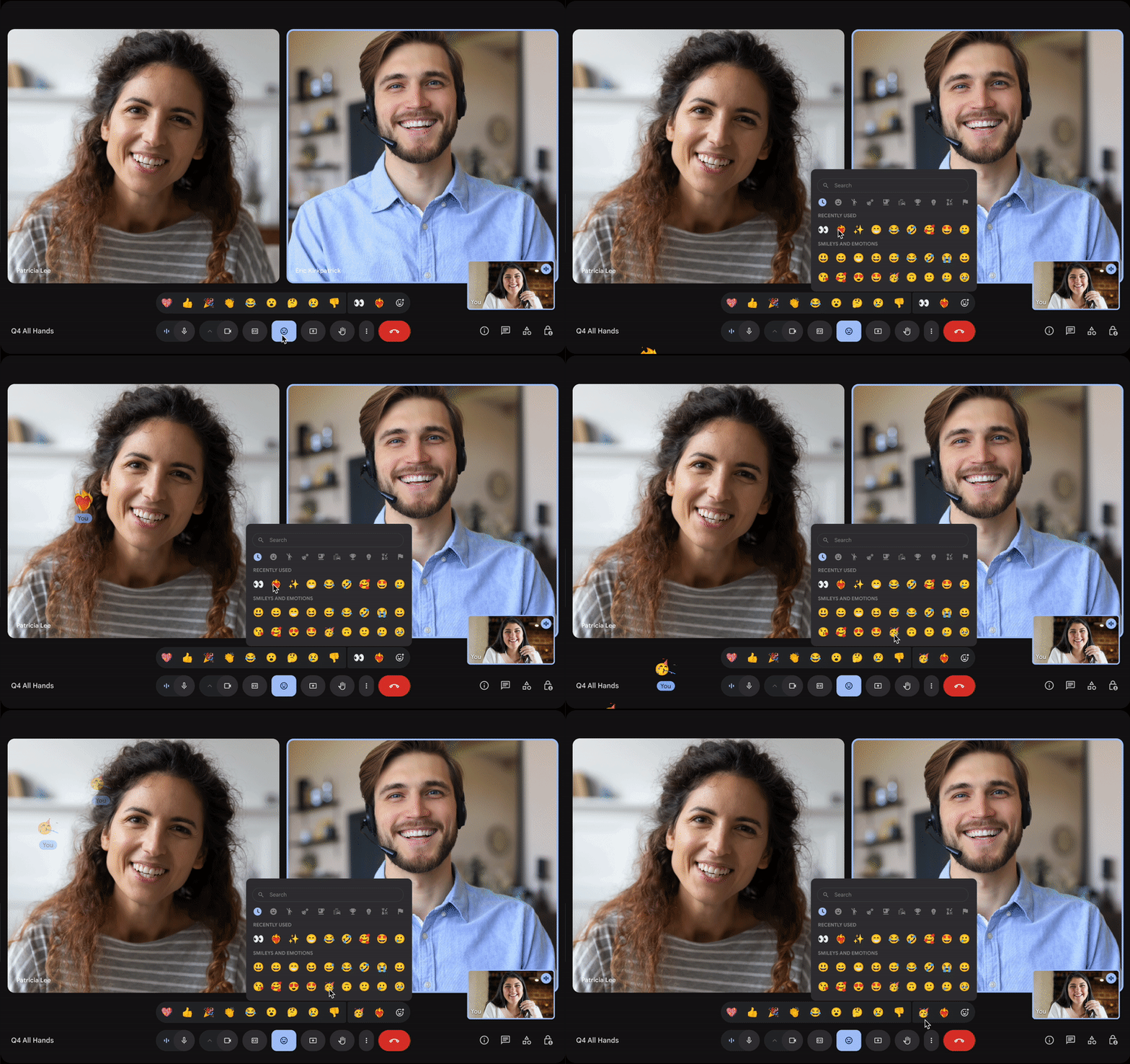
Google Meet just made video calls a whole lot more expressive. The platform has rolled out support for the complete emoji library, giving users thousands of options to react during meetings instead of the handful they had before. This is a bigger deal than it might sound at first because it changes how people can communicate without interrupting the flow of conversation.
Before this update, Google Meet offered a limited set of reactions. You could give a thumbs up, clap, laugh, or show a heart. That was pretty much it. Those options worked fine for basic responses, but they didn’t capture the full range of what people wanted to say during a video call. Now, with access to the entire emoji library, users can choose from every emoji available on their device. That means everything from food and animals to flags and symbols is now fair game for reacting during a meeting.
The way this works is simple. During a Google Meet call, users can click the reactions button and scroll through the complete emoji picker just like they would in a text message or social media post. When someone sends a reaction, it appears briefly on the screen for everyone to see, similar to how the old limited responses worked. The difference is that now there’s an emoji for virtually every situation, mood, or inside joke that might come up during a meeting.
This change matters because video meetings have become a permanent part of how people work and connect. After years of remote work and hybrid schedules, we’ve all come to realize that video calls are lacking something that in-person meetings have. In a physical room, you can nod, smile, or give a quick gesture to show you’re engaged without saying anything. On video, especially when you’re on mute or when someone else is presenting, those small acknowledgments were more problematic to give. The original reaction set was a start, but it was too limited to really replace all those subtle signals we use in person.
Opening up the full emoji library gives people more ways to participate in meetings without speaking over others. If someone makes a good point, you can send a thinking face or a brain emoji instead of just a thumbs-up. If they crack a joke, you’ve got options beyond just the basic laugh. If someone mentions food or plans, you can respond with the exact emoji that suits the occasion. It sounds like a small thing, but these little moments of connection add up over the course of a long meeting or a full day of video calls.
Google isn’t the first to recognize this. Other video platforms have been experimenting with reactions for years. Zoom has had responses for a while, though their approach has been different. Teams has its own reaction system. What makes Google’s move interesting is how they’re basically saying, “Here, take all of them.” Instead of curating a specific set, they’re letting users pick whatever makes sense to them. That’s the approach platforms like Slack and Discord have taken with emoji reactions in chat, and it’s worked well there.
There’s also a cultural element to this that’s worth noting. Emoji use varies widely across different regions, age groups, and workplace cultures. What seems like the perfect reaction to one person might be confusing to another. By offering everything, Google Meet lets users adapt to their specific context. A casual team meeting with close colleagues can be more creative in terms of reactions, while a formal client presentation should adhere to more professional options. The tool is flexible enough to work in different situations.
From a practical standpoint, this update doesn’t require users to take any special action. The expanded emoji library should be available automatically in Google Meet across desktop and mobile devices. Users need to open the reactions panel during a call, and they’ll have access to the full range of options. Google has been rolling this out gradually, so if you don’t see it yet, it should arrive soon.
This aligns with a broader trend among video platforms to make remote communication feel more natural and less formal. The early days of video calls were very formal. Everyone was on their best behaviour, meetings ran strictly, and there wasn’t much room for the informal side conversations and reactions that happen naturally when people are in the same room. As these tools have matured, companies have been adding features to bring back some of that casual interaction. Reactions are one piece of that puzzle. Background effects, breakout rooms, chat features, and now more expressive reactions all work together to make video meetings feel less like sitting in front of a camera and more like actually collaborating with other people.
Whether Google Meet goes in that direction or not, the move to support the full emoji library is a clear signal that they’re listening to what users want. More choice, more expression, and more ways to stay engaged during meetings without constantly having to unmute to speak.
For anyone who spends hours in video calls each week, this is a welcome change. It’s not revolutionary, but it’s the kind of improvement that makes daily work just a bit more bearable and maybe even more enjoyable.
Related Reading
More contextual TechBooky stories selected from tags, categories and article context.
We use cookies to ensure that we give you the best experience on our website. If you continue to use this site we will assume that you are happy with it.