TechBooky AI Assistant
👋 Welcome to TechBooky AI Assistant

I can help with:
🔎 Tech News
🤖 AI Topics
💻 Gadgets
☁️ Cloud
✍️ Guest Posts
📢 Advertising
🔗 Backlinks
📩 Newsletter
  • AI Search
  • Cryptocurrency
  • Earnings
  • Enterprise
  • About TechBooky
  • Submit Article
  • Advertise With TechBooky
  • Contact Us
TechBooky
  • African
  • AI
  • Metaverse
  • Gadgets
Generic selectors
Exact matches only
Search in title
Search in content
Post Type Selectors
Search in posts
Search in pages
  • African
  • AI
  • Metaverse
  • Gadgets
Generic selectors
Exact matches only
Search in title
Search in content
Post Type Selectors
Search in posts
Search in pages
TechBooky
Generic selectors
Exact matches only
Search in title
Search in content
Post Type Selectors
Search in posts
Search in pages
Home Security

Microsoft Drops SMS Codes for Passkey Sign-Ins

Akinola Ajibola by Akinola Ajibola
May 21, 2026
in Security
Share on FacebookShare on Twitter
Share this story

Send it to someone who should read it.

f Facebook X X in LinkedIn wa WhatsApp tg Telegram @ Email
In Brief
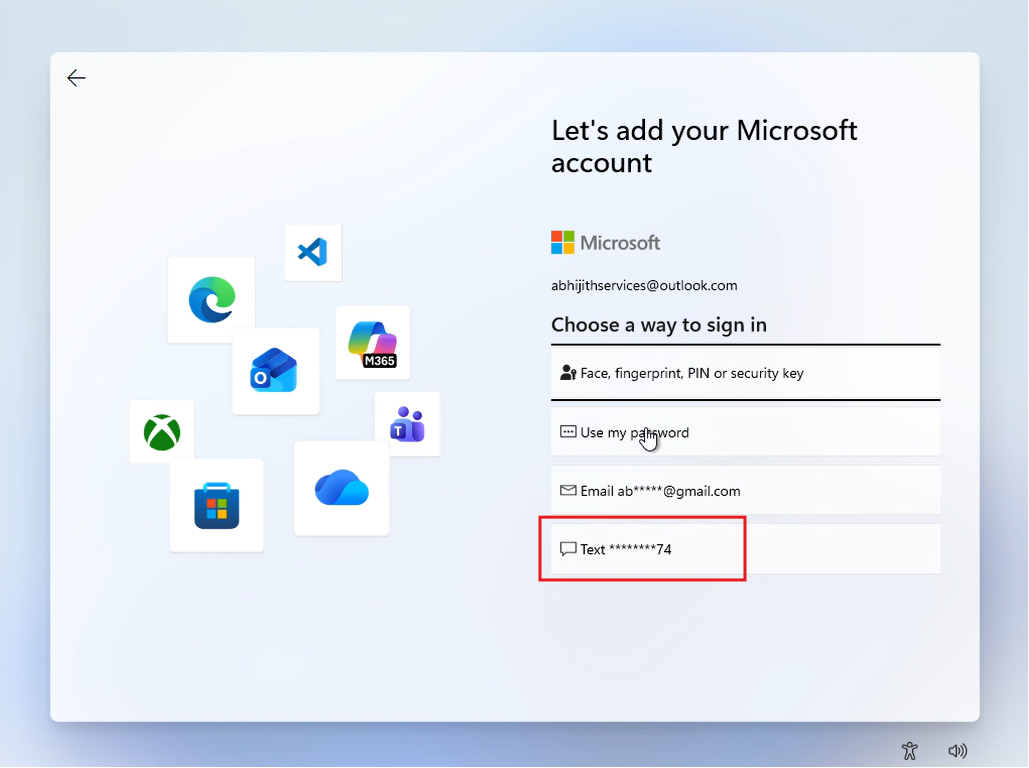
  • In a recent announcement from Microsoft, it says that it is discontinuing a feature, SMS codes for account sign-in, which allows its users to sign into...
  • The announcement went on to state that Windows 11 will soon be unable to authenticate or retrieve your Microsoft account by SMS.
  • Microsoft stated in a recent post on its website that it will begin phasing out SMS since “SMS-based authentication is now a leading source of fraud.”...

In a recent announcement from Microsoft, it says that it is discontinuing a feature, SMS codes for account sign-in, which allows its users to sign into its applications against fraud and risk. The announcement went on to state that Windows 11 will soon be unable to authenticate or retrieve your Microsoft account by SMS.

Microsoft stated in a recent post on its website that it will begin phasing out SMS since “SMS-based authentication is now a leading source of fraud.”

It emphasized that the “future of authentication is passwordless, secure, and user-friendly,” but it did not specify when the phase-out may be finished.

Accessing the passkeys and SMS codes, do passkeys truly outperform passwords?

The advice states, “We’re helping you stay ahead of evolving threats while making account access simpler and more seamless by moving to passwordless accounts, passkeys, and verified email.” 

OTP secrets and passwords function differently than passkeys. A passkey makes use of two cryptographic keys, one saved on the device and one stored on the service, instead of inputting something that could be lost or stolen.

The device uses a fingerprint, a facial scan, or a device PIN to verify that it has the correct key when a user logs in. Passkeys are more resistant to phishing and data leaks because the real secret key never leaves the device.

Also worth reading
Microsoft And ILO Take Digital Skills Training To Kenya’s Refugee Youth Microsoft’s AI Buildout Runs Into The Hard Math Of Chips And Power Microsoft Resolves An Outage Impacting MFA Sign-Ins Microsoft’s China Retreat Redraws Big Tech’s AI Map Microsoft Cloud Growth Jumps As Azure Gives AI Spending A Better Answer Microsoft Launches MAI-Cyber-1-Flash As AI Security Becomes A Model Race

They have been hailed as an improved solution that will eventually “kill” the password after decades.

Not everyone agrees, though; SquareX researchers reported new discoveries in 2025 that assert the very browsers used to control passkey workflows can be attacked in ways that go around their security.

“When users see a biometric prompt, they take that as a signal for security because passkeys are a highly trusted form of authentication,” SquareX researcher Shourya Pratap Singh stated at the time. They are unaware that by intercepting the passkey workflow in the browser, attackers can readily falsify passkey registrations and authentication. This risks almost every consumer and business application, including vital data storage and financial apps.

Either way, it’s commendable that SMS is being phased out for authentication. Security experts have cautioned for years that SMS should not be used for 2FA or any other type of authentication because SIM-swapping has made it very simple to take control of people’s accounts and cause chaos.

SMS-based authentication is being abandoned because text messages are sent in plaintext, making them vulnerable to interception, man-in-the-middle attacks, and SIM hijacking. In contrast, passkeys offer stronger security through device-bound public-key cryptography and local biometrics, which never leave the user device, while also providing resilient account recovery via verified fallback emails and synced passkeys, ensuring access even if you lose your phone or switch carriers.

If a user doesn’t already have a passkey, Windows 11 and Microsoft services will soon prompt the user to set one up during sign-in, while verified secondary emails will remain available as a fallback option for situations where biometrics can’t be used, such as when setting up a temporary virtual machine or a new PC. Additionally, a user can securely store and sync their Microsoft passkeys through Microsoft Password Manager, which is expanding its cross-platform support via Microsoft Edge.

Related Reading

More contextual TechBooky stories selected from tags, categories and article context.

  • Microsoft_passwordless
    Microsoft Will Roll Out Passkey Support For All Consumers
  • microsoft_account_changename
    Microsoft Requires Account Sign-In Starting February
  • Microsoft Unveils New Surface Laptop
    Microsoft Plans Password Deletion for 1 Billion Users
  • Microsoft-Authentictor
    Microsoft Resolves An Outage Impacting MFA Sign-Ins
  • twostep
    Google Sign in Will Require 2FA Verification
  • shutterstock_2350808261
    Microsoft Notifies Users of the Mandatory 2FA Deadline
  • csm_1200x630wa_5026e9630c
    Microsoft Pushes Edge & Disables Authenticator Autofill
  • 1756485691039
    Microsoft to Enforce MFA on Azure Resource…
Keep Reading Smarter

Search TechBooky with AI

Use TechBooky's AI Search to explore the context behind this story and related coverage across the site.

Try AI Search
More On This Topic
Security
Follow TechBooky

Follow TechBooky for more technology stories and newsroom updates.

f Facebook X X in LinkedIn ig Instagram wa WhatsApp

Tags: microsoftPasskeysms alert
Akinola Ajibola

Akinola Ajibola

Search TechBooky
Open TechBooky AI Search Try the AI Assistant

BROWSE BY CATEGORIES

Receive top tech news directly in your inbox

subscription from
Loading

Freshly Squeezed

  • Alibaba Raises $10.2B As China’s AI Race Gets More Expensive August 24, 2026
  • YouTube’s New View Count Rule Makes Creator Numbers Messier August 24, 2026
  • ChatGPT Ads Go Live Across Europe As OpenAI Becomes A Media Business August 24, 2026
  • Rivian Spinout ALSO Turns E-Bikes Into An Autonomous Delivery Bet August 23, 2026
  • Apple’s Foldable iPhone May Be Real, But The Trade-Offs Are Too August 23, 2026
  • Apple Job Cuts Point To A New Siri And Vision Pro Reset August 22, 2026
  • TikTok’s $400M Privacy Settlement Shows Child Safety Costs Are Rising August 22, 2026
  • OpenAI Cuts GPT-5.6 Sol API Prices As AI Price War Deepens August 22, 2026
  • Apollo Data Breach Shows Wall Street’s Cloud Security Problem August 21, 2026
  • Tesla’s China Recall Turns Hidden Door Handles Into A Safety Issue August 21, 2026
  • Oura Lawsuit Puts AI Sleep Tracking Under Legal Pressure August 21, 2026
  • Ericsson And MTN Move MoMo Onto Cloud Across Four Markets August 21, 2026

Browse Archives

August 2026
M T W T F S S
 12
3456789
10111213141516
17181920212223
24252627282930
31  
« Jul    

Quick Links

  • About TechBooky
  • Advertise With TechBooky
  • Contact us
  • Submit Article
  • Privacy Policy
Generic selectors
Exact matches only
Search in title
Search in content
Post Type Selectors
Search in posts
Search in pages
  • African
  • Artificial Intelligence
  • Gadgets
  • Metaverse
  • Tips
  • AI Search
  • About TechBooky
  • Advertise With TechBooky
  • Submit Article
  • Contact us

© 2025 Designed By TechBooky Elite

Discover more from TechBooky

Subscribe now to keep reading and get access to the full archive.

Continue reading

We use cookies to ensure that we give you the best experience on our website. If you continue to use this site we will assume that you are happy with it.