TechBooky AI Assistant
👋 Welcome to TechBooky AI Assistant

I can help with:
🔎 Tech News
🤖 AI Topics
💻 Gadgets
☁️ Cloud
✍️ Guest Posts
📢 Advertising
🔗 Backlinks
📩 Newsletter
  • AI Search
  • Cryptocurrency
  • Earnings
  • Enterprise
  • About TechBooky
  • Submit Article
  • Advertise Here
  • Contact Us
TechBooky
  • African
  • AI
  • Metaverse
  • Gadgets
Generic selectors
Exact matches only
Search in title
Search in content
Post Type Selectors
Search in posts
Search in pages
  • African
  • AI
  • Metaverse
  • Gadgets
Generic selectors
Exact matches only
Search in title
Search in content
Post Type Selectors
Search in posts
Search in pages
TechBooky
Generic selectors
Exact matches only
Search in title
Search in content
Post Type Selectors
Search in posts
Search in pages
Home Service news

Microsoft To Remove WMIC After Windows 11 25H2 Upgrade

Akinola Ajibola by Akinola Ajibola
September 17, 2025
in Service news
Share on FacebookShare on Twitter

The Windows Management Instrumentation Command-line (WMIC) tool will no longer be available after Windows 11 25H2 and later, according to Microsoft.

Using text commands, users can communicate with the Windows Management Instrumentation (WMI) system through WMIC, a classic built-in Windows command-line tool.

Since WMIC will no longer be included by default in later Windows editions, Microsoft now recommends IT managers to utilise Windows PowerShell for WMI, scripts, and other utilities in a Microsoft 365 message centre update.

“For any operations that were previously completed using WMIC, Microsoft advises adopting PowerShell and other contemporary technologies. Alternatives that are programmatic include scripting languages,.NET libraries, and WMI’s COM API. Please update your internal IT documentation and procedures once you’ve made up your mind,” the business stated.

However, the Windows Management Instrumentation (WMI) itself is unaffected; this modification solely affects the out-of-date WMIC component.

Microsoft released this support page on Friday separately with additional instructions for people who use WMIC for administrative activities.

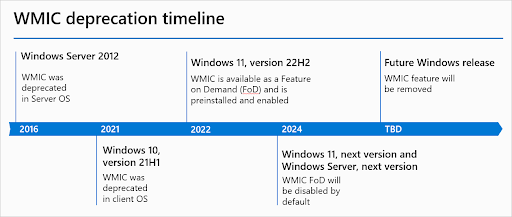
WMIC was deprecated by Microsoft in Windows 10 21H1 (2021) and Windows Server 2012 (2016). Beginning with Windows 11 22H2 (in 2022), Redmond changed it to a Feature on Demand (FoD). After initially turning it off by default, they declared in January 2024 that it will be completely eliminated.

“Over the last few years, we have made significant investments in PowerShell. The new tools offer a more effective method of WMI querying. In January 2024, Microsoft stated, “Removing a deprecated component helps reduce complexity while keeping you secure and productive.”

By preventing a variety of malware and attack techniques from working properly, WMIC’s elimination will help improve overall security.

The program has long been regarded as a LOLBIN (living-off-the-land binary), an executable signed by Microsoft that threat actors use to carry out a variety of nefarious tasks during attacks.

For example, the WMIC command is frequently used by ransomware encryptors to remove Shadow Volume Copies, making it impossible for victims to use them to recover encrypted data. WMIC has been exploited by other threat actors to find and remove installed antivirus software.

Additionally, malware has been seen to add exclusions to Microsoft Defender using WMIC in order to avoid detection when it is launched.

Related Posts:

  • powershell-1024x683
    Microsoft Drops PowerShell 2.0 from Windows 11 & Server
  • windows-update-close
    Microsoft Releases Emergency Patch For Windows Update Bug
  • windows update
    New Upgrade Policy Announced for Windows Users
  • 11-1024x576
    Count Down To The End Of Windows 10 Microsoft Support
  • Microsoft Shuts Down Cortana In Windows As It Focuses On Next-Gen AI
    Microsoft Shuts Down Cortana In Windows As It…
  • Microsoft_Office_Outlook_(2018–present).svg
    Microsoft Confirms Emergency Update for Millions of…
  • microsoft-365-app-icon-1
    M365 Apps on Windows 10 to Receive Security Updates…
  • os5thFN78X3TYYym27AxkT
    Microsoft Puts An End To Support For Cortana in Windows 11

Discover more from TechBooky

Subscribe to get the latest posts sent to your email.

Tags: microsoftWindows 11 25H2WMIC
Akinola Ajibola

Akinola Ajibola

BROWSE BY CATEGORIES

Receive top tech news directly in your inbox

subscription from
Loading

Freshly Squeezed

  • Britain’s Under-16 Social Media Ban Could Redefine Big Tech’s Responsibility To Children June 15, 2026
  • Anthropic Asked for AI Regulation, Fable 5 May Show What That Really Looks Like June 14, 2026
  • Amazon Raised Anthropic AI Security Concerns Before US Crackdown on Fable 5 and Mythos 5 June 14, 2026
  • Europe Calls Anthropic AI Ban a ‘Wake-Up Call’ as US Shuts Off Access to Fable 5 and Mythos 5 June 14, 2026
  • US Orders Anthropic to Disable Claude Fable 5 and Mythos 5 Over National Security Concerns June 14, 2026
  • Elon Musk Hits $1.1 Trillion as SpaceX Surpasses $2 Trillion Valuation June 13, 2026
  • SpaceX Prices Record $75 Billion IPO as Elon Musk Nears Trillionaire Status June 12, 2026
  • DoorDash Launches AI Chatbot for Food Orders June 12, 2026
  • Pool Launches App That Makes Screenshots More Useful June 12, 2026
  • Deezer Launches Tool to Detect AI-Generated Music June 12, 2026
  • Coinbase Introduces Platform for Agents to Trade Assets and Buy Premium Insights June 12, 2026
  • Meta Expands Edits App With AI Features and Desktop Access June 12, 2026

Browse Archives

June 2026
MTWTFSS
1234567
891011121314
15161718192021
22232425262728
2930 
« May    

Quick Links

  • About TechBooky
  • Advertise Here
  • Contact us
  • Submit Article
  • Privacy Policy
Generic selectors
Exact matches only
Search in title
Search in content
Post Type Selectors
Search in posts
Search in pages
  • African
  • Artificial Intelligence
  • Gadgets
  • Metaverse
  • Tips
  • AI Search
  • About TechBooky
  • Advertise Here
  • Submit Article
  • Contact us

© 2025 Designed By TechBooky Elite

Discover more from TechBooky

Subscribe now to keep reading and get access to the full archive.

Continue reading

We use cookies to ensure that we give you the best experience on our website. If you continue to use this site we will assume that you are happy with it.