TechBooky AI Assistant
👋 Welcome to TechBooky AI Assistant

I can help with:
🔎 Tech News
🤖 AI Topics
💻 Gadgets
☁️ Cloud
✍️ Guest Posts
📢 Advertising
🔗 Backlinks
📩 Newsletter
  • AI Search
  • Cryptocurrency
  • Earnings
  • Enterprise
  • About TechBooky
  • Submit Article
  • Advertise With TechBooky
  • Contact Us
TechBooky
  • African
  • AI
  • Metaverse
  • Gadgets
Generic selectors
Exact matches only
Search in title
Search in content
Post Type Selectors
Search in posts
Search in pages
  • African
  • AI
  • Metaverse
  • Gadgets
Generic selectors
Exact matches only
Search in title
Search in content
Post Type Selectors
Search in posts
Search in pages
TechBooky
Generic selectors
Exact matches only
Search in title
Search in content
Post Type Selectors
Search in posts
Search in pages
Home Security

Microsoft Confirms Emergency Update for Millions of Outlook Users

Akinola Ajibola by Akinola Ajibola
January 27, 2026
in Security
Share on FacebookShare on Twitter
Share this story

Send it to someone who should read it.

f Facebook X X in LinkedIn wa WhatsApp tg Telegram @ Email
In Brief
  • Since Microsoft delivered its required security patches in January, millions of Outlook users have been tormented by unsuccessful restarts and missing emails.
  • In an effort to make things right, the corporation has now confirmed a fresh emergency update.
  • This is a step In order to fix serious issues impacting millions of Outlook users, Microsoft has confirmed and issued a second emergency “out-of-band” update in...

Finally, a solution has been found. Since Microsoft delivered its required security patches in January, millions of Outlook users have been tormented by unsuccessful restarts and missing emails. In an effort to make things right, the corporation has now confirmed a fresh emergency update.

This is a step In order to fix serious issues impacting millions of Outlook users, Microsoft has confirmed and issued a second emergency “out-of-band” update in January 2026. 

Microsoft acknowledged that “Classic Outlook profiles with POP accounts and PSTs hang after Windows updates on January 13, 2026” very quickly. Additionally, a warning that there isn’t a solution but that more instructions will be available shortly.

The Outlook issue is the required Patch Tuesday security update on January 13, 2026, which caused the issue. Users that were impacted encountered:

Outlook becomes unusable when an application freezes, especially for users of Outlook Classic with POP accounts.

This has been a major situation. “Microsoft makes Outlook ‘completely unusable’ as the Windows 11 25H2/24H2 update breaks it,” according to Neowin. Random hangs and freezes, unsaved email progress, and more are some of these problems.

For the cloud storage conflict, when it opens or saves files to cloud-backed places like OneDrive or Dropbox, there are frequent crashes and hangs.

For the failed restarts, unless the process was manually stopped in Task Manager, Outlook will not reopen.

Also, data problems include missing “Sent Items” or re-downloading previously downloaded emails.

Also worth reading
Microsoft Launches MAI-Cyber-1-Flash As AI Security Becomes A Model Race Microsoft And Mistral Sign Multibillion-Dollar European AI Deal Microsoft: Teams Meeting Issues For Some Users After Edge Update AMD Lands Microsoft As Helios AI Rack Customer In Nvidia Challenge Microsoft Is Becoming an AI Company and Xbox Is Paying the Price Microsoft Confirms Degrading Service Outage On Teams

According to Microsoft, the problem is now more precise. “When opening files from or saving files to cloud-based storage, like OneDrive or Dropbox, some programs became unresponsive or encountered unexpected errors. ” Outlook may hang and not open again unless the process is stopped or the machine is restarted in specific Outlook configurations that save PST files on OneDrive. Additionally, “missing sent items or previously downloaded emails being re-downloaded” would be visible to impacted users.

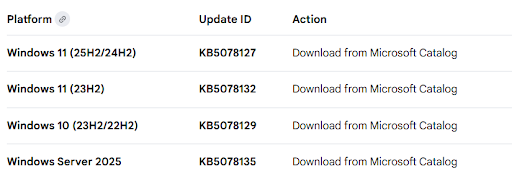
The emergency update is available for Windows 10, Windows 11 25H2, and Windows 11 23H2 (but you should stop using this right immediately).

Windows Latest claims that this emergency update comes after last week’s, which addressed “a much more widespread” remote desktop login failure affecting 24H2 and 25H2, as well as a failure to power down issue.

The new emergency updates are cumulative, which means they incorporate security fixes from earlier in January as well as solutions for prior issues (including system shutdown failures and Remote Desktop login errors) and the security update and the out-of-band update from January 17, 2026,” according to Microsoft. You don’t need to update if everything is functioning properly and you have applied the security updates from January. However, that isn’t the situation for millions of people.

Microsoft advises all users to take the follow actions:

Check for Updates: To find out if the patch is automatically available, select “Check for updates” under Settings > Windows Update.

Manual Install: Using the Microsoft Update Catalogue links mentioned above, you can manually download the update if it doesn’t show up.

Temporary Fix: Microsoft previously recommended removing PST files from cloud-synced folders (such as OneDrive) to fix the problem if you are unable to update right away.

Related Reading

More contextual TechBooky stories selected from tags, categories and article context.

  • Microsoft_Office_Outlook_(2018–present).svg
    Microsoft Resolves Outlook Encryption Access Issue
  • windows-update-close
    Microsoft Releases Emergency Patch For Windows Update Bug
  • Microsoft
    Microsoft Outage Affects Thousands Of Users Worldwide
  • outlook app
    Microsoft to Shut Down Outlook Android App
  • microsoft_exchange-blue2
    Exchange Vulnerability Turns OWA Into Script-Launching Tool
  • unnamed (10)
    Users, Even Microsoft Staff, Confused Over Several Outlooks
  • Windows_Server
    Emergency Windows Server updates issued by Microsoft
  • outlook-mobile-tips-cover
    Downtime Update On Microsoft Outlook
Keep Reading Smarter

Search TechBooky with AI

Use TechBooky's AI Search to explore the context behind this story and related coverage across the site.

Try AI Search
More On This Topic
Security
Follow TechBooky

Follow TechBooky for more technology stories and newsroom updates.

f Facebook X X in LinkedIn ig Instagram wa WhatsApp

Tags: emailmicrosoftOutlooksecurity patchwindows
Akinola Ajibola

Akinola Ajibola

Search TechBooky
Open TechBooky AI Search Try the AI Assistant

BROWSE BY CATEGORIES

Receive top tech news directly in your inbox

subscription from
Loading

Freshly Squeezed

  • Hugging Face Faces Deepfake Safety Questions After AI Forensics Study July 28, 2026
  • Recursive Superintelligence Signs $410M AWS Compute Deal July 28, 2026
  • Apple Upgrade Turns iPhones And Macs Into A Leasing Business July 28, 2026
  • Lyft And Baidu Start London Robotaxi Tests As Europe Race Heats Up July 28, 2026
  • PayPal Raises Profit Outlook As Turnaround Meets Takeover Speculation July 28, 2026
  • Microsoft Launches MAI-Cyber-1-Flash As AI Security Becomes A Model Race July 28, 2026
  • Anthropic Says It Does Not Want An Open-Weight AI Ban, But Still Wants Tough Rules July 28, 2026
  • X Money Launches In The US As Musk Moves X Closer To An Everything App July 28, 2026
  • Snapchat Brings Spotify Listening To Snap Map With Now Playing July 27, 2026
  • Threads Users Can Now DM Meta AI As The Assistant Moves Deeper Into Social Apps July 27, 2026
  • NVIDIA Launches Open Secure AI Alliance To Make Open Models A Cyber Defence Tool July 27, 2026
  • CXMT Surges 470% As China Bets Big On AI Memory Chips July 27, 2026

Browse Archives

July 2026
M T W T F S S
 12345
6789101112
13141516171819
20212223242526
2728293031  
« Jun    

Quick Links

  • About TechBooky
  • Advertise With TechBooky
  • Contact us
  • Submit Article
  • Privacy Policy
Generic selectors
Exact matches only
Search in title
Search in content
Post Type Selectors
Search in posts
Search in pages
  • African
  • Artificial Intelligence
  • Gadgets
  • Metaverse
  • Tips
  • AI Search
  • About TechBooky
  • Advertise With TechBooky
  • Submit Article
  • Contact us

© 2025 Designed By TechBooky Elite

Discover more from TechBooky

Subscribe now to keep reading and get access to the full archive.

Continue reading

We use cookies to ensure that we give you the best experience on our website. If you continue to use this site we will assume that you are happy with it.