TechBooky AI Assistant
👋 Welcome to TechBooky AI Assistant

I can help with:
🔎 Tech News
🤖 AI Topics
💻 Gadgets
☁️ Cloud
✍️ Guest Posts
📢 Advertising
🔗 Backlinks
📩 Newsletter
  • AI Search
  • Cryptocurrency
  • Earnings
  • Enterprise
  • About TechBooky
  • Submit Article
  • Advertise Here
  • Contact Us
TechBooky
  • African
  • AI
  • Metaverse
  • Gadgets
Generic selectors
Exact matches only
Search in title
Search in content
Post Type Selectors
Search in posts
Search in pages
  • African
  • AI
  • Metaverse
  • Gadgets
Generic selectors
Exact matches only
Search in title
Search in content
Post Type Selectors
Search in posts
Search in pages
TechBooky
Generic selectors
Exact matches only
Search in title
Search in content
Post Type Selectors
Search in posts
Search in pages
Home Open source

How to Safely Migrate a WordPress Site to a New Server (Step-by-Step Guide)

Paul Balo by Paul Balo
March 25, 2025
in Open source, Tips
Share on FacebookShare on Twitter

2. Download the Site Files and Database from the Original Server

The first step of the migration is to export all your site data from the old server. WordPress consists of two main parts: the files (core WordPress files, themes, plugins, uploads) and the MySQL database (which contains your posts, users, settings, etc.). You need to copy both.

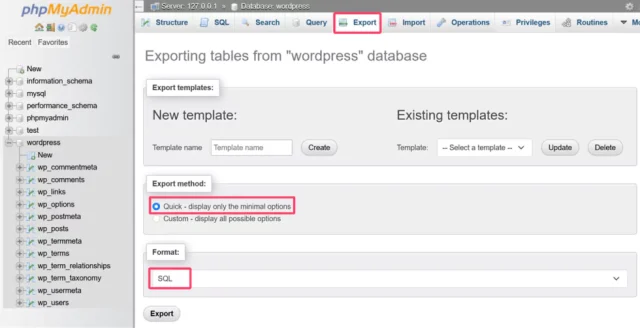
Export the Database: The database can be exported using a tool like phpMyAdmin (commonly available in hosting control panels) or via the command line (using mysqldump if you have SSH access). Using phpMyAdmin is straightforward: log into phpMyAdmin on the old host and select your WordPress database (it’s often named with your site or account name, and tables usually have the prefix wp_). Go to the Export tab. Choose the “Quick” export method and make sure the format is SQL​. Then click Go to download the .sql file containing your database dump. This will save all your WordPress tables (posts, users, options, etc.) in a file. Keep this file safe – it’s the heart of your site’s content and settings.Exporting the WordPress database via phpMyAdmin: select your database and use the Export tab with “Quick” method and format SQL​.

After the download, you might want to compress the SQL file (e.g., into a zip) to make transfer faster, especially if it’s large​. Some hosts also offer one-click backups or the option to export databases via their control panel’s backup section – use whatever method you’re comfortable with, as long as you get a complete SQL backup.

Download the Files: Next, download all the WordPress files from the old server. The easiest way is via FTP/SFTP. Using an FTP client like FileZilla​, connect to your old server with the host, username, password, and port provided by your host. Once connected, navigate to the WordPress root folder on the server (often it’s the public_html or httpdocs directory, or a folder named after your site). This folder will contain subfolders like wp-content, wp-admin, wp-includes, and files like wp-config.php.

Select all files and folders in the WordPress directory and download them to a folder on your local machine​. This may take some time depending on your site’s size (especially the wp-content/uploads folder which holds media). Ensure hidden files like .htaccess (if present) are included – by default FileZilla shows hidden files, but double-check so you don’t miss it.

FTP Tip: It’s often faster to compress the files on the server into a single zip, then download that zip, rather than transferring thousands of individual files. If you have shell access, you can SSH in and run a command like zip -r sitefiles.zip ~/public_html/* to create an archive, then download that archive via FTP. Some control panels also let you compress folders in the file manager. This step is optional but can save time. If you do create a zip of the site files, remember to extract it later on the new server.

After downloading, you should have a local copy of all site files (themes, plugins, uploads, etc.) and the database SQL. Verify the downloads are complete. Now we’re ready to move these to the new server.

Related Posts:

  • WordPress theme switch
    A Comprehensive Guide to Resolving File Permissions…
  • wp-speculative-loading-plugin-page-speed-e1712935040275
    WordPress Launches Speculative Loading Plugin To…
  • blog5f352fc3b2393_wp
    Hackers Exploit Popular WordPress Backup Tool Used…
  • https___dev-to-uploads.s3.amazonaws.com_uploads_articles_kqmbj9rjwqfghln5r5jv
    How to Convert SQL Server to Postgres
  • images (2)
    The Untold Story of WordPress and WP Engine's Clash
  • WordPress_blue_logo.svg
    WordPress Launches Revolutionary 100-Year Domain…
  • assets_task_01jrfxkvwqeexbx349fmgw9baz_img_0
    Schema Markup in WordPress: A Step-by-Step Guide to…
  • bluesky-social-app-inc-GettyImages-1252042401_537192_e2lpcg
    Bluesky Adopts Long-Form Content To Rival X Articles

Discover more from TechBooky

Subscribe to get the latest posts sent to your email.

Page 2 of 11
Prev123...11Next
Tags: tipswordpresswordpress migration
Paul Balo

Paul Balo

Paul Balo is the founder of TechBooky and a highly skilled wireless communications professional with a strong background in cloud computing, offering extensive experience in designing, implementing, and managing wireless communication systems.

BROWSE BY CATEGORIES

Receive top tech news directly in your inbox

subscription from
Loading

Freshly Squeezed

  • TIDAL Moves to Block Payouts for Fully AI‑Generated Music June 30, 2026
  • OpenClaw Brings Its Agentic AI Apps to iOS and Android June 30, 2026
  • New Data Shows Heavy AI Users Are Hiring More Especially at Entry Level June 30, 2026
  • Report: Google Put Limits on Meta’s Heavy Gemini Usage After Token Surge June 29, 2026
  • UK Plans AI Face Scans To Judge Asylum Seekers’ Ages Despite Known Bias Risks June 21, 2026
  • Trump Reportedly Mocked Zuckerberg and Bezos After Their Private Messages. Were We All Watching a Tech Industry Loyalty Contest? June 19, 2026
  • Snap Launches $2,195 AR Glasses to Challenge Phones June 17, 2026
  • Android 17 Is Here and Google Wants Gemini to Run Your Entire Phone June 17, 2026
  • SpaceX Buys Cursor Maker Anysphere for $60 Billion in Bold AI Power Play June 17, 2026
  • Britain’s Under-16 Social Media Ban Could Redefine Big Tech’s Responsibility To Children June 15, 2026
  • Anthropic Asked for AI Regulation, Fable 5 May Show What That Really Looks Like June 14, 2026
  • Amazon Raised Anthropic AI Security Concerns Before US Crackdown on Fable 5 and Mythos 5 June 14, 2026

Browse Archives

June 2026
MTWTFSS
1234567
891011121314
15161718192021
22232425262728
2930 
« May    

Quick Links

  • About TechBooky
  • Advertise Here
  • Contact us
  • Submit Article
  • Privacy Policy
Generic selectors
Exact matches only
Search in title
Search in content
Post Type Selectors
Search in posts
Search in pages
  • African
  • Artificial Intelligence
  • Gadgets
  • Metaverse
  • Tips
  • AI Search
  • About TechBooky
  • Advertise Here
  • Submit Article
  • Contact us

© 2025 Designed By TechBooky Elite

Discover more from TechBooky

Subscribe now to keep reading and get access to the full archive.

Continue reading

We use cookies to ensure that we give you the best experience on our website. If you continue to use this site we will assume that you are happy with it.