TechBooky AI Assistant
👋 Welcome to TechBooky AI Assistant

I can help with:
🔎 Tech News
🤖 AI Topics
💻 Gadgets
☁️ Cloud
✍️ Guest Posts
📢 Advertising
🔗 Backlinks
📩 Newsletter
  • AI Search
  • Cryptocurrency
  • Earnings
  • Enterprise
  • About TechBooky
  • Submit Article
  • Advertise With TechBooky
  • Contact Us
TechBooky
  • African
  • AI
  • Metaverse
  • Gadgets
Generic selectors
Exact matches only
Search in title
Search in content
Post Type Selectors
Search in posts
Search in pages
  • African
  • AI
  • Metaverse
  • Gadgets
Generic selectors
Exact matches only
Search in title
Search in content
Post Type Selectors
Search in posts
Search in pages
TechBooky
Generic selectors
Exact matches only
Search in title
Search in content
Post Type Selectors
Search in posts
Search in pages
Home Tips

Microsoft Releases a Remedy For Office 365 Apps Deactivation

Akinola Ajibola by Akinola Ajibola
December 24, 2024
in Tips
Share on FacebookShare on Twitter
Share this story

Send it to someone who should read it.

f Facebook X X in LinkedIn wa WhatsApp tg Telegram @ Email
In Brief
  • Users have reported for months that the (Office) apps included in their subscriptions are deactivated on their own and cannot be used.
  • Microsoft has issued a support article on the issue, stating that they are examining it.
  • A user complained in the US Microsoft Answers site on September 14, 2024, in a post titled School license deactivation alert.

There was a problem activating Microsoft 365 apps. Users have reported for months that the (Office) apps included in their subscriptions are deactivated on their own and cannot be used. Microsoft has issued a support article on the issue, stating that they are examining it. On December 20, 2024, they announced the release of a fix.

A user complained in the US Microsoft Answers site on September 14, 2024, in a post titled School license deactivation alert. A Turkish government employee complained that the Office 365 packages licensed by the Turkish Ministry of Education’s IT department had been disabled on the 26 smartboards in the corresponding classrooms. The billboard implies that this will affect all Turkish schools and inquires whether it is necessary to convert to LibreOffice. The post has since been banned from receiving comments.

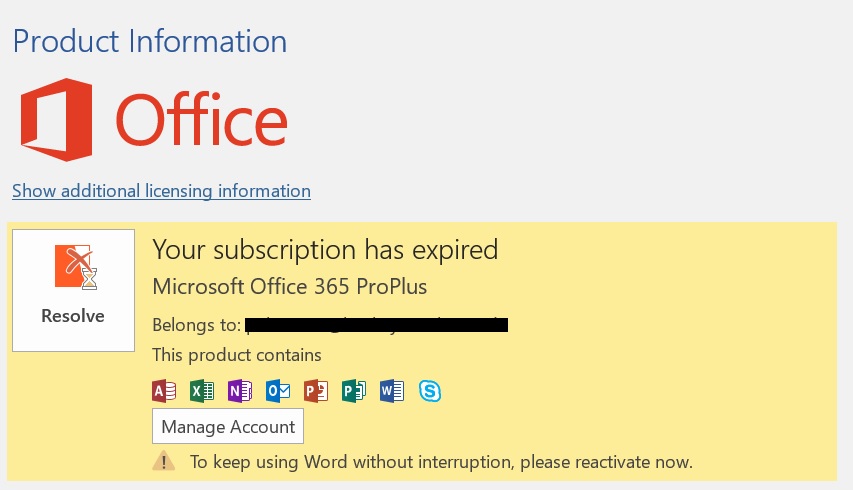
On the reddit.com site, a user submitted the above screenshot in April 2024 and questioned what was wrong with his account in the post What is wrong with my account? The screenshot shows him receiving an error message because the Microsoft 365 product has been cancelled. He can no longer access any of his Office modules.

He tried Microsoft’s Support and Recovery Assistant (SaRA) without result. In this post, the affected person also claims that SaRA did not assist. A Microsoft moderator offers some additional suggestions on what he can do.

On December 19, 2024, Microsoft published the support article customers may get a Product Deactivated error in Microsoft 365 Office apps, which confirms the deactivation of Microsoft 365 for individual customers. 

Microsoft has corrected a Microsoft Account (MSA)-related flaw that prevented customers with legitimate Office 2024 licenses from installing the software. The subject is discussed in full in this article.

Aside from that, the business stated that it was looking into another Microsoft 365-related fault in which Office products like Word, among others, would display a deactivation notice that read: “Your Microsoft 365 license will be deactivated soon…. most features of Word will be disabled.” Request that your Admin reactivate your license.

At the time, Microsoft offered a remedy and encouraged impacted users to assist them. The research appears to have paid off, as the tech giant has officially closed the issue and labelled the flaw as repaired. A patch to address the deactivation issue has been deployed on the server side.

Microsoft also explained that any change made by the administrator at the license level can cause the problem. Microsoft lists a number of possible causes for this situation.

However, it invites impacted consumers to contact the Microsoft Engineering team working on such vulnerabilities. And you can advise your company’s admin to learn that the Microsoft Engineering team has published a patch on the service side to address unexpected product deactivations.

For individuals with open support cases, please collect the Office Logs and file information listed below and share them with your support engineer. To collect the office license diagnostics and to learn more, visit the Official Microsoft Download Center and download the Office Licensing Diagnostic Tool.

Find below the issue, cause, the fixed status and the walk around on this remedy, if you encounter this.

The Issue user may encounter – Users may randomly encounter a Product Deactivated error in Microsoft 365 Office programs.

The likely cause;

Any change made by the administrator at the license level may result in the issue. The following are potential causes of this issue:

Also worth reading
Microsoft Gives Windows AI Agents A Security Boundary Microsoft Puts Apps And Always-On Agents Inside Copilot Microsoft Rebuilds Defender Security Operations For AI Agents OpenAI And Microsoft Feared AI Could Break The Web Microsoft’s Patch Tuesday Shows AI Is Finding Bugs Fast Microsoft 365 Outage Shows Cloud Dependence Has A Cost
  • Change in license group, when a user is changed from one group to another.
  • Changes to license/product assignment at the user level. For example, converting a user license from an Office 365 E3 subscription to a Microsoft 365 E3 subscription.
  • Removing and adding users to the same or separate license groups.
  • Toggling the licensing or service plan for users.
  • If administrators disabled the “Latest version of Desktop Apps” service plan for users with a Microsoft 365 subscription.


How to FIX the status encountered

The engineering team has published a patch on the service side to address unexpected product deactivation.

For individuals with open support cases, please collect the Office Logs and file information listed below and share them with your support engineer.

Collect office license diagnostics. For additional information, visit the official Microsoft Download Center and download the Office Licensing Diagnostic Tool.

Close all Office applications, then zip up the logs in this directory and attach them to your support case.

Logs:%temp%/diagnostics.

Alternatively, you can use the walkaround trick to resolve this issue

Select the Reactivate button in the banner. You will be requested to sign in to reactivate.


OR


Sign out and close all Microsoft 365 applications, including Outlook. Then, restart your Microsoft 365 app and login back in.

If you are still experiencing problems, please contact your administrator to check for subscription expiration. For further information, see Find out when your Microsoft 365 subscription expires.

Related Reading

More contextual TechBooky stories selected from tags, categories and article context.

  • OMB_Hero-WholeNewWayToWork
    Microsoft Denies Office-to-Copilot Rebranding Reports
  • LV40ExqW
    Microsoft 365 Glitch Blocks Desktop App Installs
  • microsoft-365-logo-with-some-of-its-apps-beside-it-and-a-field-to-add-alt-text
    Microsoft Tests Ad-Supported Free Version of 365 Apps
  • m365app
    Microsoft Office Apps for Windows End Support October 14
  • dXmRB5MeFaufdWPnyWHf34
    Microsoft Adds Office Companion Apps to Windows 11 Taskbar
  • c4398f2d-a521-487b-b68e-c986db06f158
    Microsoft Disables ActiveX in Office 2024 &…
  • microsoft-365-app-icon-1
    M365 Apps on Windows 10 to Receive Security Updates…
  • Microsoft_Office_logo_(2013–2019).svg
    Microsoft Increases Office App Speed
Keep Reading Smarter

Search TechBooky with AI

Use TechBooky's AI Search to explore the context behind this story and related coverage across the site.

Try AI Search
More On This Topic
Tips
Follow TechBooky

Follow TechBooky for more technology stories and newsroom updates.

f Facebook X X in LinkedIn ig Instagram wa WhatsApp

Tags: microsoftmicrosoft 365subscriptiontips
Akinola Ajibola

Akinola Ajibola

Search TechBooky
Open TechBooky AI Search Try the AI Assistant

BROWSE BY CATEGORIES

Receive top tech news directly in your inbox

subscription from
Loading

Freshly Squeezed

  • Natura Puts AI Agents On Your Finger With A $99 Ring October 8, 2026
  • M-KOPA Brings Phone Locking In-House With $8M KilpiTek Deal October 8, 2026
  • Kenya’s Refugee Tech Workers Face A Shrinking AI Job Ladder October 8, 2026
  • Safaricom Launches Managed SD-WAN For Kenyan Businesses October 8, 2026
  • Manus Raises More Than $500M After Its Meta Deal Unravels October 8, 2026
  • Samsung Forecasts 107.4 Trillion Won Profit As AI Memory Booms October 8, 2026
  • Claude Haiku 5.5 Puts Cost Controls Into Everyday AI Work October 8, 2026
  • MNT-Halan IPO Opens At EGP24.50 A Share In Egypt October 8, 2026
  • Microsoft Gives Windows AI Agents A Security Boundary October 8, 2026
  • GPT-6 Makes ChatGPT Answers Interactive As Free Rollout Begins October 8, 2026
  • Pesa Opens Australia To Nigeria Money Transfer Route October 7, 2026
  • Anthropic Gives Vetted Security Teams More Powerful Claude Access October 7, 2026

Browse Archives

October 2026
M T W T F S S
 1234
567891011
12131415161718
19202122232425
262728293031  
« Sep    

Quick Links

  • About TechBooky
  • Advertise With TechBooky
  • Contact us
  • Submit Article
  • Privacy Policy
Generic selectors
Exact matches only
Search in title
Search in content
Post Type Selectors
Search in posts
Search in pages
  • African
  • Artificial Intelligence
  • Gadgets
  • Metaverse
  • Tips
  • AI Search
  • About TechBooky
  • Advertise With TechBooky
  • Submit Article
  • Contact us

© 2025 Designed By TechBooky Elite

Discover more from TechBooky

Subscribe now to keep reading and get access to the full archive.

Continue reading

We use cookies to ensure that we give you the best experience on our website. If you continue to use this site we will assume that you are happy with it.