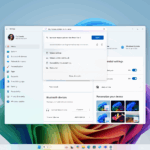
In Windows 11, Microsoft is exploring a number of new artificial intelligence (AI) technologies for third-party apps. The software behemoth from Redmond said Thursday that it would be launching a new version of Windows Insiders in the Dev and Canary channels. Only users with a Copilot+ PC are eligible for the update. The update adds new functionality to Notepad, MS Paint, and the Snipping Tool. The business is making it simpler to take screenshots with the Snipping Tool, while Paint is gaining a new sticker creation tool and the ability to pick certain components in a picture.
There Will Be New AI Features in Windows Apps as the Windows manufacturer revealed a number of new AI features in a blog post, which Windows Insiders are now testing. Although there is no information on when they will be readily accessible, historical tendencies suggest that they may be introduced later this year.
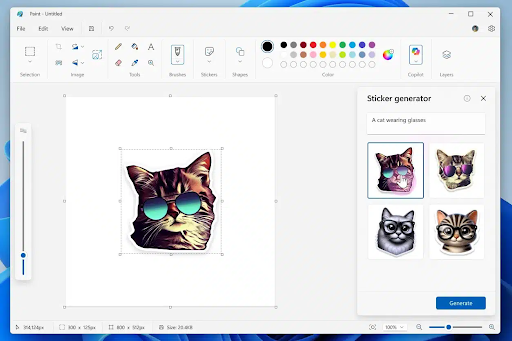
MS Paint is getting two new AI features. The first is a new Sticker Generator button that complements Paint’s already-existing AI tools, like the Cocreator tool, Generative Fill, and Generative Erase. With the new function, users may use text prompts to create personalized stickers. The Copilot menu contains the Sticker Generator button. When touched, a text area appears where users may provide a description of the sticker they want.
Copilot will then produce four different iterations of the sticker. Any one of them can be clicked by users to add it to the canvas. They can store it for later or copy it to use in another app. By selecting the new Stickers option in the toolbar, users may go back and review the stickers.
A new Object Select tool is also being added by Microsoft. It intelligently separates and chooses specific components in an image using AI, which users may subsequently modify independently. Users can choose an item or element in the canvas by simply moving the cursor over it. The tool is located in the toolbar. A new dialogue box that offers a brief summary of Paint’s current and new capabilities is also being added by the firm.
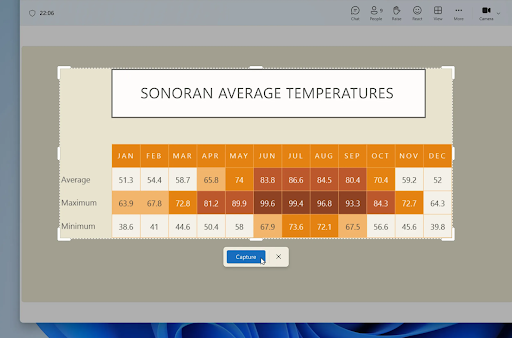
Additionally, Snipping Tool will get a few additional capabilities. The first is Perfect Screenshot, an AI-powered tool that helps users take accurate screenshots without requiring post-capture cropping or resizing. When in rectangle mode, users can choose the Perfect Screenshot button after using the Print Screen keyboard shortcut to open the Snipping Tool toolbar. The program will utilize artificial intelligence (AI) to precisely resize the screenshot as the user starts to select a section of the screen, capturing only the content from the whole selection area. Before confirming the screenshot, users will have the option to move or modify the region.
The second function is called Color Picker, which is a tool that allows users to swiftly examine any area of the screen and determine its color code. Users must choose the tool from the toolbar and adjust the color code output to either HEX, RGB, or HSL values. After that, they can move the cursor to the region they want, and the tool will display the area’s color code. To examine the color of a smaller area, users can also zoom in.
Lastly, Notepad will get a new AI function from Microsoft. As Microsoft is currently developing a new Notepad tool that uses artificial intelligence to create text for you. This function, called Write, enables users to use AI to create fresh text content within the app. Users can enlarge a pre-written composition or use the tool on a blank note. Once the cursor is at the desired location, users have the option to choose it from the Copilot menu or right-click and select Write.
It is a component of the Windows 11 upgrade that is being made available to Windows Insiders with Copilot Plus PCs in the Canary and Dev channels. New AI-powered Paint capabilities, including as a sticker creator, and enhancements to the Snipping Tool, which can automatically crop and resize screenshots depending on what you’re picking, are also included in the update.
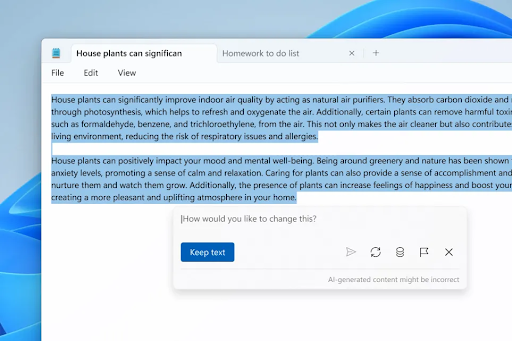
According to the Windows Insider Blog, Notepad’s new Write function allows users to “quickly draft text based on your prompt” or “build upon existing content with AI-powered assistance.” You have two options: either right-click the area in a document where you want new text to be added, or pick the text you wish to use as a guide.
Users can enter a prompt in the text field that appears, explaining what they would like the AI to produce. Copilot will create the response on the canvas after you click Send. After that, users can submit more prompts to tweak the content or choose to add it to the document. If they so want, they can also throw away the text.
Users must be logged into their Microsoft account in order to use Write in Notepad. Interestingly, the feature needs credits, just as previous Windows 11 AI features. Microsoft 365 Personal and Family users receive 60 credits per month, while those on the free tier receive 15 credits. In contrast, Copilot Pro subscribers receive an infinite amount of credits.
Also Instructions can be entered in a dialog that appears after choosing the new Write option from Windows’ Copilot menu. When the AI-generated output shows up in the document, you may choose whether to keep it, delete it if it isn’t what you want, or edit it by adding follow-up prompts. Earlier this year, the feature was initially seen in code found in Windows 11 beta releases.
Write comes after Notepad, two other AI-powered applications that Microsoft has been exploring. While Rewrite, which started testing in November, can change the tone of text, reduce or extend it, and rephrase sentences, Summarize, which was first offered in March, can provide a summary of the text in a document.
Related Reading
More contextual TechBooky stories selected from tags, categories and article context.
We use cookies to ensure that we give you the best experience on our website. If you continue to use this site we will assume that you are happy with it.